What should you look for when choosing?
Wired for a fixed workstation
Suitable if: you dictate at one computer and don’t want to charge a headset battery.
Trade-off: the cable limits how far you can move. Check the connection and test the headset with your dictation software.
Listening isolation to help you concentrate
Suitable if: noise at home distracts you while you’re writing a report.
Trade-off: passive isolation or ANC for the wearer is different from microphone noise reduction.
Wireless for greater freedom to move
Suitable if: you regularly stand up or change position while dictating.
Trade-off: check that the stated range suits your space, and remember that you’ll need to charge it.
When dictating a report in a noisy home, shoppers may prioritise recording quality, the connection, wearing comfort or freedom to move.
| Consideration |
What to look for |
Who it matters most to |
| Voice recording with background noise at home |
Check whether the noise reduction applies to the microphone and whether its boom is adjustable. Make a test recording with your usual background noise. |
If your main aim is to record your voice clearly while there’s noise at home, focus on what the microphone picks up. Around 36% of shoppers put this first. |
| Connection and uninterrupted use |
Compare the connector on the exact model with your computer. Select the headset as your input device, then check mute and recording levels with a short dictation. |
If you want to dictate at a fixed workstation without connection or charging interruptions, a suitable connection is important. Around 29% of shoppers prioritise connection and continuity. |
| Concentration and wearing comfort |
Check the wearing style, adjustability and ear cushions. Separately, check whether the version you’ve chosen has ANC if you want to hear less noise yourself. |
For a longer report, you may want to minimise distractions and wear your headset comfortably. Around 21% of shoppers put concentration and wearing comfort first. |
| Freedom to move |
Compare how far you want to move with the stated range, and check how the headset is charged. |
If you want to stand up while composing, a cable could get in the way. You’ll also need to consider range and charging. Around 14% of shoppers prioritise freedom to move. |
Joybuy products for dictation
This selection consists mainly of wired headsets for a fixed computer setup, with a Bluetooth over-ear option as well. Before extended use, check the connection, microphone performance and compatibility with your dictation software.
 No image available
Logitech USB Headset H540 Wired
A wired USB headset to consider if you dictate at a fixed computer workstation. Test the microphone with your dictation software and the usual background noise.
View at Joybuy
 No image available
Logitech PC 960 USB Wired Headset
A wired USB option for dictating at a fixed computer. Before use, check that the microphone works properly with your chosen dictation software.
View at Joybuy
 No image available
Logitech H340 USB Headset Black, Wired
A wired USB headset to consider for dictating at a computer. First, make a test recording with your usual background noise and software.
View at Joybuy
 No image available
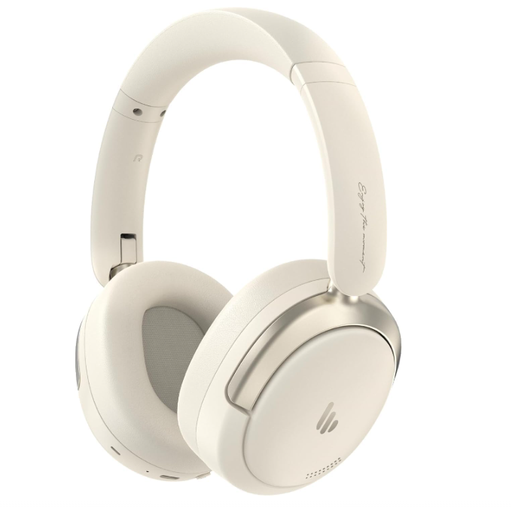
Edifier Atom Max Foldable Over-Ear Headset
A Bluetooth over-ear option to consider if you don’t want a cable at your workstation. The product title lists Bluetooth 5.4 and a built-in microphone; test the recording with your dictation software and remember that you’ll need to charge it.
View at Joybuy
 No image available
Kingston USB Hi-Fi Headphones with Microphone
A USB headset to consider for dictating at a computer. Check the connection and make a test dictation to see how the microphone performs in your space.
View at Joybuy
Frequently asked questions
Is ANC in the ear cups enough for dictation?
No. ANC or passive noise reduction for the wearer is different from microphone noise reduction. Test the recording with a short dictation; manufacturer information doesn’t show how accurately your dictation software will work with background noise at home.
How should I position and check the microphone for my report?
For Dragon, Nuance recommends positioning the microphone about 2.54 cm from your mouth and slightly to one side, reducing background noise and speaking evenly. This is specific advice for Dragon, not a guarantee for every headset or application. Select the correct microphone input and check mute and recording levels with a short dictation.
What do the cooling-off period and guarantee mean when buying online in the Netherlands?
For an eligible online consumer purchase, you generally have a 14-day cooling-off period; the Government of the Netherlands lists some exceptions. There is no fixed general time limit for statutory guarantees on products in the Netherlands: what you can expect depends in part on the product and how it is used. Check the specific sales and returns terms. Business purchases are not automatically covered by the same consumer rules.
Can I process a report containing personal data using a cloud dictation service?
That depends on who processes the data and in what capacity. If an organisation uses a service provider to process personal data on its behalf, the Dutch Data Protection Authority says that certain matters must be set out in a data processing agreement. Before working on such a report, establish what data will be processed and what working arrangements apply.


