
Someone dictating in a noisy classroom
If you record your own summaries, you can position the microphone towards your voice and test a recording first. SURF highlights the importance of a good-quality speech recording.


For dictating your own notes, choose a headset with an adjustable microphone boom and a connection that works with your device. Test a recording with background noise before relying on speech recognition; Microsoft Support and SURF both highlight the importance of a working microphone and a usable recording. If speaking aloud would disrupt the lesson, or you want to transcribe the teacher, a microphone near your own mouth will not help. Choose another way to take notes or ask about an approved recording option.
If you record your own summaries, you can position the microphone towards your voice and test a recording first. SURF highlights the importance of a good-quality speech recording.
If speaking aloud during the lesson is not appropriate, first decide whether typing, dictating later or using an approved recording option is better suited to your note-taking task.
If you study in different places or use different devices, check the connection, selected microphone and wearing comfort for each situation.
Suitable if: you dictate your own voice on a laptop and can connect the right USB version.
Consider: the cable limits your freedom of movement, and noise cancellation does not guarantee accurate transcription in a classroom.
Suitable if: you dictate often, need freedom of movement and your device supports the specific connection.
Consider: check how the headset charges, connects and which accessories are included.
Suitable if: speaking would disturb others, or you want to capture the teacher's words rather than dictate your own notes.
Consider: typing or dictating later means an extra step. Check your institution's policy if you want to record a lesson.
First decide whether you can speak during the lesson and whether you want to dictate your own voice. Then check the connection and test the microphone in a similar environment.
| Consideration | What should you check? | Who is this important for? |
|---|---|---|
| Clarity | Position the microphone towards your voice and make a test recording with background noise. | If I record my own summary in a noisy classroom, I want to be able to hear my voice clearly. Around 27% of consumers rank clarity as their top purchasing priority. |
| Working quietly | Decide whether speaking aloud during the lesson is appropriate; wearing a headset does not stop others from hearing you speak. | If I don't want to disturb others, I look for a way to take notes without dictating aloud during the lesson. Around 27% of consumers prioritise being able to work quietly. |
| Connection and software | Check whether the version uses USB-A or USB-C, select the headset as the input device and test the dictation language. | I want the headset to work with my device and dictation software, without having to guess which connection I need. Around 20% of consumers rank compatibility as their top purchasing priority. |
| Wearing comfort | Check the fit and decide whether you want mono or stereo; try the headset on if possible. | During longer study sessions, I want a comfortable fit that suits how much of the lesson I want to keep hearing. Around 13% of consumers prioritise wearing comfort. |
| Use and service | Check which accessories are included and whether the extra features suit the way you plan to use the headset. | I only want to pay for features I actually need, and I want to know the applicable service terms in advance. Around 13% of consumers give purchase and service costs top priority. |
A manufacturer's claim about noise cancellation does not prove that speech recognition will transcribe your words perfectly in a noisy classroom.
Check the microphone and try a test dictation with background noise. Compare the recorded voice with the recognised text.
Versions within the same product range can have different connections and designs. The range name alone does not tell you which port the model has.
Before ordering, check the full model specification and compare it with the port on your device.
The wrong connection could mean arranging a suitable adapter or returning the product.
A microphone near your mouth is designed to record your own voice. It does not change the rules for recording lessons.
Check your educational institution's rules and policies before recording. You could also dictate only your own summary.
The H390 is a wired USB headset for anyone who wants to dictate their own notes using a compatible laptop connection.
The Evolve2 30 SE is available in mono and stereo versions for anyone looking for a wired work headset.
The Blackwire 3300 series includes versions that let you choose between a single earpiece and stereo.
The wired IMPACT 100 series is an option for use with a computer.
The SpeechOne PSM6000 is a specialist wireless dictation headset for frequent dictation.
These wired USB headsets have a microphone for dictating your own notes. Check the connection and microphone specification for each model before choosing.
 Image unavailable
The wired USB connection and flexible microphone make it suitable for dictating from a fixed study space.
The microphone is detachable and can be muted using the control on the earcup.
The product description lists a 2-metre cable.
 Image unavailable
The adjustable microphone boom can be positioned towards your own voice while you dictate.
The description mentions USB plug-and-play and in-line volume and mute controls.
 Image unavailable
The adjustable microphone is designed for use with a computer when dictating your own notes.
The product description mentions a USB plug-and-play connection.
 Image unavailable
The microphone and wired connection are designed for dictating on a laptop or computer.
The description lists USB-A and a USB-C adapter cable, an adjustable headband and ear cushions.
The microphone can be flipped up to mute it.
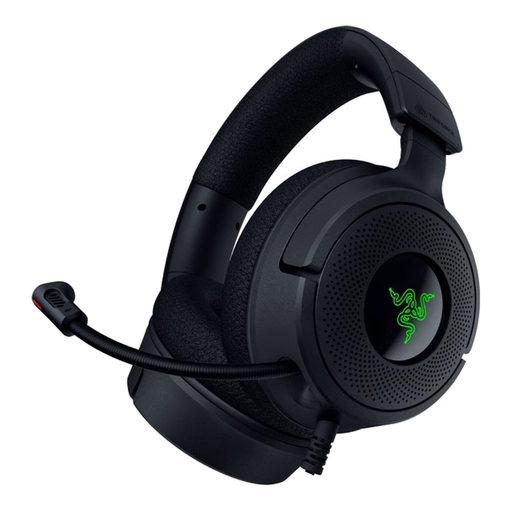 Image unavailable
The foldable microphone can be positioned when you want to dictate your own voice.
The product description lists a cardioid microphone and USB-C and USB-A compatibility.
The headset has ear cushions; check that the fit is comfortable for your study sessions.
Don't assume so: a headset near your mouth is designed to record your own voice, not to capture the teacher clearly from elsewhere in the classroom. SURF highlights the importance of good-quality recordings for speech recognition; recognising multiple speakers is a separate application.
Select the headset as the input device and make a test recording first. Also check the input volume and dictation language. According to Microsoft Support, Windows voice typing requires an internet connection; Dutch (Netherlands) is listed for Windows 11.
Store the microphone boom and cable carefully, and check whether the cushions are replaceable for your model. Philips lists replaceable cushions for the SpeechOne; don't assume this applies to other models.
According to ACM ConsuWijzer, online consumer purchases usually come with a 14-day cooling-off period from delivery, subject to exceptions. The Dutch government states that there is no fixed statutory guarantee period in the Netherlands. Check the applicable terms and contact the seller if the product is faulty.
Don't assume that recording without permission is allowed; check your educational institution's rules and policies before recording. Leiden University states on its page about online lectures that recording lectures and teaching materials without permission is not allowed. This institutional rule is not a general statement about every in-person classroom.