What should you look for when buying?
First, think about how you dictate and which port your computer has. Then consider comfort and whether you need to move around as you speak.
| What to consider |
What to look for |
Who is it important for? |
| Clear speech |
Check the position of the microphone boom and the microphone input in your app. Try dictating a sample with your usual level of background noise. |
If I want to dictate my study notes, I need the microphone to pick up my voice clearly enough in my own space. Around 36% of consumers rank clear speech as their top priority for dictation. |
| Comfort |
Check the wearing style, adjustability and ear cushions. If possible, try the headset on for yourself. |
During long study sessions, I want a comfortable fit that lasts and a wearing style that suits my preferences. Around 29% of consumers prioritise comfort. |
| Connection and software |
Check whether you need USB-A or USB-C, whether your operating system is supported and which microphone is selected in the app. |
Before choosing a headset, I want to make sure my computer and dictation app can use the right microphone. Around 21% of consumers prioritise connectivity and software compatibility. |
| Freedom to move |
Think about whether you’ll actually walk around while dictating, and check the stated range, battery life and any components required for the particular version. |
If I want to stand up while speaking, freedom to move matters to me, but I also need to consider charging and any set-up requirements. Around 14% of consumers make freedom to move their top priority. |
Products for dictating at home
This selection includes headsets and earbuds with microphones for computer use, studying or calls. Check that the connection on each version is compatible with your computer, and test the microphone with your own dictation software.
 Image unavailable
HyperX Cloud III S Wireless Gaming Headset
The detachable boom microphone may be useful if you’re looking for a headset with a microphone boom. Try it with your dictation app to see how well it works.
The product name lists wireless use, a detachable 10 mm boom microphone and compatibility with PC, PS5, PS4, Switch and mobile devices.
Joybuy
 Image unavailable
Jabra Evolve2 65 USB-A Black MS Mono
The mono version may suit you if you want to keep one ear free while dictating. Decide for yourself whether it feels comfortable to wear.
The product name lists USB-A and a mono design.
Joybuy
 Image unavailable
Kingston USB Hi-Fi Headphones with Microphone
USB headphones with a microphone may suit you if you dictate at a computer using a wired connection. Check that the connection and microphone input work with your device.
The product name lists USB headphones with a microphone.
Joybuy
 Image unavailable
Trust Ayda Wired Headset USB Type-A
The wired version may suit you if you dictate at a computer and need USB-A. Noise cancellation doesn’t guarantee accurate speech recognition.
The product name lists a wired USB Type-A headset with noise cancellation.
Joybuy
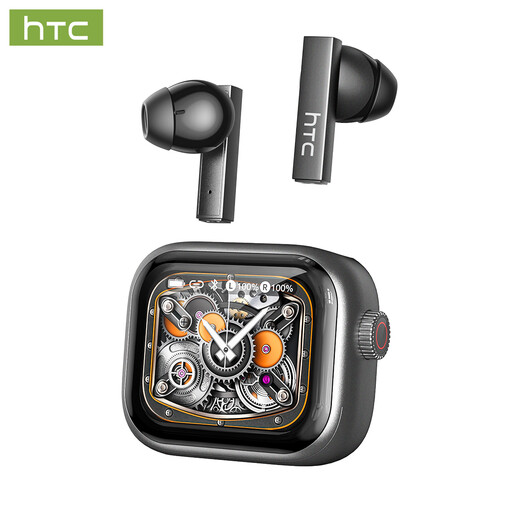 Image unavailable
HTC NE40 Bluetooth earbuds with built-in microphone
Earbuds with a built-in microphone are an alternative if you don’t want an over-ear headset. Check that your computer and dictation app support Bluetooth audio.
The product name lists Bluetooth 6.0 and a built-in microphone.
Joybuy
Frequently asked questions
Can I dictate notes in Dutch straight away with any headset?
Not without checking the dictation feature and settings. Microsoft Support lists Dutch (Netherlands) as a supported language for voice typing in Windows 11, and says you need a working microphone, an internet connection and a cursor in a text box. On a Mac, check the selected language, microphone and input volume, as Apple Support advises.
What should I check if the microphone is connected but no text appears?
First, check that the correct microphone is selected as the input device and that the headset isn’t muted. Apple Support also recommends checking the selected language, input volume and disruptive background noise. For the H390, Logitech also mentions checking the USB connection and input settings.
Can I use the Philips SpeechOne directly via USB to record?
No. According to Philips, the docking station must be connected to the computer to record. The USB cable connected directly to the headset is for charging the headset only, according to the manual.
What are my rights if a headset I bought online is faulty or I change my mind?
The Government of the Netherlands says that when you buy from a business at a distance, you often have a 14-day cooling-off period. Conditions and exceptions may apply. If a product is faulty, your statutory rights are against the seller. The Government of the Netherlands says there is no fixed two-year statutory guarantee period in the Netherlands.
Does a CE mark guarantee that a headset is good for dictation?
No. According to the European Commission, the CE mark indicates that the manufacturer considers a product to comply with the applicable EU product rules; it says nothing about transcription accuracy. The product rules that apply depend on the specific headset.


