
The only person speaking at the laptop
You’re discussing the design with people remotely and want to be heard clearly, without connection hassles.


If you’re the only person speaking, choose a headset based on its microphone, a compatible connection and wearing comfort. A wired USB headset doesn’t need charging, while a wireless model gives you more freedom to move around. If several people in the room need to join in, consider shared room audio rather than expecting one personal headset to pick up everyone. To improve your video in low light, look at the lighting or camera settings; a headset only handles audio.
You’re discussing the design with people remotely and want to be heard clearly, without connection hassles.
You move around during the meeting and want the freedom to do so, provided charging and connectivity work for the way you use your headset.
Several people in the room need to join in. Consider whether room audio is better suited to the setup than one personal headset.
A good fit if: you’re the only person speaking in the room, usually stay in one place and your device has a compatible USB port. Trust, Jabra and Yealink offer wired USB models.
The trade-off: you don’t need to charge the headset, but the cable limits how far you can move around.
A good fit if: you’re the only person speaking but regularly get up or move to another workspace during meetings. HP Poly and Trust offer wireless models.
The trade-off: you get more freedom to move around, but you’ll also need to charge the headset and manage the connection.
A good fit if: several people in the same room need to speak directly to remote participants. Microsoft Support explains that Teams has separate options for room audio and audio devices.
The trade-off: you’ll need to select the right device for the room and take other active audio devices into account.
First, work out who will be speaking in the room. Then check the microphone and connection, or, if several people will be speaking, consider a solution for the whole room.
For this type of design review, the main buying priority varies from shopper to shopper; each row highlights one priority.
| What to consider | What to look for when buying | Who is this important to? |
|---|---|---|
| How clearly the speaker can be heard | Check the microphone specifications for the exact model, where the microphone is positioned, and how your voice sounds in the room where you’ll use it. | If I’m the only person speaking, I want my voice to come across clearly during the review. Around 36% of shoppers prioritise how clearly their own voice is heard. |
| Connection and controls | Check the port and the exact USB type, or whether you’ll need an adapter. Select the right microphone and speaker in your meeting app. | If I want to get started without connection hassles, I also check that the controls work with my meeting app. Around 29% of shoppers prioritise connection and controls. |
| Freedom to move around | Check the wireless connection type and talk time under the stated settings, and remember that the headset will need charging. | If I get up or move around during a meeting, freedom of movement matters more to me than being tethered by a cable. Around 21% of shoppers prioritise freedom to move around. |
| Several people speaking in the room | Work out who will be speaking at the table and check that room audio, microphone selection and speaker selection suit the setup. | If colleagues at the same table need to join in, I don’t want to assume that a microphone worn by one person will pick up everyone. Around 14% of shoppers prioritise participation from several people in the room. |
Microphone noise reduction affects what the other people on the call hear; ANC and passive ear cushions affect what you hear. Check these features separately for the exact model.
Microphone noise reduction is designed to improve what the other person hears; ANC or passive noise isolation affects what you hear. These terms don’t describe the same feature.
Check both features separately for the exact model, and test your voice in the room where you’ll hold the meeting.
A microphone worn by one person won’t automatically pick up the other people at the table.
First work out who needs to speak in the room, then consider a suitable solution for the space. For a shared meeting, select the right audio device in your meeting app.
Models within the same product range can differ in their connections, mono or stereo design, and platform version.
Before buying, compare the full model details with the ports and meeting app you use. Also check whether you’ll need a compatible adapter.
The Dutch Government explains that the Netherlands has no fixed legal guarantee period. A manufacturer’s warranty is not the same as your rights if a product doesn’t meet expectations.
Check what an extended warranty covers, and contact the seller if there’s a fault.
The Ayda range includes wired USB models for individual calls.
The Evolve2 40 SE is a wired personal office headset with a microphone boom.
The Voyager Focus 2 is a wireless stereo option for anyone looking for freedom to move around and adjustable ANC.
The wired UH34 and UH34 Lite ranges include mono and dual models for calls at a computer.
This selection of Joybuy products includes wired and wireless personal headsets for meetings. Check the connection, platform version and stated microphone features for each model.
 Image unavailable
For wired meetings on a computer with USB-A.
The product description specifies two integrated microphones and mute and call controls.
If your device only has USB-C, you’ll need a compatible adapter.
 Image unavailable
For personal meetings when you want a wireless connection option.
The product description specifies Bluetooth and eight microphones with beamforming for calls.
 Image unavailable
For one person who wants to meet wirelessly and use a USB-A adapter to connect to a computer.
The product description specifies Bluetooth and a microphone system that reduces background noise during calls.
 Image unavailable
For a fixed setup with a device that has a 3.5mm connection.
The product description specifies a cardioid microphone and a microphone mute switch.
This model uses a 3.5mm connection.
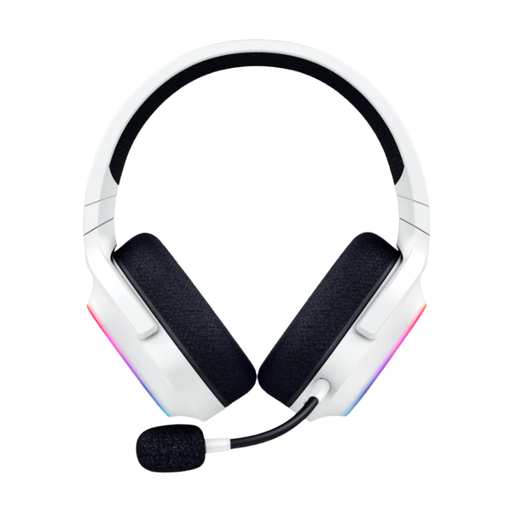 Image unavailable
For personal meetings when you want a wireless connection option.
The product description specifies Bluetooth and a USB transmitter, plus a detachable cardioid microphone.
The description mentions microphone noise reduction.
No. A headset handles audio and won’t change the lighting on your face or documents. In Teams, you can check the low-light brightness setting; also consider the lighting in the room.
Select the intended speaker and microphone in your meeting app and, where possible, make a test call. Microsoft Support explains how to select devices and make a test call in Teams; also check that mute isn’t on.
Don’t assume so. If several people will be speaking in the room, you can select room audio or a suitable connected audio device in Teams. Consider whether it works for your table setup.
According to the Dutch Government, applicable distance sales usually come with a 14-day cooling-off period, subject to exceptions. The Netherlands has no fixed legal guarantee period: a product must meet what you can reasonably expect from it. If there’s a fault, contact the seller; a manufacturer’s warranty is separate.