Start with the microphone, the connection to your teaching device and how far you move from your desk during lessons. A wired headset is practical if you stay within cable reach; wireless gives you more freedom to move, but you’ll need to consider pairing and charging. Choose mono if you also want to hear people in the room, and try the fit and microphone quality on a test call.
Who is this guide for?
Teacher who gives speech-focused online lessons
You lead lots of discussions and want students to hear you clearly. Pay attention to the microphone position, mute controls and how well the microphone picks up sound. Lenovo Netherlands and Bax Music offer advice on teaching online and microphone placement.
Teacher who moves away from the desk
You move further away during explanations or activities than a cable allows, so you need to weigh up wireless freedom against charging and pairing. Logitech and Jabra describe wired and wireless models, along with their respective features.
Teacher with other people in the room
You want to follow online participants while still hearing what’s happening around your standing desk. HP Netherlands distinguishes between mono and stereo versions in the Poly Blackwire 5200 series.
What should you look for?
First decide whether you’ll stay within cable reach, then choose mono or stereo depending on how much you want to stay connected to the room around you.
| Feature to consider |
What to look for when buying |
Who is this important for? |
| Speech clarity |
Check that you can position the microphone well and mute it easily; test the outgoing sound on a call. |
If I do a lot of talking, I want students to follow my instructions clearly and to be able to mute the microphone between speaking. Around 33% of consumers prioritise the teacher’s speech clarity. |
| Freedom to move |
Measure the distance along your cable route or, for wireless use, check the connection and charging requirements. Logitech lists a 1.9 m cable for the H390 USB-A. |
If you want to stand, turn around or walk away from your desk during lessons, you’ll need enough freedom to move. Around 27% of consumers give this their highest priority. |
| Staying connected to the room |
Compare mono and stereo: mono leaves one ear free. HP distinguishes the mono Blackwire 5210 from the stereo Blackwire 5220. |
If I want to hear online participants while staying available to someone beside me, the headset’s earcup design matters. Around 20% of consumers prioritise staying connected to the room. |
| Comfort |
Check the adjustability and fit; don’t judge comfort by the product description alone. |
When I have back-to-back lessons, I want my headset to remain comfortable. Around 20% of consumers give long-lasting comfort their highest priority. |
Common pitfalls
-
Assuming a long cable will automatically be long enough for a standing desk
The distance you can use also depends on the route around your desk and computer. Logitech specifies a 1.9 m cable for the H390 USB-A.
Measure how you normally move and check that the cable route will work before choosing a wired headset.
-
Confusing noise isolation for your ears with a microphone that sounds clear
Earcushions that block out ambient noise for the wearer and a microphone that reduces background noise are two different features.
Check both what you hear and what participants hear from your microphone during a test call.
-
Assuming every model in a series is identical
Models can differ in whether they’re mono or stereo, their connection and their software version.
Compare the full model name and connection type with the ports and software on your teaching device.
Brands to consider
Logitech
The wired H390 USB-A is a useful point of comparison for lessons close to your computer.
- Logitech specifies a rotatable microphone boom, in-line controls and a 1.9 m cable for the H390.
- A cable limits how far you can move from your computer; the product specifications are not an independent assessment of the microphone.
Jabra
The Evolve2 65 is a wireless option available in several versions, including mono, stereo, USB-A, USB-C, Teams and UC.
- Jabra describes the microphones and passive noise isolation available across the product range.
- Jabra says its call-quality comparison was carried out in its own audio lab. Check the exact version and test the sound in your teaching environment.
Poly
The wired Blackwire 5200 series includes both mono and stereo versions.
- HP Netherlands describes the Blackwire 5210 as mono and the Blackwire 5220 as stereo. The series also includes volume and mute controls.
- Check the exact version and connection type; features of the series do not necessarily apply to every version on sale.
Joybuy products
These Joybuy products include wired and wireless options for conversations at a standing desk. Check the connection, microphone controls and fit of each model to make sure it suits your teaching setup.
 No image available
Sennheiser MOMENTUM 4 Wireless, Black
Could suit you if you want to move around during lessons without a headset cable; check the microphone and connection with your teaching device first.
The product title lists a Bluetooth connection, four microphones and a 60-hour battery life. The headset has a rechargeable battery.
Joybuy
 No image available
Jabra Evolve2 30 SE
Could suit a fixed teaching setup where you want to mute the microphone between speaking.
Wired via USB-A; the product information lists a USB-C adapter as a connection option. The description mentions two microphones, in-line mute controls and adjustable earcups.
Joybuy
 No image available
AOC wired gaming headset for PS5, Xbox Series X|S, Xbox One and PC
Could suit a wired teaching setup if your device has a compatible connection.
The product description lists a wired 3.5 mm connection and a flexible microphone.
Joybuy
 No image available
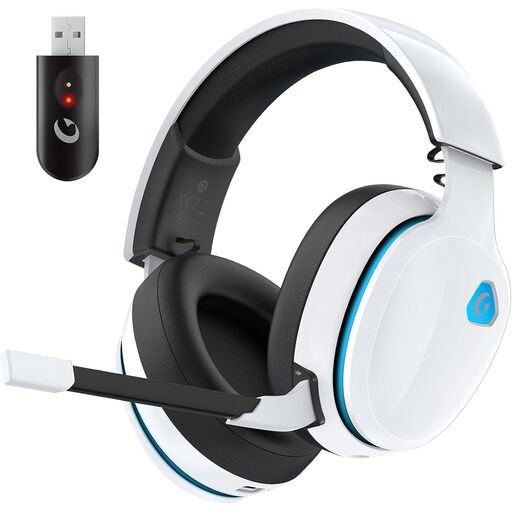
AOC 2.4GHz wireless gaming headset, white
Could suit you if you want to move around during lessons without a headset cable; check which connection mode works with your teaching device.
The product title lists a 45-hour battery life. The description mentions 2.4 GHz, Bluetooth and a wired mode; you’ll need to charge it for wireless use.
Joybuy
 No image available
Bose QuietComfort Ultra Bluetooth Headphones, Black
Could suit you if you want to move around wirelessly during lessons; check that the connection and microphone work with your teaching device and software.
The product description lists Bluetooth 5.3, built-in microphones for hands-free calls and a battery life of up to 24 hours. Android and iOS devices are listed as connection options.
Joybuy
Frequently asked questions
Should you choose a mono or stereo headset for conversation lessons?
Choose mono if you also want to hear people beside you; consider stereo if you want both ears covered. HP distinguishes the mono Blackwire 5210 from the stereo Blackwire 5220. Try the fit for yourself to see how comfortable the headset is.
What should you check before your first online lesson?
Check the connection, select the headset as the microphone and speaker on your teaching device or in your teaching software, then make a test recording or call. Position the microphone boom correctly. For a wireless model, also check the pairing and battery level.
Who should you contact as a consumer if a product develops a fault after purchase?
Report the fault to the seller. According to the Dutch government, there is no fixed statutory warranty period in the Netherlands; your legal rights to a product that works properly still apply. An additional warranty does not replace those rights.
What should you look for in a wireless headset in the Netherlands?
Check that the headset has the applicable CE marking; radio equipment must also meet the relevant requirements. The Dutch Authority for Digital Infrastructure describes these requirements. A CE marking does not mean the headset will work with your teaching computer or software.


