
Vandaag of morgen in huis

Kwaliteit gegarandeerd

Welkomstaanbiedingen ontgrendelen: GRATIS bezorging | Tot 80% korting | Gratis 30 dagen JoyPlus-proefperiode
Download de app
Buying a headset might seem straightforward, until you have to choose between a gaming headset, a wired headset, a wireless headset, a USB headset or a pair of headphones with a microphone. What’s more, marketing terms like “surround”, “noise cancellation” and “professional sound” don’t always tell you what you actually need in practice.
That’s why the most important question isn’t which headset has the most features, but which connection, fit and microphone suit your everyday use. The checklist below will help you avoid a bad purchase and compare more effectively.
A 3.5mm headset only works if your PC, laptop, smartphone or console has a suitable audio port. Some computers have separate jacks for headphones and microphone, which may require a splitter.
A USB headset usually works straight away with a computer, but it isn’t automatically compatible with every smartphone, tablet or games console. For example, a USB Type-A connector won’t fit directly into a device that only has USB-C. So always check:
A Bluetooth headset gives you freedom of movement, but needs charging and may require an extra dongle for some consoles or computers.
A large driver, say 50mm, tells you something about the design, but it doesn’t on its own predict how the sound will be for you. The housing, tuning and fit also play a part. What’s more, virtual 7.1 audio often only works through specific software or a USB adapter.
So don’t just look at terms like “surround sound” or “studio quality”. Check whether the feature is available on your platform. On some models, spatial audio only works on PC, for example.
A headset that feels light in the shop can still put pressure on your ears during a long workday or gaming session. Pay attention to the weight, the shape of the ear cups, the cushion material and the adjustability of the headband.
An on-ear model rests on your ears and is often more compact. An over-ear headset seals your ears off more, but can feel warmer. In-ear buds are light and portable, but offer a different fit and sound experience.
Choose a wired headset if you don’t want to charge a battery and value a stable connection. A 3.5mm jack is widely compatible with laptops, controllers and certain smartphones. A USB headset is especially practical for PC and Mac, because the audio is processed digitally through the USB port.
A wireless headset with Bluetooth is handy for calls, music and mobile use. For a gaming model, check whether 2.4GHz, Bluetooth or both connection types are supported. Also look at the stated battery life: this is a product specification under certain usage conditions and can vary in practice.
If you often have meetings, make calls or play online, you’ll benefit from a headset with a microphone that’s easy to adjust. A fold-away or flip-up microphone can be practical when you’re not using it. A mute button on the ear cup or cable saves you from having to search through software settings during a conversation.
Note the difference between a fixed, detachable and integrated microphone. A detachable microphone is handy if you also want to use the headset as ordinary headphones. With an in-ear model, like the JBL Tune 210, the microphone is built into the in-line remote on the cable.
A cable of around 1.8 to 2 metres gives you room to move next to a desk, but can get in the way. For a console, the cable length from the controller matters. A model weighing 240 to 308 grams can be fine for gaming, while a lighter on-ear model may be more comfortable for daily calls.
Also check the technical specifications without overestimating them. A frequency range of, say, 20 Hz to 20 kHz describes the speaker’s range, but isn’t a complete guarantee of a particular sound quality. Choose first based on use, fit and compatibility.
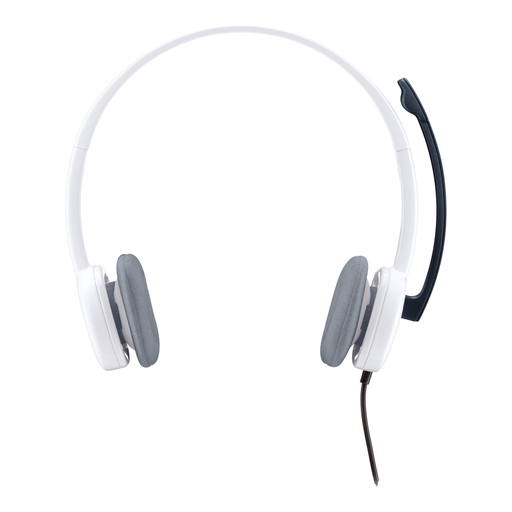
Why this fits the profile: This lightweight on-ear headset is suitable for calls, multimedia and everyday computer use. The 3.5mm connection works with many computers, smartphones and tablets.
The simple wired connection avoids charging issues. On a PC with separate jacks, do check whether a splitter is needed; according to the product information, one is not included.
80 grams, 180 cm cable, stereo sound and an adjustable microphone with volume control and mute function.

Why this fits the profile: An over-ear gaming model with memory foam cushions, 53mm drivers and included USB-C, USB-A and 3.5mm connections for different devices.
Compatibility isn’t limited to one connection. Do check in advance which part you need for your PC, console or mobile device.
308 grams, detachable microphone, microphone mute indicator and support for PC, PlayStation, Xbox, Switch, Mac and mobile.
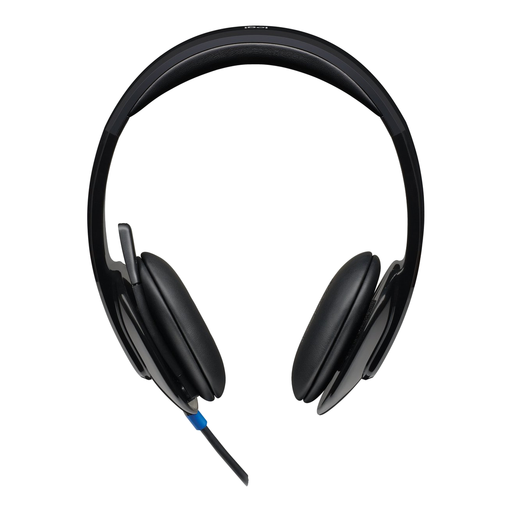
Why this fits the profile: For home workers and business users who mainly make calls via PC or Mac and need direct volume control.
The USB-A plug-and-play connection doesn’t require a 3.5mm combo port. This makes the headset practical for a fixed workstation, but less suitable for devices without USB-A.
Stereo sound, adjustable headband, microphone with noise filter according to the product description and on-ear cup controls.

Why this fits the profile: This wired model uses a 3.5mm connection and, according to the product information, is compatible with PC, Mac, PlayStation, Xbox, Nintendo Switch and mobile devices.
You don’t need to charge a battery and can use the same headset on multiple devices. The stated 7.1 feature requires software and an activation code, according to the instructions.
50mm drivers, 240 grams, adjustable microphone, volume control and a 1.3 metre cable.
We’ve put together a full, up-to-date list of products that fully meet these strict selection criteria and comply with current European safety regulations.
That depends on the model and console. Many gaming headsets work through the connection on the controller, but always check the product’s compatibility list. On a PC with separate audio and microphone jacks, a splitter may be needed.
The lifespan depends on use, cable strain, storage and maintenance. A fixed cable can wear out if you pull on it or if it gets caught under a chair wheel. Store the headset in a dry place, don’t bend the headband beyond its intended range, and clean the ear cushions according to the product instructions.
A wireless headset has no running costs during normal use, but the battery does need to be charged. Over time, battery capacity can decrease. A wired headset doesn’t have that component, making it practical if you plan to use the headset for years at the same workstation. With wireless models, also check the Bluetooth version, dongle, range and stated battery life.
