
Vandaag of morgen in huis

Kwaliteit gegarandeerd

Welkomstaanbiedingen ontgrendelen: GRATIS bezorging | Tot 80% korting | Gratis 30 dagen JoyPlus-proefperiode
Download de app
Buying a headset seems straightforward, until you have to choose between Bluetooth, USB, USB-C, on-ear, in-ear and different types of microphone. A model that is comfortable for listening to music on the go may not be suitable for a full day of online meetings. A wireless headset for calls also needs different features from a gaming headset.
Pay particular attention to these three common pitfalls:
A wireless headset usually uses Bluetooth. This is useful when you want to move around freely or switch between a laptop and smartphone. Check the Bluetooth profile and whether you can pair multiple devices at the same time. According to the product specifications, for example, the Jabra Evolve2 75 supports two simultaneous connections and has a range of up to 30 metres.
A USB headset is suitable for computers and laptops. The signal travels directly through the cable, so there is no need to pair the device or charge a battery. However, check whether the device requires USB-A or USB-C. USB-C earphones only work when the port supports audio; some devices require a separate adapter.
A Bluetooth headset offers greater freedom of movement, but it has a battery and may depend on software settings. A wired model is often more practical for a fixed workstation, call centre or online lesson.
Anyone who regularly makes calls or attends meetings needs a headset with a microphone that can be positioned effectively. A flexible microphone boom is generally easier to position close to your mouth than a microphone built entirely into an earbud.
Look out for:
According to the product description, the Jabra Evolve2 65 MS Mono uses three microphones and is certified for Microsoft Teams. These are verifiable product specifications, but the ultimate clarity of your voice also depends on your surroundings, internet connection and settings.
An on-ear office headset may feel lighter than an over-ear gaming headset, while in-ear earbuds take up less space. The right choice depends on how long you wear the product at a time.
Check the weight, ear cushions, adjustability and cable length. According to the product specifications, the EPOS IMPACT SC 230 USB MS II weighs 58 grams and has a 2.9-metre cable. The Corsair HS80 RGB USB weighs 373 grams and is an over-ear model. This difference matters if you make calls or play games for several hours every day.
Battery life is also important for wireless models. According to the product information, the Jabra Evolve2 65 offers up to 37 hours of music playback and up to 35 hours of talk time. The Soundcore Liberty 4 Pro is listed with up to 10 hours of continuous playback and a charging case.
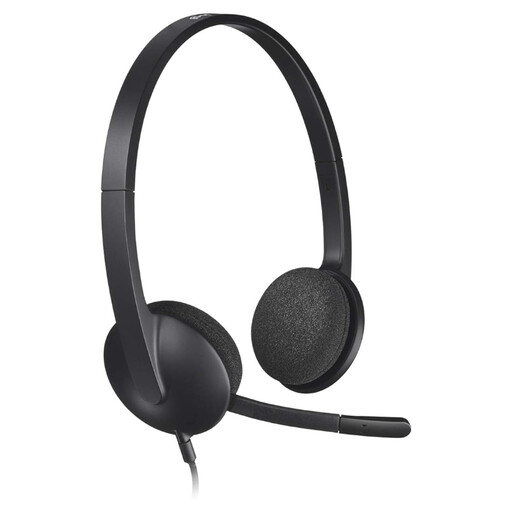
Why it suits this profile: This wired model is designed for plug-and-play use with a computer. It is suitable for working from home, online lessons and simple internet calls without Bluetooth pairing or a battery.
The USB connection avoids the hassle of Bluetooth and charging. However, check beforehand that your computer has a suitable USB port.
According to the product specifications: USB connection, stereo audio, adjustable headband and a noise-cancelling microphone.
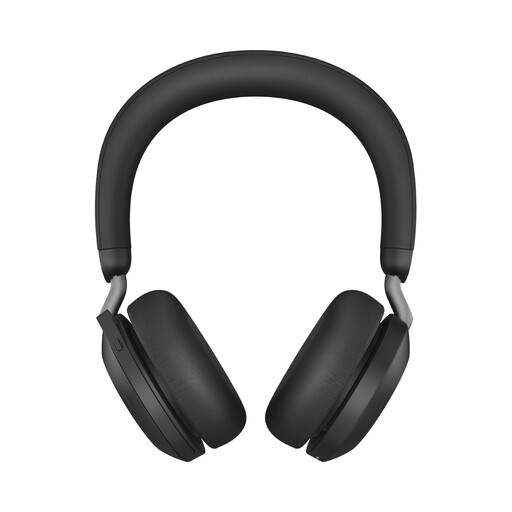
Why it suits this profile: For business professionals and home workers who make frequent calls, this wireless model offers features for meetings, music and switching between two devices.
The stated battery life, range and number of simultaneous connections are listed separately. This allows you to compare the specifications instead of relying solely on marketing terms.
According to the product specifications: Bluetooth 5.2, range of up to 30 metres, up to 36 hours of audio use and eight microphones.
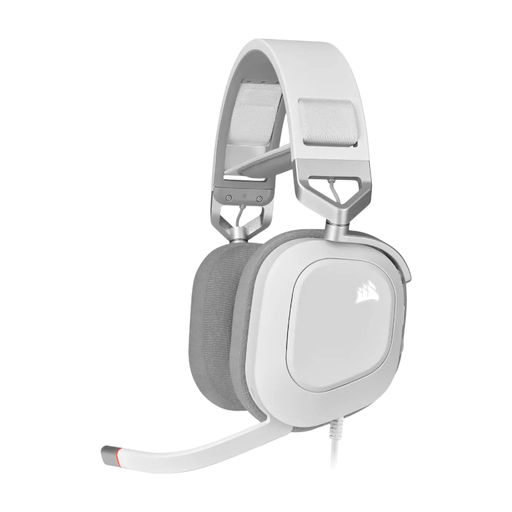
Why it suits this profile: This over-ear model is designed for gamers with a fixed PC setup who value a flip-up microphone, long periods of use without cable-free charging interruptions and surround audio on PC.
The connection is clearly wired via USB. This means you do not need to factor wireless delay or a flat battery into your purchasing decision.
According to the product specifications: 50mm drivers, 20 Hz–40 kHz, flip-up microphone and Dolby Audio 7.1 True Surround Sound on PC.
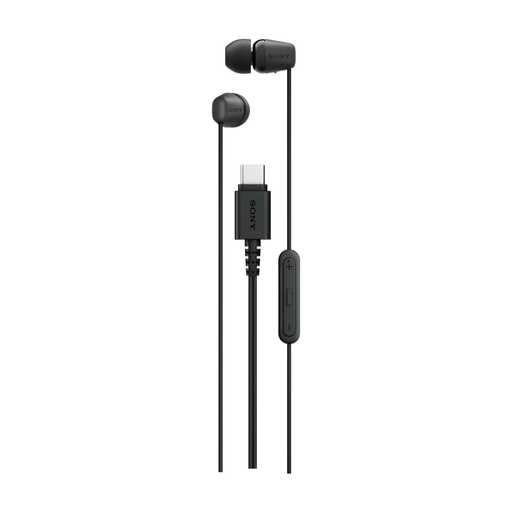
Why it suits this profile: These USB-C earphones are ideal for students and travellers looking for a compact wired model for music, phone calls and everyday use.
There is no battery status or Bluetooth pairing to manage. However, check beforehand that your USB-C port supports audio output.
According to the product specifications: USB-C connection, built-in microphone, remote control and a 120-centimetre cable.
We have compiled a complete, up-to-date list of products that fully meet these strict selection criteria and the applicable European safety regulations.
It can be, provided the battery life, comfort and microphone suit your working routine. Also check whether the model can connect to your laptop and smartphone at the same time. For a fixed workstation, a wired USB headset may be easier because you do not need to charge a battery.
The lifespan depends on usage, storage and maintenance. For wireless models, the battery is an important component. For wired headsets, the cable, plug, ear cushions and microphone boom are particularly susceptible to wear. Do not run the cable under an office chair, and store earbuds in their case. A legal guarantee of at least two years applies to many of the products mentioned; additional rights may apply under Dutch and European regulations.
A Bluetooth headset uses electricity when charging. The cost per charge is generally limited, but check whether a charging case, USB cable or adapter is included. A USB headset does not require a separate battery, but the device draws power from the computer while connected. For earbuds, also consider charging frequency and whether a USB-C charging cable or adapter is included.
