For meetings next to a bright window, choose a headset with a microphone boom, a connection that suits your device and controls that let you mute quickly. Manufacturers such as Logitech and Yealink describe microphone noise reduction for specific models. This is different from reducing the sound you hear, and it won’t solve backlighting. Adjust your camera and the light from the window separately, and check Teams features only for the exact version you’re considering.
Who is this buying guide for?
Speaking in a noisy environment
You’re speaking in the online meeting and want others to hear your voice clearly. Look for an adjustable microphone boom and check whether the manufacturer specifically describes noise reduction for the microphone. Logitech and Yealink mention this for certain models.
Regular laptop meeting attendee
You usually meet in the same place and prioritise a suitable connection, simple controls and comfort over freedom of movement. Logitech lists a USB-A connection and in-line controls for the H390.
Meeting attendee who moves around
You want to be able to stand up during a call, and are happy to manage pairing, the receiver and battery charge. Jabra describes pairing options for specific Evolve2 versions.
What should you look for in a headset?
Start with what you want the person you’re speaking to hear, then check that the connection, wearing style and freedom of movement suit your meeting space.
| What to consider |
What should you check? |
Who is this important for? |
| Clarity in a noisy environment |
Check whether the microphone boom is adjustable, whether the manufacturer mentions noise reduction for the microphone, and where the mute button is. |
If you’re speaking while there’s noise in the room, you’ll want your voice to come through clearly. Around 33% of consumers say clarity is their main consideration. |
| Connection and meeting app |
Check the port on your device and the full model name. Also check which microphone and speaker the app is using. |
If your main priority is making sure your headset works with your device, check the connection and app controls. Around 27% of consumers put compatibility first. |
| Comfort |
Check adjustability, ear cushions and whether the exact version is mono or stereo. |
Fit and wearing style can be especially important if you have longer meetings or want to keep one ear free. Around 20% of consumers put comfort first. |
| Freedom of movement |
For wireless models, check the connection method, whether a receiver is needed and the talk-time information for the version you’ve chosen. |
If you want to move around during a meeting, consider a wireless version and factor charging and pairing into your choice. Around 13% of consumers prioritise freedom of movement. |
| How you look on camera by the window |
Check the camera preview and the position of the window and camera before treating a headset feature as a solution to backlighting. |
If you mainly want to avoid buying a headset to solve a lighting problem, assess audio and video separately. Around 7% of consumers say this is their main consideration. |
Common buying mistakes
-
Confusing microphone noise reduction with a clear camera image or complete silence for yourself
The microphone affects the sound you transmit, while a bright window affects the lighting in your camera image. A manufacturer’s claim about the microphone is no guarantee of performance in every sound environment.
Assess the microphone, the sound you hear and your camera set-up separately.
-
Assuming every version in a headset range is the same product
Connections, wearing styles and app features can vary between models. For the Poly Blackwire 3300 series, HP says the 3.5mm option is available on specific models; EPOS describes Teams controls for the relevant Teams versions.
Compare the full model name, connection and features of the version you want to buy.
Brands to consider
Logitech
Logitech describes the H390 as a wired USB-A option and the H151 as a headset with a 3.5mm connection.
- For the H390, Logitech lists a microphone boom, in-line controls and a 1.9 m cable.
- The H151 requires a compatible 3.5mm headset socket. Neither model corrects backlighting in the camera image.
Jabra
Jabra describes the Evolve2 65 USB-A MS Stereo as a specific wireless version for anyone looking for that Teams variant; the Evolve 20 is a separate wired range.
- Jabra documents pairing options for specific Evolve2 versions.
- Check the full version name, receiver and charging requirements. Features of another Evolve version don’t necessarily apply.
Poly
HP describes the Poly Blackwire 3300 series as wired work headsets available in mono and stereo versions.
- HP lists a flexible microphone with noise reduction for the series.
- According to HP, the 3.5mm option is available on the Blackwire 3315 and 3325. Check the connection and version of the model you choose.
Yealink
Yealink offers the UH34 and UH34 Lite as wired USB headsets in mono and stereo versions.
- Yealink lists microphone noise reduction and controls for the UH34 family.
- The manufacturer distinguishes the foam cushions on the UH34 Lite from the leatherette cushions on the UH34. Comparisons about comfort and weight are manufacturer claims.
EPOS
According to EPOS, the ADAPT 100 series consists of wired on-ear headsets with a microphone boom, available in single-sided and double-sided versions.
- EPOS lists plug-and-play use and call controls for the series.
- According to EPOS, Teams controls are available only on the relevant Teams versions. Check the specific model number.
Headsets at Joybuy
This selection includes wired and wireless headsets for online meetings. For each version, check that the connection and features suit your device and meeting app.
 No image available
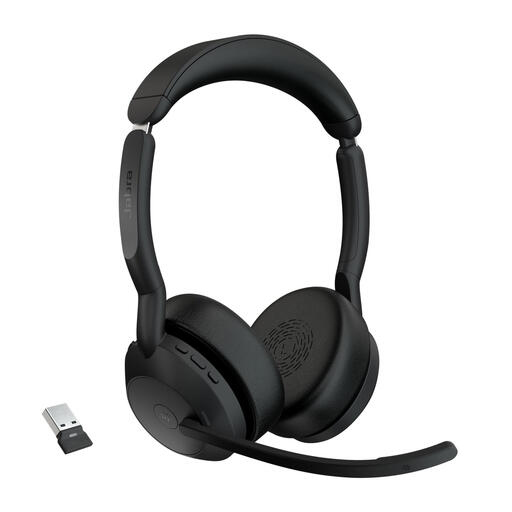
Jabra Evolve2 55 Link380a MS Stereo
A wireless work headset for anyone who wants to move around during a call. Check that the exact version suits your device and how you hold meetings.
Version: Link380a MS Stereo.
Joybuy
 No image available
Jabra Evolve2 75 USB-A MS Teams Black
An option for anyone looking for the MS Teams version listed and whose device has a USB-A connection. Check that the connection is available.
Version: USB-A MS Teams, Black.
Joybuy
 No image available
Logitech PC 960 USB Wired Headset
A wired USB option for meetings from a fixed desk. Check that your device has a suitable USB connection.
Version: USB Wired Headset.
Joybuy
 No image available
Jabra Evolve 30 II MS Stereo
A wired stereo option for anyone who wants to listen through both earcups. Check which connections and controls suit your device.
Version: MS Stereo.
Joybuy
 No image available
Trust Ayda Noise-Cancelling Wired Headset, USB Type-A, Black
A wired USB headset for online meetings. Check that your device has the USB Type-A connection listed.
Version: USB Type-A, Black.
Joybuy
Frequently asked questions
Will a headset make your face more visible on camera next to a bright window?
No, a headset won’t change the lighting on your face. Logitech advises against pointing a camera towards a strong light behind the participants; adjust the light from the window separately if needed. If you use Teams, you can also check the available video settings and camera preview.
How do you set up your headset for a Teams meeting?
Before joining, select your preferred microphone and speaker in Teams. Also check that your device allows Teams to access the microphone. Whether the headset buttons control Teams features depends on the exact version.
What should you look for in a wireless work headset?
Before a call, check the battery charge and pairing, and make sure the right receiver or connection method suits your device. Follow the manufacturer’s instructions for your model when charging, cleaning and installing any software updates.
When shopping online in the Netherlands, do you always have 14 days to return a headset?
As a consumer, you generally have a statutory cooling-off period of up to 14 days from delivery for an online purchase, according to ACM ConsuWijzer. Check which exceptions apply to your purchase; don’t assume that every opened headset automatically falls under an exception. Different rules apply to business purchases.
What can you do if a headset breaks too soon during normal use?
As well as any manufacturer’s warranty, you have a statutory guarantee. ACM ConsuWijzer explains that the seller must offer a solution free of charge if a product breaks during normal use sooner than you could reasonably expect. There isn’t one fixed warranty period that automatically applies to every headset.
Does a wireless headset need a CE mark in the Netherlands?
Relevant European requirements apply to electrical, electronic and radio equipment placed on the European market. The Digital Infrastructure Inspectorate states that products must have the required CE marking to be sold; a product listing alone doesn’t prove that a specific item meets every requirement.


