
Reviewer with a small desk
You want to practise a spoken review without a separate microphone on a stand. A headset with a boom microphone can save desk space; Logitech, Trust and EPOS describe wired models with a microphone.


If you mainly practise sitting at a laptop, a wired headset with a microphone is a practical way to keep your desk clear. Before buying, check the connection and make a test recording to hear how your voice sounds; noise cancellation for calls doesn’t prove that a recording will sound natural. A wireless headset is worth considering mainly if you walk around while practising.
You want to practise a spoken review without a separate microphone on a stand. A headset with a boom microphone can save desk space; Logitech, Trust and EPOS describe wired models with a microphone.
You record using a laptop or another device and want to check in advance that the connection on your chosen version is compatible. Logitech lists USB-A and USB-C options for the H390; RØDE specifies the supplied TRRS cable for the NTH-100M’s microphone.
You prefer to practise standing up or walking around. A wireless headset may be worth comparing in that case, as long as the connection and any adapter are compatible with your recording device. HP describes the Poly Voyager 4300 UC series as using Bluetooth with a USB adapter.
Choose this if: you mainly practise at a computer and have the right USB-A or USB-C connection available.
Consider: the cable limits how far you can move from your recording device; a claim about noise cancellation for calls doesn’t tell you how naturally your voice will be recorded.
Choose this if: you want to use the same headset for practising and listening back, and your device has a suitable microphone input.
Consider: the supplied TRRS cable is required for the RØDE NTH-100M’s microphone; also check that the port supports microphone input.
Choose this if: you actually walk away from your desk while reading aloud and freedom of movement matters to you.
Consider: check the exact version, adapter and connection; HP’s stated range doesn’t guarantee coverage or recording quality in your room.
| What to consider | What to look for when buying | Who is this important for? |
|---|---|---|
| Clear voice without a separate microphone | Check that you can position the microphone boom comfortably, then listen back to a short recording of your speaking voice. | If I practise my review at a small desk, I want to be able to position the microphone near my mouth without setting up a microphone stand. Around 36% of consumers are most concerned about clear speech without a separate desk microphone. |
| Connection to the recording device | Check the port and whether it supports microphone input; also check the exact version of the headset. | I want to know in advance whether my laptop or recording device will work with the connection I choose. Around 29% of consumers prioritise a connection that’s compatible with their recording device. |
| Comfort during repeated practice | Consider the style and adjustability; choose a comfortable, not-too-high volume when listening back. | If I practise several passages one after another, I want a comfortable headset that lets me listen back to my recording. Around 21% of consumers say comfort and listening back are their main concerns. |
| Freedom of movement | Decide whether you really walk away from your device while practising, and check which adapter comes with the version you’re considering. | I want to be able to stand or walk around while speaking, rather than being tied to a cable. Around 14% of consumers prioritise freedom of movement while practising. |
Manufacturers mainly describe noise cancellation as a feature for calls. This isn’t a comparative assessment of recorded Dutch speaking voices.
Make a short test recording of your own review and listen for quiet words and plosive sounds before relying on a microphone claim.
A model may be available in different versions or with different connections. According to RØDE, the supplied TRRS cable is required for the RØDE NTH-100M’s microphone.
Compare the full model version with your device’s ports, and if you’re using a 3.5 mm connection, check that it also supports microphone input.
Freedom of movement is the main difference between the wireless option considered here and a wired USB headset that doesn’t need a separate microphone stand.
First, decide whether you’ll actually walk away from your recording device while practising.
The H390 is a wired computer headset for practising at a computer. Logitech lists USB-A and USB-C options; check which version you need.
According to Trust, the Ayda USB-ENC is an on-ear option for use with a laptop or PC.
The PC 8 USB, product number 1000432, is a wired on-ear headset for PC and Mac.
The NTH-100M is an over-ear headset with a detachable microphone, designed for people who also want to listen back to their voice.
The Voyager 4300 UC series is a wireless option for anyone who walks away from their desk during a rehearsal.
This selection includes wired headsets with microphones for practising at a desk; check that the connection on each version is compatible with your recording device.
 No image available
A wired headset for practising without a separate microphone on your desk; check whether your device supports a microphone through the 3.5 mm connection.
The product name specifies a 3.5 mm connection.
 No image available
A wired USB headset for practising at a computer without a separate microphone stand; check that the USB connection is compatible with your device.
The product name specifies USB and a wired design.
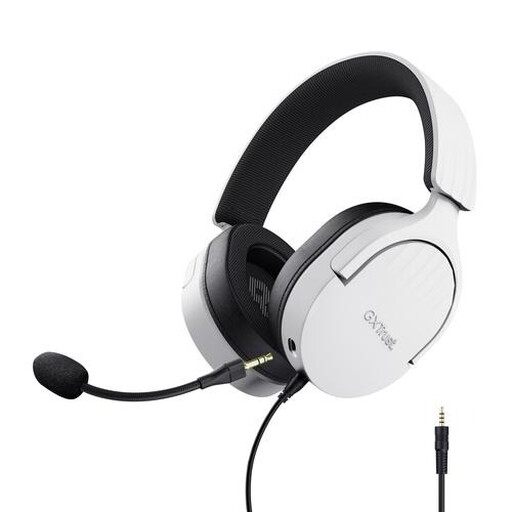 No image available
A wired over-ear headset for practising without a separate microphone on a stand; check that the connection on this version is compatible with your recording device.
The product name specifies a wired over-ear design.
 No image available
A headset for practising without a separate microphone stand; check whether your device’s connection also supports microphone input.
The product information specifies a wired 3.5 mm connection. If your device has separate headphone and microphone ports, you may need a splitter; this isn’t included.
 No image available
A wired USB headset for practising at a computer without a separate microphone on your desk; check that USB is compatible with your recording device.
The product name specifies USB, a wired connection and 7.1 surround sound.
First, check that the connection on the exact version is compatible with your device. Then select the headset as the microphone in your recording software and make a short test recording. For the RØDE NTH-100M, use the supplied TRRS cable, as specified by RØDE.
That depends on your device and the version you choose. Logitech lists USB-A and USB-C options for the H390; for the RØDE NTH-100M’s microphone, RØDE specifies the supplied TRRS cable. If you’re using a 3.5 mm port, check specifically that it also supports microphone input.
Keep the volume low and take listening breaks. The World Health Organization advises setting the volume no higher than 60% of the maximum; the duration and sound level of exposure also matter.
According to ACM ConsuWijzer, when you buy online you generally have 14 days after delivery to change your mind, with some exceptions. If the product breaks too quickly under normal use or doesn’t meet what you could reasonably expect, you also have statutory rights and the seller must offer a suitable solution. A manufacturer’s guarantee doesn’t replace those statutory rights.