
Recording at home
You record your book review on a computer and want to listen back to each attempt on your own device. Check which input and output are selected, and use a short test to check the recording level.


For a book review that you record and listen back to on your own device, first choose a headset with a connection that’s compatible with your device. A wired USB headset is a practical option for using with a computer; 3.5 mm may also work if your device supports microphone input through that connection. Then make a short test recording and check that the correct microphone is selected as the input and the headset as the output.
You record your book review on a computer and want to listen back to each attempt on your own device. Check which input and output are selected, and use a short test to check the recording level.
You practise on different computers or use devices with different connections. Compare the exact USB or 3.5 mm version with the ports on your device.
You want to listen back to your recording while possibly staying available to the people around you. Compare mono and stereo versions, and try the fit in the space where you practise.
Start with the connection and recording input, then consider playback and the style that will suit your practice sessions.
| What to consider | What to look for when buying | Who is this important for? |
|---|---|---|
| A clear voice recording | Select the headset microphone as the input and make a test recording. The Audacity Manual recommends keeping normal speech peaks between −18 dB and −6 dB on the meter. | I want to hear how my delivery sounds after each attempt, without accidentally recording through another microphone. Around 31% of consumers put getting a clear voice recording first. |
| The right connection | Check the USB-A, USB-C or 3.5 mm connection against your device. If you’re using 3.5 mm, also test whether the microphone works as an input. | When I practise on different devices, I don’t want to find out only after plugging in that the headset microphone isn’t recognised. Around 31% of consumers give device compatibility top priority. |
| Listening back to local recordings | Select the headset as the output and check how to open existing recordings and save new versions in your software. | I want to listen to several attempts side by side to spot issues with my pace and any slip-ups. Around 23% of consumers put listening back to local recordings first. |
| Fit and surrounding noise | Compare mono and stereo styles, adjustability and the position of the mute button. Try wearing the headset for as long as your practice session. | When practising repeatedly, I want a comfortable style that can also leave one ear free if needed. Around 15% of consumers put wearing comfort first. |
Playback and recording devices can be set separately. With a 3.5 mm connection, your device must also support microphone input through that port.
Check the port and make a short test recording straight away to see whether the headset microphone works as the input.
A device without a compatible connection may require a different headset version or a suitable adapter.
A product description for calls doesn’t tell you how your voice or the sound in your room will come across in a local recording.
Record a short clip in your own space, check the level and listen back before recording the full review.
Versions within a product range can have different connections and wearing styles. The name alone doesn’t always tell you whether a particular version will work with your device.
Compare the full product code, plug and mono or stereo version with the way you plan to use it.
The H390 is a wired USB computer headset for recording at your computer.
The GXT 415 Zirox is a wired 3.5 mm option for a device with a compatible headset socket.
The wired Blackwire 3200 series includes mono and stereo versions, letting you compare wearing styles and computer connections.
The Evolve2 30 SE range offers USB versions in mono or stereo, with UC or MS variants.
These picks include wired 3.5 mm and USB-C models, as well as wireless headphones supplied with a 3.5 mm audio cable. For each model, check whether the microphone works through the connection you plan to use for recording.
 No image available
An option if you’re looking for a wired headset with a 3.5 mm connection for recording and listening back. Check whether your device also supports microphone input through that connection.
The product information lists a flip-up microphone with mute.
 No image available
A compact wired option for recording and listening back on a device with a compatible USB-C connection.
The product information lists a built-in microphone and in-line controls. Check whether your device supports audio input via USB-C.
 No image available
An option if you’re looking for headphones to listen back to local recordings and also want to use a 3.5 mm audio cable.
The product information lists Bluetooth and an included 3.5 mm cable. Check separately whether the microphone works through the connection you choose for recording.
 No image available
A wired option with a microphone and 3.5 mm connection for recording and listening back. Check whether your device supports microphone input through that connection.
The product name lists compatibility with PS5, Xbox Series X|S, Xbox One and PC.
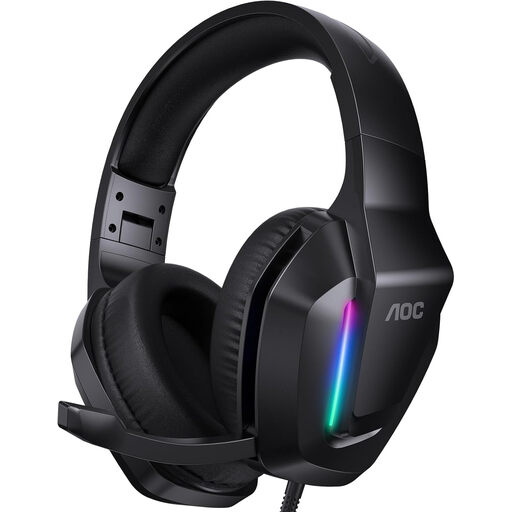 No image available
A wired headset with a microphone for recording and listening back through a compatible 3.5 mm connection.
The product information lists in-line volume and mute controls. Check whether the microphone works through your device’s connection.
Playback and recording use separately selected devices. Select the headset as the recording source too, then check whether the microphone responds using a short test and the input meter.
In Audacity, you can import an existing audio file and make a new voice recording on a separate track. Then export the version you want to a folder of your choice; some import or export formats require additional FFmpeg support.
In the Netherlands, a product must meet what you could reasonably expect from it. According to ACM ConsuWijzer, the seller is responsible for providing an appropriate solution if the product breaks too soon during normal use; a manufacturer’s guarantee doesn’t replace this right.
For many distance purchases, you have a 14-day cooling-off period, according to the Dutch government. Check the seller’s information for the terms and any applicable exceptions.
A private practice file isn’t the same as a public release. According to the Dutch government, you can make a private copy of protected work for your own use, but you can’t simply share or publish it. If you publish information that identifies other people, the GDPR may apply; the personal or household exemption comes with conditions. Whether a particular extract can be published depends on its content and how you share it.