If you’re the only person in the room speaking online and you’re staying close to your computer, a wired USB headset is a straightforward option. Choose a wireless model if you want to move further away from your desk during the discussion. Check the connection, microphone controls and, for wireless use, charging and Bluetooth. If people in the same room also need to be heard online, choose and test a separate room audio setup: a personal headset won’t automatically work as a microphone for the whole group.
Who is this guide for?
Online discussion host
You’re hosting the book discussion on a computer and want your voice to come across clearly, with a quick way to mute the microphone. Logitech and Trust describe personal headsets with microphone controls for this kind of conversation.
Host with people in the room
People in the room and joining remotely are taking part. So you need to consider not only your own headset, but also how people in the room will be heard online. Microsoft treats audio for a shared meeting room as a separate device choice.
Host who likes to move around
You use a sit-stand desk and sometimes want to walk away from it without a cable restricting your movement. A wireless headset could suit you, as long as you also factor in charging and connectivity.
What should you look for?
Wired personal USB headset
A good fit if: you’re the main person speaking online and you stay by your computer.
Bear in mind: the cable limits how far you can move, but you won’t need to charge a battery during the discussion.
Wireless personal headset
A good fit if: you regularly step away from your desk while hosting and need online participants to keep hearing you.
Bear in mind: you’ll need a compatible Bluetooth connection and will need to charge the headset. Logitech quotes up to 16 hours of talk time on a full charge for the Zone 300. This is a manufacturer’s figure, not a guarantee of how long it will last in every situation.
Personal headset with separate room audio
A good fit if: several people in the same room are also joining the discussion online.
Bear in mind: a microphone near the wearer’s mouth doesn’t prove that voices from further away in the room will come through clearly. Test the audio from the places where people will be speaking.
| What to consider |
What should you check? |
Who should give this more weight? |
| Your voice and muting |
Check whether you can position the microphone and reach the mute control as speakers change. Test the microphone during a call; a noise-cancelling claim doesn’t tell you how it will sound in your room. |
If I’m hosting the discussion, I want my voice to come across clearly and to be able to mute the microphone easily. Around 28% of consumers prioritise the clarity of their own voice and muting. |
| Voices in the room |
Work out who else will be speaking alongside you and test the audio from their usual seats or standing positions. Microsoft describes room audio as a separate choice for shared meeting rooms. |
If people beside me also need to join in online, I want to know whether their voices will be picked up by the microphone setup. This is the top priority for around 22% of consumers. |
| Freedom to move |
Check the cable route when the desk is at its highest setting against the distance you need to cover. For wireless models, also check the charging requirements and the quoted talk time for the exact version. |
If I regularly walk away from my desk, I don’t want the cable to restrict my movement. Around 22% of consumers give freedom of movement top priority. |
| Connection and controls |
Check whether the exact version uses USB-A, USB-C or Bluetooth, and whether it works with your computer. Then select the correct microphone and speaker in your calling app. |
If I want to get started without any hassle, I need a connection that works with my computer and settings I can check before the discussion. Around 17% of consumers prioritise connectivity and setup. |
| Comfort during a long discussion |
Compare the wearing style and try the headset on if possible. Specifications can’t predict exactly how a model will feel on your head. |
If I’m wearing the headset for the whole discussion, I want a fit that feels comfortable to me and lets me stay aware of the room. Around 11% of consumers give long-wear comfort top priority. |
Common buying pitfalls
-
Assuming a personal headset will work as a microphone for the whole group
A microphone boom by the host’s mouth doesn’t show that other people in the room will be easy to understand online.
First, work out who will be speaking in the room, then test the whole setup from their usual positions.
Group audio may need a separate room audio setup.
-
Assuming every version in a model range is the same
A range may include different connections, wearing styles or accessories. For example, Jabra’s Evolve2 30 SE offers mono or stereo, and USB-A or USB-C options.
Before buying, compare the full model name, connection, version and what’s included in the box.
-
Reading ‘noise cancelling’ without checking which noise it refers to
For the Trust Ayda USB-ENC, Trust describes noise reduction for the microphone. This doesn’t prove that you won’t hear background noise, or that other people in the room will be heard online.
Check which feature the description refers to and assess the speech quality on a test call.
-
Assuming a product listing gives a fixed statutory warranty period
According to the Dutch government, there’s no fixed statutory warranty period in the Netherlands. If a product is faulty, the seller must provide a solution; a manufacturer’s warranty is in addition to your statutory rights.
Compare any extra warranty with your rights against the seller.
Brands to consider
The features mentioned apply to the product ranges and versions described, so always check the full model name and connection.
Logitech
The H390 USB-A is a wired personal headset, while the Zone 300 is a wireless Bluetooth alternative.
- Logitech lists a 1.9 m cable and in-line controls for the H390 USB-A.
- Logitech quotes up to 16 hours of talk time on a full charge for the Zone 300.
- The quoted talk time is a manufacturer’s figure; the headset still needs to be charged.
Trust
The Ayda USB-ENC is a wired on-ear PC headset for anyone looking for USB connectivity and easy microphone controls.
- Trust lists on-ear volume controls and a flip-up microphone for muting.
- The background-noise claim refers to the microphone and isn’t an independent test for your book discussion.
- Check the exact USB-ENC version; don’t assume features from another Ayda variant apply to it.
HP Poly
HP describes the Blackwire 3220 USB-A as a wired stereo on-ear headset for PC calls.
- HP lists microphone mute and volume controls for this version.
- Check the full model name and wearing style; similar-looking product names don’t necessarily identify the same version.
Jabra
The Evolve2 30 SE is available with different options for mono or stereo, USB-A or USB-C, and communications platforms.
- Jabra describes the Evolve2 30 SE as having two built-in microphones.
- The range name alone doesn’t tell you which connection, version or accessories you’re buying.
- Jabra’s claims about call clarity or comfort are manufacturer claims, not an independent assessment of your setup.
Joybuy products
These models are personal headsets for computer calls, with wired and wireless options to compare.
 No image available
Jabra Evolve2 65 USB-A Black MS Mono
A wireless personal headset for anyone who wants to move away from their desk during a call.
The product description lists Bluetooth, a USB-A adapter, a mono design and a microphone. It also mentions memory foam ear cushions.
View at Joybuy
 No image available
Razer Kraken V3 X Black
A wired USB PC headset for anyone speaking online who wants to position the microphone.
The product description lists a microphone boom and a cardioid microphone for communication. The cable limits how far you can move from your computer.
View at Joybuy
 No image available
Logitech H340 USB Headset Black, Wired
A wired USB headset for online calls on a computer, with an adjustable microphone boom.
The product description lists internet calls and a lightweight design. The cable limits how far you can move from your computer.
View at Joybuy
 No image available
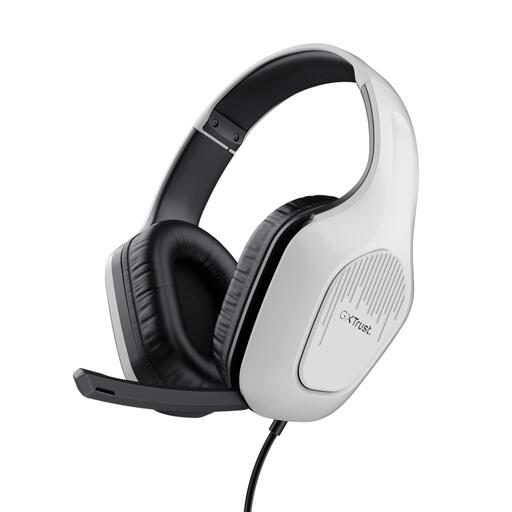
Trust GXT 415W Zirox Wired Gaming Headset - White
A wired headset for computer use, with a foldable microphone and on-earcup controls.
The product description lists a 2 m cable with a 3.5mm connection, an over-ear design and an adjustable headband. The cable limits how far you can move.
View at Joybuy
 No image available
Logitech PC 960 USB Wired Headsets
A wired USB headset for computer use, with an adjustable microphone and an in-line mute control.
The product description lists a 240 cm cable and a mute indicator. The cable limits how far you can move from your computer.
View at Joybuy
Frequently asked questions
Can one headset make everyone around my desk audible online?
Don’t assume so. A personal microphone boom sits by the wearer’s mouth, while Microsoft treats audio for a shared meeting room as a separate choice. For a hybrid book discussion, test the setup from the places where people in the room will be speaking.
How should I set up my headset before the book discussion?
Connect the correct version and select the intended microphone and speaker in your calling app. Also check the physical mute setting. Microsoft describes a test call in Teams that lets you check your audio settings.
What should I look for in a wireless headset?
Check that Bluetooth works with your computer and plan to charge the headset before a longer discussion. Logitech quotes up to 16 hours of talk time on a full charge for the Zone 300. That manufacturer’s figure applies to this model and isn’t a guarantee for every situation.
What product requirements apply to wireless headsets in the Netherlands?
The Dutch Authority for Digital Infrastructure describes the relevant European requirements and required CE marking for electrical, electronic and radio equipment sold in the Netherlands. Wireless radio equipment must also meet the applicable radio requirements. Check the product information for the exact version: a Bluetooth listing or brand name alone doesn’t show that the requirements have been met.
Who can help if my headset turns out to be faulty?
According to the Dutch government, you should contact the seller for a solution, not the manufacturer. There’s no fixed statutory warranty period in the Netherlands; a manufacturer’s warranty is in addition to your statutory rights.


