If you’re recording your own voice, start by comparing closed-back, wired studio headphones: RTINGS.com describes closed-back models as more suitable for recording, as less sound leaks into a microphone than with open-back models. If you mainly want to listen back wirelessly in different, noisy places, a noise-cancelling model may suit you better, but headphones are no substitute for a microphone. Check the connection and fit too. Audacity Support warns that software monitoring can cause latency, which switching to a different pair of headphones won’t automatically solve.
Who is this buying guide for?
Presentation narrator
You record your script and listen back to it. Check which microphone the recording uses: the headphones themselves won’t automatically record your voice. Audacity Support explains how to select the microphone you want as the recording source.
Listener on the go
You review recordings in different places and want headphones that are easy to put away or use wirelessly. Product information from Audio-Technica Europe and Sony Netherlands gives examples of foldable and wireless models.
Listener in a shared space
You want to follow spoken content without constantly turning up the volume. Pay attention to how well the earcups seal around your ears and compare closed-back models, with or without noise cancellation. Consumentenbond also highlights wearing comfort and ease of use.
What should you look for when buying?
When practising a presentation, choosing your recording source and deciding how to listen back are two separate decisions.
| What to consider |
What to look for |
Especially useful for |
| Recording source |
Check which microphone is selected and make a short test recording. |
If I’m recording my own voice, I want to make sure it’s being captured by the microphone I intended to use. Around 30% of consumers put the recording source first. |
| Speech clarity |
Listen to a familiar speech clip at a comfortable volume and check the fit. |
In a shared space, I want to follow spoken content clearly without constantly turning up the volume. Around 30% of consumers prioritise speech clarity and isolation. |
| Compact storage |
Check how the headphones fold or pack away and, for a wired model, whether the cable is practical for your workspace. |
If I pack away or take my setup with me after practising, I consider how the headphones and cable will fit in my bag. Portability is the top buying priority for around 20% of consumers. |
| Live monitoring |
Decide whether you want to hear yourself as you speak and check the monitoring function on your recording device. |
If I want to hear myself while recording, I check the monitoring route first. Around 20% of consumers prioritise live monitoring. |
Common buying mistakes
-
Assuming headphones are a complete recording setup
To record your voice, you need the microphone you intend to use to be available and selected as the recording source.
Start by making a short test recording with the microphone you actually plan to use.
If your current device doesn’t have a suitable microphone or connection, you may need extra equipment.
-
Buying different headphones to fix software latency
Audacity Support attributes latency during audible software monitoring to the monitoring route; simply switching headphones won’t automatically fix it.
First decide whether you need to hear yourself live or only review the recording afterwards. For live monitoring, check whether your recording device or audio interface supports it.
If you need to monitor audio directly, you may need a suitable audio interface.
-
Assuming isolation or noise cancellation works the same for everyone
How well closed-back headphones seal depends partly on their fit. A stated noise-isolation rating doesn’t guarantee how well they’ll fit your head.
Check the fit and listen to a familiar speech clip at a comfortable volume.
-
Expecting Bluetooth to work the same on every computer
According to Microsoft, stereo playback while using a Bluetooth microphone depends, among other things, on support from both the computer and headphones, your version of Windows and suitable drivers.
Check that combination and test the recording settings on the device you use.
Brands worth comparing
Audio-Technica
The ATH-M40x is a closed-back, foldable pair of wired studio headphones for a compact recording space.
- Audio-Technica Europe lists swivelling earcups and detachable cables for this model.
- Check whether the supplied cables are practical for your desk. The listed product specifications don’t say whether there’s a built-in microphone, and they can’t predict how the fit will feel for you.
Sony
The wired MDR-7506 and wireless WH-CH720N suit different listening and recording setups.
- Sony Netherlands specifies a 3 m cable for the MDR-7506. According to Sony, the WH-CH720N has Bluetooth and a detachable cable. Its stated maximum battery life varies depending on whether noise cancellation is on or off.
- A 3 m cable needs space on a small desk. The two models aren’t necessarily interchangeable for live monitoring.
beyerdynamic
The DT 270 PRO is a compact, closed-back wired option to compare if you put your equipment away after practising.
- According to beyerdynamic, the DT 270 PRO is foldable and has a detachable cable that can be connected on either side.
- beyerdynamic says the older DT 240 PRO is no longer in its range, so don’t treat it as the same product version.
Sennheiser
The wired, closed-back HD 280 PRO is worth comparing if isolation and replaceable ear pads are important to you.
- For article 506845, Sennheiser specifies a foldable design, replaceable ear pads, a coiled cable and a weight of 285 g without the cable.
- The stated noise-isolation figure is a manufacturer’s rating and doesn’t guarantee how well the headphones will seal around your ears.
Joybuy products
This selection includes wireless models for listening back in different places, as well as a wired headset for a compact, fixed recording space.
 No image available
Sennheiser MOMENTUM 4 Wireless, Black
For anyone who wants to listen back wirelessly and also have a wired listening option; check that the listed connection is compatible with your recording device.
The product title describes wireless over-ear headphones with noise cancellation.
View at Joybuy
 No image available
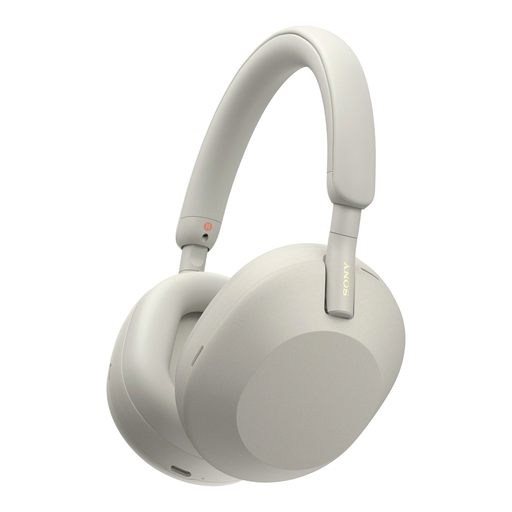
Sony WH-1000XM5, Silver
A wireless option for listening back to recordings in places with background noise; check that the fit works well for you.
The product title describes wireless headphones with noise cancellation.
View at Joybuy
 No image available
Jabra Evolve2 75
For anyone who wants to switch between wireless and wired use; check which connection is compatible with your computer and recording device.
The product title identifies this model as a headset.
View at Joybuy
 No image available
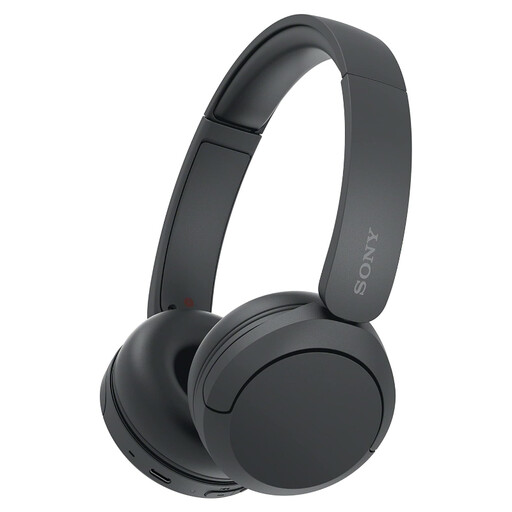
Sony WH-CH520, Black
A wireless option for listening back to recordings; check that the fit and the microphone setup you need are right for the way you plan to use it.
The product title describes wireless Bluetooth headphones.
View at Joybuy
 No image available
Razer BlackShark V2 X 7.1, Black
A wired headset to compare for a fixed recording space; check that the connection is suitable for your recording device.
The product title describes a wired gaming headset.
View at Joybuy
Frequently asked questions
Do I need a microphone as well as headphones?
To make a new voice recording, you need an available microphone, such as the one in your laptop. Select the intended recording source and make a test recording; wired headphones without a microphone can’t replace that recording source.
Why can I hear myself with a delay while practising?
Audacity Support reports that audible input monitoring through software can cause latency. If hearing yourself in real time is important, check whether your recording device or audio interface supports real-time monitoring. You don’t need this feature just to listen back afterwards.
Can I record and listen in stereo at the same time with a Bluetooth headset?
This doesn’t work with every Windows setup. Microsoft says this depends on Bluetooth LE Audio support on both the computer and headphones, as well as a suitable version of Windows and the right drivers. Test the combination you actually use.
How can I listen safely during long review sessions?
Keep the volume low and take breaks. The World Health Organization gives an average of 80 dB for up to 40 hours a week as an example; at higher levels, safe listening time falls quickly. This isn’t a guaranteed safe setting for any particular pair of headphones.
What are my rights when buying online in the Netherlands?
For a typical online purchase, you usually have 14 days from delivery to change your mind, subject to statutory exceptions, according to ACM ConsuWijzer. This right to cancel is separate from your rights if a product is faulty or not as described. The Dutch government states that the Netherlands has no fixed statutory guarantee period; the seller remains your point of contact if there’s a problem with a product.


