If you only want to listen back to an existing presentation, you don’t need a microphone in your headphones. Focus on choosing a comfortable pair that connects to your playback device. If you also want to record using the same headset, or hear yourself while speaking, check the microphone input and whether the exact model variant offers sidetone. A wired connection avoids Bluetooth audio delay. Closed-back earcups or noise cancellation can reduce background noise, but they won’t make a room silent.
Who is this for?
Listening back to a presentation
You record elsewhere and want to assess your Dutch phrasing, pronunciation and pace without using room speakers. A suitable connection and a comfortable fit matter more than having a microphone in your headphones. The University of Amsterdam’s Taalwinkel recommends practising a presentation out loud.
Recording while practising aloud
You want to speak and record using the same device, or hear your own voice while speaking. Check the microphone, connection and whether sidetone is available on the exact headset variant. Microsoft Support explains how to test the microphone input on a Windows computer.
Practising in a shared space
You listen back to recordings among other sounds and weigh up passive isolation or active noise cancellation against being able to hear what’s going on around you. The fit and automatic voice features can also affect how you use the headphones.
What should you look for in headphones for presentations?
First, decide whether you’ll only be listening back to a recording or also recording with the headphones. Then check that the connection is compatible with your device, and that you find the fit and level of background noise comfortable while practising.
| What to consider | What should you look for? | Who is this important for? |
|---|
| Clear playback |
Check that the connection is compatible with your playback device and that the headphones fit comfortably. |
If I mainly want to listen back to existing recordings, I want to assess my pronunciation and pace without room speakers. Around 36% of consumers say listening back is their main concern when buying. |
| Recording and sidetone |
Check which microphone you’ll use, which input the computer selects and whether sidetone is available on the exact variant. |
If I want to record with the same headset or hear my voice while speaking, the microphone needs to be set up correctly. Around 29% of consumers give recording or direct voice playback top priority. |
| Background noise |
Compare a close-fitting design with active noise cancellation; don’t expect complete silence. |
If I’m practising in a shared space, I want to follow my recording without hearing every background sound. Around 21% of consumers prioritise reducing background noise. |
| Comfort during repeated listening |
Consider the fit and, if relevant to you, whether the exact model has replaceable ear cushions. |
For longer listening sessions, I mainly want headphones that stay comfortable. Around 14% of consumers say comfort during repeated listening is their main concern. |
Common buying mistakes when practising presentations
-
Assuming listening headphones are a complete recording solution
Headphones that play audio won’t automatically record your voice.
Decide whether you only want to listen back or also record. If you’re recording, make a short test recording using the microphone you actually plan to use.
-
Confusing sidetone with the final recording
Sidetone lets you hear what the microphone picks up while you’re speaking; it doesn’t let you assess the saved presentation recording.
Make a short recording after practising and listen back to it separately.
-
Expecting noise cancellation to remove all sound
Voices may still be audible. On models with an automatic voice feature, speaking may also pause playback.
Try the fit in your own space and check the voice settings for the exact model variant.
-
Not checking the recording device’s connection
A wired audio connection and a USB headset don’t necessarily offer the same recording features.
Compare the ports on your computer or phone with those on the exact model variant, and test the audio input and output separately.
Brands to consider
Audio-Technica
The wired ATH-M40x is an option for listening back to recordings. The separate ATH-M50xSTS-USB is designed for use as a headset with a PC or Mac.
- Audio-Technica describes the ATH-M40x as a closed-back, wired monitor headphone.
- Before recording, check which microphone and connection you’ll use. Don’t assume the ATH-M40x has a built-in microphone based on the name alone.
Jabra
The wired Evolve2 40 SE range may suit anyone who wants to record with a headset. Sidetone is available on a specific USB-C UC Mono variant.
- Jabra describes the headset range as having a microphone boom and passive noise isolation.
- Check the exact connection and variant. Jabra’s description of noise isolation isn’t an independent measurement for practising presentations.
Sennheiser
The wired, closed-back HD 280 PRO is designed for monitoring and listening back repeatedly.
- Sennheiser lists replaceable ear cushions and a 3.5 mm plug with a 6.3 mm adapter.
- The stated noise attenuation is a manufacturer’s specification; it doesn’t tell you how the headphones will fit around your ears or on your head. Check the microphone separately if you want to record.
Sony
The wireless WH-1000XM6 is an option if freedom of movement and active noise cancellation matter when you’re listening back.
- Sony describes noise cancellation and Speak-to-Chat, which can pause audio when you start speaking.
- Noise cancellation won’t make your surroundings silent. Before practising aloud, check whether the automatic voice feature pauses playback.
Headphones and headsets on Joybuy
These product options cover wired and wireless listening, with some models also listing a microphone or active noise cancellation. The RDI states that electrical and electronic equipment sold in the Netherlands must have the appropriate CE marking. Check this on the specific product.
 No image available
JBL Tune 305C wired USB-C earphones, blue
An option for listening back to recordings over a wired connection; the product description also lists a built-in microphone.
USB-C connection. Check that your playback device supports USB-C audio.
Joybuy
 No image available
Sennheiser MOMENTUM 4 Wireless, black
Wireless over-ear headphones for listening back to recordings; the product description lists active noise cancellation.
Bluetooth and an included 3.5 mm audio cable are listed. Bluetooth audio may be delayed; wired listening is an alternative.
The stated battery life is 60 hours. The product description lists four microphones.
Joybuy
 No image available
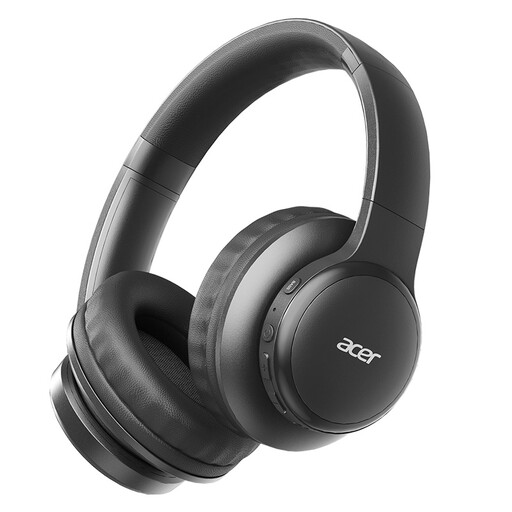
Acer OHR559 OWS wireless headphones
A wireless option for listening back to recordings; the product description mentions a microphone for voice calls.
Bluetooth 5.3, a foldable design and a USB-C charging port are listed. The product title mentions a low-latency mode for gaming.
Joybuy
 No image available
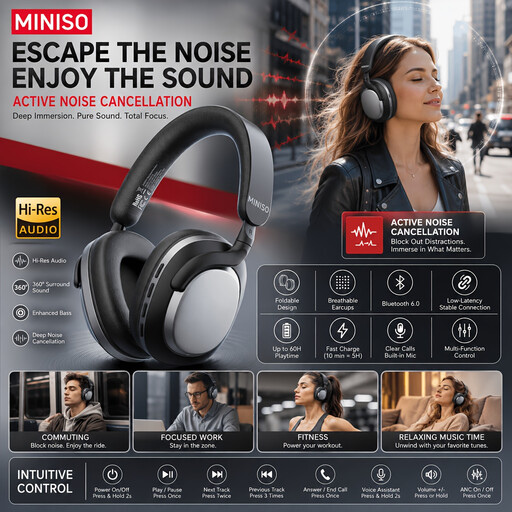
MINISO MG210 wireless over-ear headphones, black
An option for listening to recordings wirelessly; the product description lists active noise cancellation.
The stated battery life is 24 hours. The description mentions a lightweight design and soft earcups.
Joybuy
 No image available
Turtle Beach Airlite Fit wired headset, blue and red
A wired headset for listening back to recordings and, according to the product description, using a microphone.
3.5 mm connection and flip-to-mute microphone. Check that your device has a compatible audio input.
Joybuy
Frequently asked questions
Do I need a microphone in my headphones to review my presentation?
No, not if you’re only listening back to an existing recording. If you also want to record, select the microphone you’ll actually use as the input and make a short test recording. Sidetone lets you hear your voice while speaking, but it doesn’t replace listening back to the recording.
How do I set up a microphone on a Windows computer?
In the sound settings, select the microphone you want under Input and test whether it records your voice. Microsoft Support also recommends checking which input is selected in your recording software.
Can I use noise cancellation while practising aloud?
Yes, but don’t expect voices and other sounds to disappear completely. Sony says that Speak-to-Chat can pause audio when you start speaking. Check this setting if you want to keep listening while you practise.
Which product marking should I check?
The Dutch Authority for Digital Infrastructure states that electrical and electronic equipment sold in the Netherlands must have the appropriate CE marking. Check the marking on the specific product; a product page alone doesn’t prove which marking is on the item you receive.
How can I listen safely if I repeat my presentation often?
Keep the volume low and take breaks. The World Health Organization gives an average of 80 dB for up to 40 hours per week as an example of safe listening exposure. This isn’t a measured sound level for the models on this page.


