
Presentation recorders
If you regularly record spoken presentations, check the microphone, connection and compatibility with your recording app before buying. Jabra warns that not every USB-C app or device supports audio with the Evolve2 40 SE.


If you’re recording your presentation, start with the microphone and check that the headset works with your device and recording app. If you’re mainly listening back, consider the fit and background noise. Noise cancellation can be useful when listening, but it doesn’t automatically tell you how well your voice is being recorded.
If you regularly record spoken presentations, check the microphone, connection and compatibility with your recording app before buying. Jabra warns that not every USB-C app or device supports audio with the Evolve2 40 SE.
If you listen back to clips in a shared room, look for a comfortable fit and use headphones rather than a speaker. The Consumers’ Association lists comfort as something to consider during longer listening sessions.
If you replay recordings often or for long periods, compare comfort, connectivity and the stated listening time. The Consumers’ Association says over-ear models are often comfortable for longer listening sessions, although fit is a personal matter.
Choose this option if: you make lots of practice recordings on a computer and want to record your voice through the headset.
Bear in mind: a cable limits your freedom to move. Check which USB version you need and test that your device and app support audio. The Jabra Evolve2 40 SE is an on-ear model, so consider how much pressure it puts on your ears, too.
Choose this option if: you already have a separate microphone and mainly want to listen back to recordings.
Bear in mind: check that your device has a suitable 3.5mm socket. The Audio-Technica ATH-M40x specifications don’t list a built-in recording microphone.
Choose this option if: background noise distracts you when listening back and you want to listen wirelessly.
Bear in mind: noise cancellation doesn’t prove that your recording will sound better. The Consumers’ Association says it mainly reduces deep, continuous humming. Test the microphone separately from the listening audio.
Choose this option if: a compact design matters to you and the earbuds feel comfortable.
Bear in mind: fit and seal vary from person to person. Compare the earbuds’ own listening time, not just the extra charge provided by the charging case.
The table groups the key considerations around your first decision: recording, being considerate of housemates, background noise or listening back for long periods.
| Consideration | What should you check? | Who should prioritise this? |
|---|---|---|
| Recording your voice | Check which microphone is selected in your app and make a test recording. Make sure the connection is compatible with your device. | When I make test recordings, I want to listen back to my voice and make sure my app is using the intended microphone. Around 33% of consumers make recording checks their top priority. |
| Practising in a shared space | Check that the fit is comfortable and that you can listen at a moderate volume without using a speaker. | When other people are at home, I want to listen back to my presentation without using a speaker or turning the volume up unnecessarily. Around 27% of consumers prioritise being considerate of housemates. |
| Background noise | Consider whether the noise in your room is continuous, and compare the fit and noise cancellation offered by the model. | When background noise interrupts my short clips, I want to assess whether the fit or noise cancellation suits where I listen. Around 20% of consumers prioritise listening back without interruptions. |
| Listening back for long periods | Compare the fit and, for wireless models, check the stated listening time. For wired models, check the connection. | When I replay the same recording often or for a long time, I want a comfortable fit and as few interruptions as possible from charging or an unsuitable connection. Around 20% of consumers make extended practice their top priority. |
Noise cancellation affects what you hear while listening, but it doesn’t prove that the microphone or recording app captures your voice more clearly.
Test the recording quality separately, and choose a headset with a microphone if recording is your main priority.
The earbuds’ own battery life is different from the extra charge provided by the case.
Compare the stated listening time per charge under the same conditions.
You can’t use earbuds while they’re charging in the case, which could interrupt a practice session.
ACM ConsuWijzer distinguishes between statutory rights and an additional warranty from a manufacturer or seller. If a product doesn’t perform as you could reasonably expect during normal use, the seller is responsible under the statutory guarantee.
Keep your proof of purchase and contact the seller if there’s a problem.
The Evolve2 40 SE range is a wired headset option for recording on a computer.
The wired ATH-M40x is a listening option if you record separately.
The WH-CH720N is a wireless over-ear option with active noise cancellation.
The Tune 770NC is a wireless over-ear option for comparing listening and voice-monitoring features.
AirPods Pro 3 are a compact in-ear option if the fit and connection to your devices suit the way you work.
This selection includes wired headsets and earbuds, wireless over-ear headphones and wireless in-ear earbuds to use when recording or listening back.
 Image unavailable
You could consider this wired headset for test recordings. Check that the connection and microphone work with your device and recording app.
Over-ear design; 50mm drivers; white.
 Image unavailable
If you’re looking for a compact listening option for a USB-C device, check that the connection and microphone work with your recording app.
Wired earbuds; blue.
 Image unavailable
This wireless over-ear option could suit you for listening back if you want to compare noise cancellation. Test the microphone separately if you also record.
Noise cancellation; the product name lists 60 hours of battery life and four microphones.
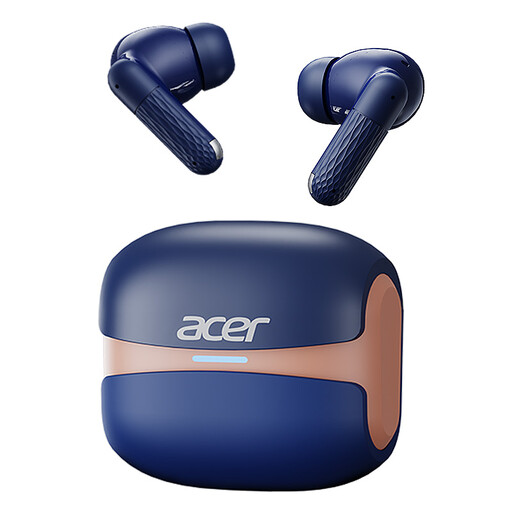 Image unavailable
You could consider this compact option for listening back wirelessly. Check that the controls and microphone work with your recording app.
In-ear design; Bluetooth 5.4; Type-C charging case.
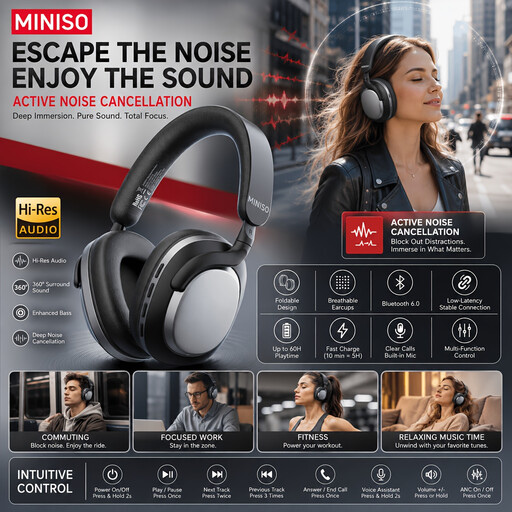 Image unavailable
You could compare this wireless over-ear option if background noise distracts you. Noise cancellation doesn’t automatically tell you how your voice recording will sound.
The product name lists 24 hours of battery life.
Select the microphone you want to use in your recording app, then listen back to a short test recording. Jabra says that not every USB-C app or device supports the Evolve2 40 SE’s audio connection.
Not always. First, try a comfortable fit and a moderate volume. Active noise cancellation may be useful if continuous background noise bothers you; the Consumers’ Association says it mainly reduces deep humming.
Keep the volume low and take regular breaks. The World Health Organization gives an average of 80 dB for up to 40 hours a week as an example of safe listening for adults; at 90 dB, that example falls to four hours a week. This is general listening guidance, not a guaranteed safe setting for every pair of headphones.
ACM ConsuWijzer says online purchases generally come with a statutory cooling-off period of up to 14 days after delivery, with some exceptions. If a product doesn’t perform as you could reasonably expect during normal use, the seller is responsible under the statutory guarantee. This doesn’t mean that every pair of headphones comes with a fixed two-year statutory period. Before opening in-ear earbuds, check the returns policy: certain unsealed hygiene products are exempt, but that doesn’t mean all earbuds are automatically excluded.