If you mainly listen in a noisy place, well-fitting, closed-back headphones with noise cancellation are a sensible choice; in a quiet room, you could also consider an open-back wired model. Manufacturer specifications won’t tell you which headphones will make your recording sound clearest. So test a difficult passage from your own recording and check that the connection, fit and any rules on sharing work for your situation.
Who is this relevant to?
If you replay difficult passages
You replay parts of a lecture to check the content before your rehearsal. Leiden University notes that interactive elements of lectures may not come across well in web lectures. So listen to the recording itself too: headphones can’t make up for information that’s missing.
If you listen in a busy place
You want to follow speech without constantly turning the volume up to drown out background noise. A good seal and, where available, noise cancellation may help; also consider any sounds around you that you need to hear.
If you listen to several recordings in a row
For longer listening sessions, consider the style, pressure on your ears and battery life. Fit is personal, so if possible, assess it during a listening session similar to the way you’ll actually use the headphones.
What should you look for when choosing?
Start with the recording and where you’ll be listening. Then consider comfort, connectivity and battery life.
| What to consider |
What should you check? |
Who is this important to? |
| Speech clarity |
Listen to a difficult passage from your own recording; check the course materials too if anything remains unclear. |
I want to know what was actually said before the rehearsal; around 36% of consumers put speech clarity first. |
| Background noise |
Assess the seal where you usually listen and test noise cancellation or an ambient mode if the model offers one. |
If background noise distracts me, I want to follow the recording without turning up the volume; around 29% of consumers put this first. |
| Comfort during long sessions |
Pay attention to the pressure from the ear cushions and the fit when listening to several recordings in a row. |
I want my headphones to stay comfortable during long listening sessions; around 21% of consumers prioritise comfort. |
| Connectivity and battery life |
Check your device’s audio output or Bluetooth connection and, for wireless use, the battery life with your preferred features switched on. |
I want to get started without connection problems and finish the session; around 14% of consumers prioritise connectivity and battery life. |
Things to consider when buying
-
Expecting noise cancellation to restore unclear words
Noise cancellation can reduce background noise, but it can’t fill in words that weren’t recorded clearly. Leiden University notes that interactive elements of a lecture may not come across well in a web lecture.
Before letting extra features sway your decision, test a difficult passage from the recording you actually want to listen to.
-
Choosing open-back headphones for a noisy or shared space
An open-back design is different from a model that seals around your ears. In a space with background noise, this can affect how easily you follow the recording.
Choose a style to suit where you usually listen, and check that you won’t disturb anyone nearby.
-
Looking only at the stated battery life or manufacturer’s warranty
Battery life can depend on which features are switched on. A manufacturer’s warranty is also not the same as your statutory rights if a product develops a fault.
Compare battery life in the mode you plan to use, and read the terms of any additional warranty cover before you decide.
Brands and models to consider
Sony
The WH-CH720N is a wireless option that can also be used with a wired connection.
- Sony lists noise cancellation, multipoint connectivity and up to 35 hours of playback with noise cancellation on for this model.
- These specifications don’t prove how clear your lecture recording will sound; check the fit and connection.
JBL
The Tune 770NC is a wireless over-ear option with features to reduce or let in ambient sound.
- JBL lists adaptive noise cancelling, Smart Ambient, multipoint connectivity and up to 70 hours of playback under the conditions specified by JBL.
- The stated features and battery life don’t tell you how clear a particular recording will sound.
Sennheiser
The HD 560S is an open-back, wired option for a quiet place to listen.
- Sennheiser lists an open-back design and a detachable cable.
- Sennheiser says an amplifier may be useful with the 120-ohm model, but it isn’t essential. An open-back design isn’t the obvious choice if you want to block out background noise.
Philips
The TAH4209BL/00 is a compact, foldable wireless on-ear option.
- Philips gives this model a playback time of up to 55 hours.
- On-ear cushions rest on your ears; decide for yourself whether they stay comfortable during longer sessions. The stated battery life says nothing about speech clarity.
Products at Joybuy
This selection includes wireless and wired headphones and headsets for listening back on your own. Before use, check that the connection or wireless link works with the device you’re using to play the recording.
 Image unavailable
Sennheiser MOMENTUM 4 Wireless, black
An over-ear model for listening to recordings wirelessly or with an audio cable.
The product description lists adaptive noise cancellation, a transparency mode and up to 60 hours of playback.
Check that the cable supplied, or the one you plan to use, is compatible with your playback device.
View at Joybuy
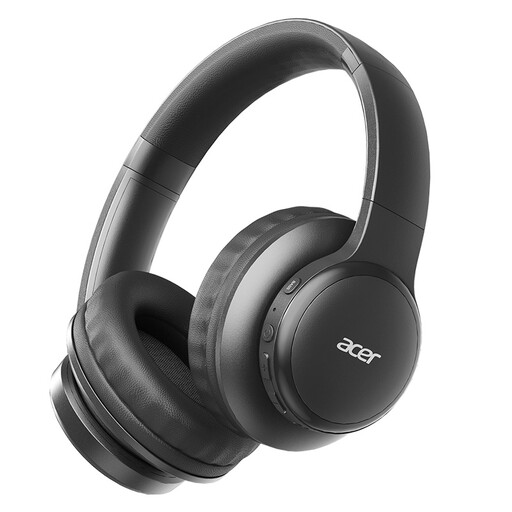 Image unavailable
Acer OHR559 OWS wireless headphones
A foldable model to take with you when listening to lecture recordings in different places.
The product title lists Bluetooth 5.3 and a Type-C charging port.
Check that Bluetooth is suitable for the device you’re using to play the recording.
View at Joybuy
 Image unavailable
Samsung Galaxy Buds4 Pro, black
A wireless in-ear option for listening to a lecture recording on your own.
The product description lists active noise cancellation and Bluetooth 6.1. With noise cancellation on, it gives up to 6 hours of playback per earbud and up to 26 hours in total with the charging case.
Check that the in-ear fit is comfortable for the length of your listening session.
View at Joybuy
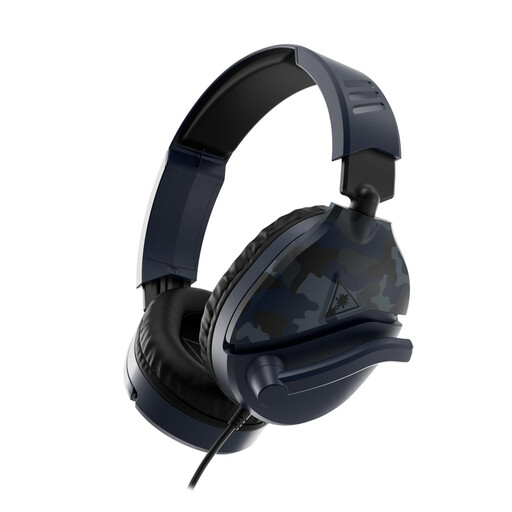 Image unavailable
Turtle Beach Recon 70 wired gaming headset, Blue Camo
A wired over-ear headset for playing recordings from a device with a compatible connection.
The product description lists a closed-back design and a 3.5 mm connection.
Check that your laptop or phone has a suitable audio output.
View at Joybuy
 Image unavailable
Turtle Beach Stealth 600 Gen 3 Xbox, black
An over-ear headset for listening to lecture recordings wirelessly on a compatible device.
The product description lists a closed-back design, a 2.4 GHz connection and Bluetooth 5.2.
Check which connections are supported by the device you’re using to play the recording.
View at Joybuy
Frequently asked questions
Will noise cancellation make an unclear lecture recording easier to understand?
Not necessarily: noise cancellation can reduce background noise, but it can’t restore missing words or improve a poor recording. Try the difficult passage with your own recording and check the course materials if needed.
What should you check before playing a recording on your laptop or phone?
Check that the headphones connect to the device the recording is on. According to Sony, the Sony WH-CH720N can be paired with two Bluetooth devices; a wired Sennheiser HD 560S needs a compatible audio output. Test playback before the rehearsal.
How can you limit your sound exposure when listening back for a long time?
Keep the volume low, take regular listening breaks and use well-fitting headphones so you don’t have to turn the volume up to drown out background noise. The World Health Organization gives an average of 80 dB for up to 40 hours a week as an example of safe listening; louder sound reduces the safe listening time. This is listening advice, not a product specification.
Can you simply forward a lecture recording to your rehearsal group?
That depends on the recording and your educational institution’s rules. The University of Amsterdam sets out specific consent and sharing rules for recordings featuring lecturers or students, including sharing parts of web lectures. Check the rules for your recording before sharing it; listening back on your own is not the same as sharing it.
What are your rights when buying online from a Dutch retailer if the headphones don’t suit you or develop a fault?
For a distance purchase from a business, you usually have a 14-day cooling-off period, according to the Dutch Government. You’re also entitled to a product that is fit for purpose; if there’s a fault, contact the seller. The Dutch Government states that there is no fixed statutory warranty period in the Netherlands that applies to all products.


