
Vandaag of morgen in huis

Kwaliteit gegarandeerd

Welkomstaanbiedingen ontgrendelen: GRATIS bezorging | Tot 80% korting | Gratis 30 dagen JoyPlus-proefperiode
Download de app
Buying a new pair of headphones or earbuds seems simple – until you have to choose between wireless earbuds, over-ear headphones, USB-C earbuds or a gaming headset. Marketing terms such as “HiFi”, “AI”, “noise cancelling” and “waterproof” don’t always tell you how a product will perform in everyday use.
So pay particular attention to the connection, fit, battery life and what technical claims actually mean. Read on to find out which common pitfalls to look out for, and which features matter for different situations.
For wireless headphones, the battery life sometimes includes the charging case. So check the difference between:
A model with a long total battery life may still last only a few hours on a single charge. This is important if you’re travelling or working a long day.
Noise-cancelling headphones use electronics to reduce background noise. This technology is generally more effective against low, constant sounds such as train engines or aircraft noise than sudden voices or traffic sounds.
So treat claims such as “-44 dB” or “-50 dB” as product specifications measured under certain conditions, not as a guarantee that all noise will disappear. According to the product description, the Edifier Atom Max offers up to -44 dB of hybrid active noise cancellation. Your actual experience will depend on factors including the fit and your surroundings.
Always check the exact IP rating. According to the product information, IPX5 is designed to protect against water jets and sweat, but it doesn’t mean a product is suitable for submersion. With sports earbuds, it’s also important to check the charging case’s level of protection, which may differ from that of the earbuds.
Don’t use a model with a water-resistance claim for swimming or showering unless the manufacturer explicitly says it’s suitable.
Bluetooth earbuds and wireless headphones are convenient for smartphones, tablets and laptops. Just check:
USB-C earbuds don’t need a battery and are handy for devices with a USB-C port. Check in advance whether your smartphone or laptop supports audio over USB-C. A USB-C port doesn’t automatically support audio.
Wired models with a 3.5mm connection are worth considering for devices with a headphone socket, music equipment or gaming. They don’t need charging, but the cable can get in the way when you’re travelling or exercising.
In-ear models seal the ear with a silicone tip. This can provide a secure fit and reduce background noise, but not everyone finds them comfortable. Open-ear models let in more background noise and may be suitable for walking or cycling, depending on the traffic conditions.
Over-ear headphones fully cover your ears. Check the weight, headband pressure and how warm they get around your ears. A lightweight on-ear model may be more practical for the office, but usually offers less physical isolation.
If you often take part in online meetings, a good headset with a microphone is more useful than a strong music profile alone. Check whether the microphone has noise cancellation, whether there’s a mute button and which devices the model works with.
For a gaming headset, platform support, cable type, latency and surround features are also important. Bear in mind that software features may only be available on Windows.
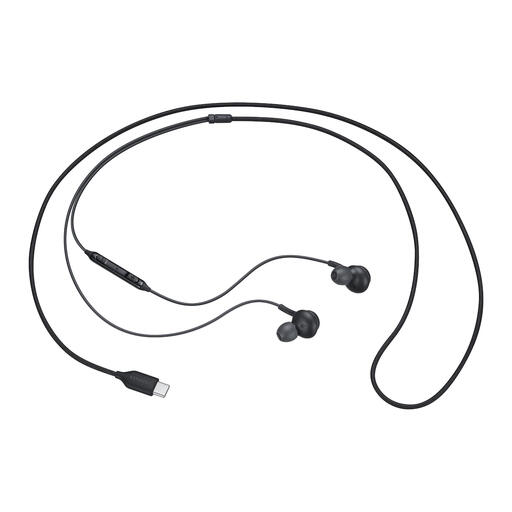
Why it suits this need: This wired model connects via USB-C, has a built-in microphone and weighs 18.35 grams according to the product specifications. There’s no need for a battery or Bluetooth pairing.
You won’t pay for wireless features you may not use. Just check that your device supports audio over USB-C.
USB-C connection, microphone, in-line controls and included ear tips in various sizes.
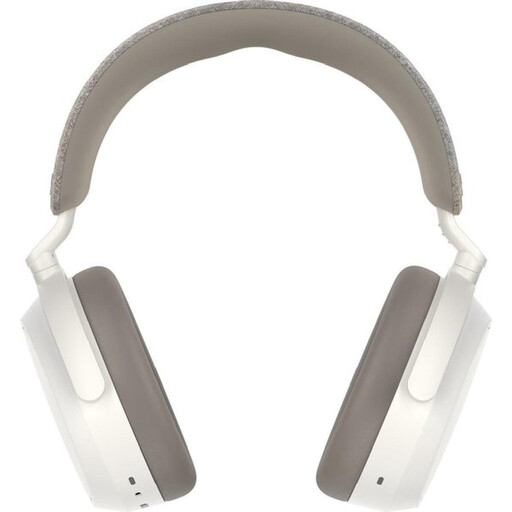
Why it suits this need: These over-ear headphones are designed for extended listening. According to the product information, they feature adaptive noise cancellation, a 42mm transducer system and up to 60 hours of playback time.
The stated battery life and app settings make it easier to assess how long they’ll last and how you can adjust the sound before you buy.
Up to 60 hours according to the product description, USB-C fast charging, four microphones and an adjustable equaliser via the app.
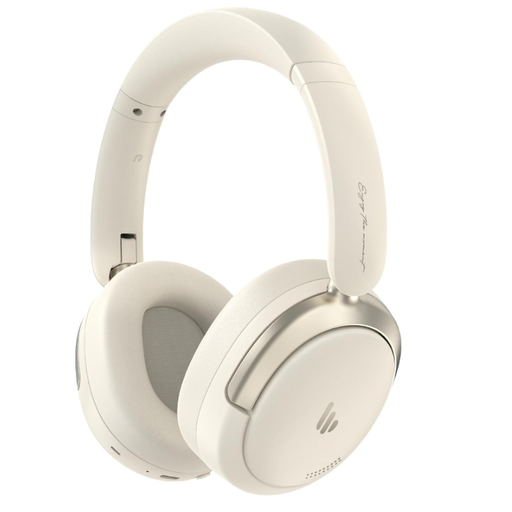
Why it suits this need: This model combines an over-ear design with Bluetooth 5.4, a built-in microphone, connection to two devices and a stated playback time of 45 hours.
The product specifications list both wireless and wired USB-C use, giving you an alternative when the battery runs out.
40mm driver, hybrid active noise cancellation according to the product description, multipoint connection and foldable design.
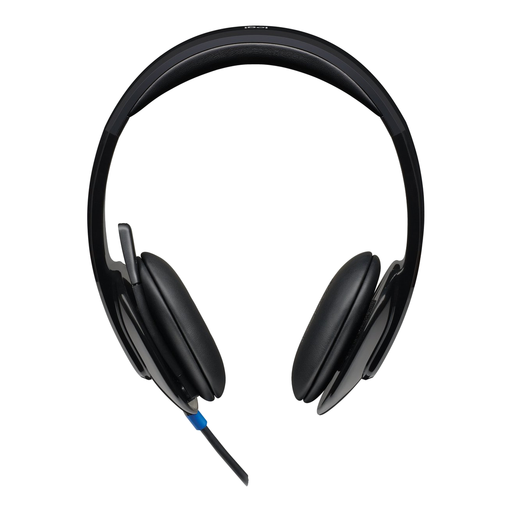
Why it suits this need: This USB headset is designed for plug-and-play use with a PC or Mac. The adjustable headband, on-earcup controls and microphone make it well suited to everyday office work.
There’s no need for Bluetooth pairing or a battery. The USB Type-A connection is clearly specified, but check that your laptop or computer has this port.
Plug-and-play USB connection, adjustable headband, volume control and microphone with noise cancellation according to the product description.
We’ve put together a complete, up-to-date list of products that meet these strict selection criteria and the applicable European safety regulations.
That depends mainly on the microphone and how background noise is handled. Check the number of microphones, the stated noise cancellation for calls and reviews from people using the same type of smartphone as you. A headset with a microphone positioned closer to your mouth may be more practical in a busy office.
Battery life per charge varies by model and settings. Battery capacity decreases over time as a result of charging cycles. Store your earbuds in the charging case, avoid heat and use suitable charging accessories. When buying, always compare battery life per charge with the total battery life, including the case.
Neither connection is automatically better for every user. USB-C earbuds don’t need a battery and can provide a direct connection. Bluetooth earbuds give you more freedom to move around, but need charging and may depend on compatibility, Bluetooth settings and microphone performance.
