What should you look for?
First decide whether your priority is hearing your teacher more clearly or making yourself easier to hear. Then check the connection, fit and controls.
| Factor to consider |
What should you check? |
Who is this important for? |
| Being heard clearly when you speak |
Check the microphone, the correct connection and which microphone the lesson app is using as its input. Test the setting before your lesson. |
If I often answer questions, I want my teacher to hear me clearly; around 36% of consumers say being heard clearly when speaking is their top buying priority. |
| Hearing your lesson over noise at home |
Compare the fit and any active noise cancelling (ANC). Don’t assume there’s a set level of noise reduction for voices at home. |
If my housemates distract me during listening exercises, I want to hear less background noise; around 29% of consumers prioritise reducing noise at home. |
| Comfort during long lessons |
Try the fit and check for pressure around or on your ears. Also check that the controls are easy to reach during a lesson. |
If I wear headphones for a long time, I want them to stay comfortable; around 21% of consumers say long-term wearing comfort is their top consideration. |
| Connection and ease of use |
Check that your computer has the USB or audio connection you need, or decide whether you want to use Bluetooth. Test both the speakers and microphone before your lesson. |
If I don’t want to lose lesson time to connection problems, I check the connection and app settings in advance; around 14% of consumers prioritise connectivity and a reliable connection. |
Joybuy products for lessons
These products suit different lesson needs: speaking yourself, reducing noise at home while listening, or choosing wireless over-ear or in-ear headphones.
 No image available
Samsung Galaxy Buds4 Pro true wireless earbuds, black
A wireless in-ear option to compare if you want to use ANC during lessons and speak yourself, too.
The product description lists Bluetooth 6.1, up to 6 hours of playback with ANC on and six microphones for calls. These specifications alone don’t tell you how clearly your voice will come through in your lesson app.
View at Joybuy
 No image available
Bose QuietComfort Ultra Bluetooth headphones, black
These wireless over-ear headphones are worth comparing if you want ANC and also speak during lessons.
The product description lists Bluetooth 5.3, up to 24 hours of battery life and an audio cable for use without battery power. ANC and built-in microphones are also mentioned; test the microphone in your own lesson app.
View at Joybuy
 No image available
Sonos ACE over-ear Bluetooth headset, black
These wireless over-ear headphones are worth comparing if ANC, microphones for calls and longer listening sessions matter to you.
The product description lists up to 30 hours of listening with ANC and the ability to connect to two devices at once. According to the description, multipoint requires registration in the Sonos app.
View at Joybuy
 No image available
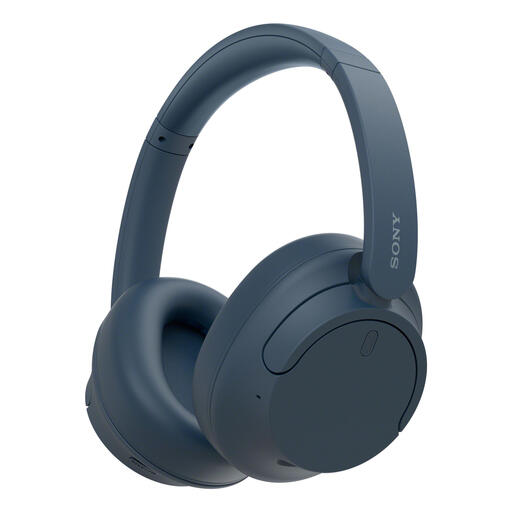
Sony WH-CH720N wireless over-ear headphones, blue
A wireless over-ear option to compare if you want to use ANC to reduce background noise while listening.
The product description lists up to 35 hours of battery life with noise cancelling on, multipoint connectivity and a weight of 192 g.
View at Joybuy
 No image available
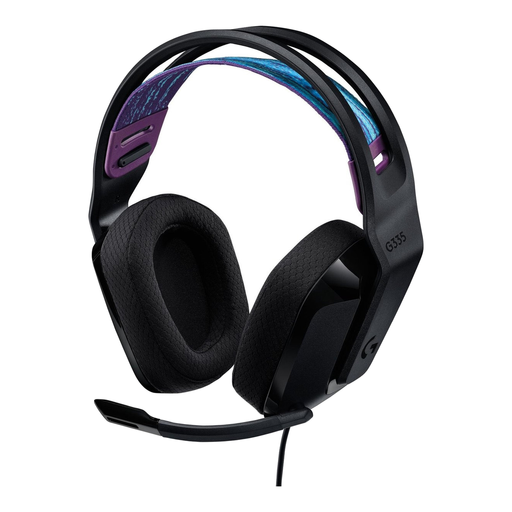
Logitech G G335 gaming headset
This wired over-ear headset could suit you if you want to speak during lessons and have a 3.5 mm connection available.
The product description lists a flip-to-mute microphone, volume controls on the ear cup and a weight of 240 g. Check that your device has a compatible audio connection.
View at Joybuy
Frequently asked questions
For a conversation lesson, should I choose ANC or a noise-cancelling microphone?
It depends on which sound is causing the problem: ANC is designed to reduce the noise you hear, while a microphone feature affects the noise others hear through your microphone. If you find it hard to hear your teacher because of noise at home, compare the fit and noise reduction; if others find it hard to hear you, check the microphone and input settings in your lesson app. The Logitech H390 description refers to microphone noise reduction, not ANC.
What should I check just before an online lesson?
Select the speakers and microphone you want to use in your lesson app, and check that mute isn’t switched on. Microsoft Support explains that you can choose an audio source in Teams before joining; test your chosen input and output devices in advance.
How can I listen during a long lesson without turning the volume up unnecessarily?
The World Health Organization recommends well-fitting headphones and mentions noise cancelling as a way to reduce the need to turn up the volume in a noisy environment. Both listening volume and listening duration matter; the WHO gives a maximum of 60% of your device’s volume as a practical guideline, not a product specification.
Can I return headphones bought online in the Netherlands, and what if they break too soon?
According to ACM ConsuWijzer, online purchases generally come with a statutory cooling-off period of up to 14 days after delivery, subject to exceptions that must be made clear before purchase. If a product breaks through normal use sooner than you could reasonably expect, you have statutory guarantee rights and the retailer is responsible. Before placing your order, also check the returns terms that apply to the product.


