
Vandaag of morgen in huis

Kwaliteit gegarandeerd

Welkomstaanbiedingen ontgrendelen: GRATIS bezorging | Tot 80% korting | Gratis 30 dagen JoyPlus-proefperiode
Download de app
Buying new headphones seems simple, until you have to choose between wireless headphones, Bluetooth earbuds, a gaming headset, noise-cancelling headphones or a wired model. Marketing terms don’t always tell you how a product performs in real life. So focus on the connection, comfort, microphone quality and the conditions in which you’ll use the device.
Noise-cancelling headphones can reduce background noise, but they won’t automatically make a train, office or aircraft cabin silent. How well they work depends on the fit, software and type of noise. Low, constant sounds are usually easier to reduce than voices or sudden noises.
Terms such as “-44 dB” or “-50 dB” should also be considered in context. According to the relevant brands’ product information, these are stated values measured under specific conditions. Treat such claims as product specifications, not a guarantee that you’ll have the same experience in every environment.
A manufacturer may quote total playback time including the charging case, or measure battery life with noise cancellation switched off. So check:
Wired headphones or wired in-ear earbuds don’t need a battery. This can be handy for everyday use, travel or a device on which you don’t want to set up Bluetooth.
Not every connection works with every device. A USB headset needs a free USB port, while a Type-C headset may not be recognised by every smartphone. You may also need an adapter for a 3.5mm connection.
Check features such as multipoint, an app, voice assistants and virtual surround sound too. Some features only work on Windows, through a specific app or with certain mobile devices.
Wireless headphones usually use Bluetooth. Check the Bluetooth version, range and whether you can connect two devices at once. Bluetooth 5.4 or Bluetooth 6.0 mainly indicates the connection standard; it doesn’t directly guarantee better sound quality.
A USB headset may offer plug-and-play use on Windows, Mac and Chromebook. Check whether your phone or tablet supports USB audio. An analogue 3.5mm connection works with a wide range of laptops, games consoles and mobile devices with a suitable port.
An over-ear headset fits around your ears and can be comfortable during longer work or gaming sessions. Check its weight, the pressure from the headband and the material used for the ear cushions. A heavy model may feel less comfortable after a few hours, even if the cushions are soft.
In-ear earbuds are compact and suitable for commuting or sport. A good fit is important for sound isolation and stability. An IPX5 or IP55 rating means protection against water jets or sweat according to the stated standard, but it doesn’t automatically mean the earbuds are suitable for swimming or submersion.
For calls, online lessons, livestreaming and gaming, headphones with a microphone are often more practical than a standalone model. Check the microphone’s position, whether you can mute it and whether it has noise reduction.
According to various brands’ own product information, AI noise reduction can reduce background noise. However, how clearly you’re heard also depends on wind, how far the microphone is from your mouth, the app you’re using and your internet connection. If possible, test whether your voice comes through clearly in the environment where you’ll use the headphones.
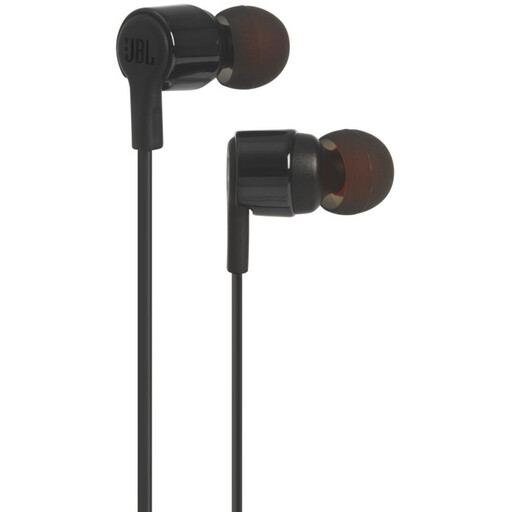
Why it suits this profile: These wired in-ear earbuds are designed for everyday listening to music and podcasts, and making calls, without charging or pairing over Bluetooth.
There’s no battery life to interpret and no app required. Check in advance, though, that your device has a suitable 3.5mm connection or adapter.
According to the product information: built-in microphone, 8.7mm drivers and controls for everyday use.
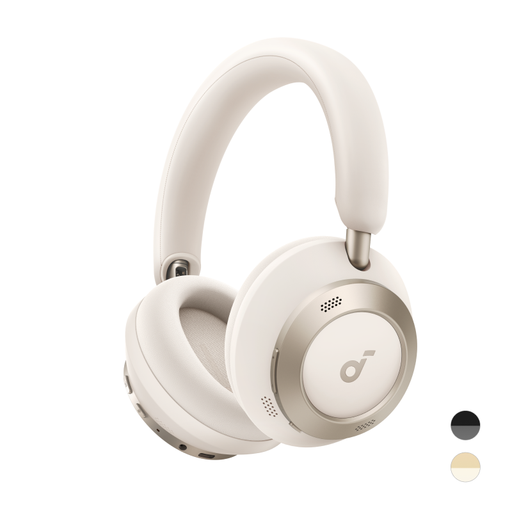
Why it suits this profile: A foldable over-ear model for travellers and home users looking to combine active noise cancellation, long battery life and wireless audio.
The product information gives separate battery life figures for ANC on and off. This makes it easier to match the stated 40 or 60 hours to how you plan to use the headphones.
According to the specifications: up to 60 hours without ANC, up to 40 hours with ANC, LDAC audio and fast charging.

Why it suits this profile: This gaming headset is designed for players who need a wired connection, positional audio and a microphone for team communication.
The wired 3.5mm connection means you don’t have to rely on a battery. According to the product information, the stated 7.1 feature requires software and an activation code.
50mm drivers, a cardioid microphone, passive noise isolation and compatibility with PCs, consoles and mobile devices.
We’ve put together a complete, up-to-date list of products that meet these strict selection criteria and comply with current European safety regulations.
That depends on the microphone and the Bluetooth profiles used. Check that the model has a built-in microphone and that your phone recognises the headset correctly. A model with microphone noise reduction may be useful in a busy office, but according to the brand’s claims, how clearly you’re heard still depends on your surroundings.
Their lifespan depends on the hinges, cables, batteries, ear cushions and how well you look after them. A wired model remains usable as long as the connection and cable are intact. With wireless headphones, the battery is another factor to consider. Keep the device dry, avoid high volumes and charge it according to the manufacturer’s instructions.
With wireless models, power consumption comes from charging the earbuds or headset and the charging case. This is generally low. Wired headphones don’t need their own battery. For models with an app or extra features, check whether registration, software or an internet connection is required, especially for AI translation earbuds and translation features.
