
Vandaag of morgen in huis

Kwaliteit gegarandeerd

Welkomstaanbiedingen ontgrendelen: GRATIS bezorging | Tot 80% korting | Gratis 30 dagen JoyPlus-proefperiode
Download de app
Buying headphones seems straightforward until you have to choose between Bluetooth, a cable, noise cancellation, a microphone or gaming features. Many models sound similar on paper, but can differ significantly in connectivity, comfort and everyday use.
Pay particular attention to these common pitfalls:
The right choice depends on where and how you use your headphones.
A 3.5mm connection works with many laptops, phones, controllers and tablets, but modern smartphones do not always have this port. Also check whether your computer has one combined headset port or separate connections for audio and microphone.
With USB headphones, the connection is digital. This can be useful for calls and meetings, but you will need a free USB port. View the full range of USB headphones if you are specifically looking for this type.
For Bluetooth models, it is worth checking the supported Bluetooth version, codecs and whether multiple devices can be paired. An advertised Bluetooth feature does not automatically mean that every function is available on every device.
A stated range, such as 20 Hz to 20 kHz, describes which frequencies a product can reproduce according to its specifications. On its own, it does not tell you how the music will sound. Drivers, sealing, fit and tuning also play a role.
For everyday use, these points are often more relevant:
According to the product description, the Razer BlackShark V2 X features 50mm drivers and a 3.5mm connection. According to the manufacturer, the stated 7.1 feature requires software and an activation code. This is therefore not the same as a fully independent surround connection.
A microphone with noise cancellation can help reduce background noise, but its effectiveness depends on positioning, the surroundings and the software. Do not present this as guaranteed silence: according to Logitech’s own product information, the microphones in the H150, PC 960 and H340 are designed to reduce background noise.
Also consider:
Active noise cancellation, often referred to as ANC, uses microphones and electronics to counteract ambient noise. Its effectiveness varies depending on the surroundings. Low, consistent sounds may be treated differently from voices or sudden noises. When in traffic or cycling, always make sure you remain sufficiently aware of your surroundings.
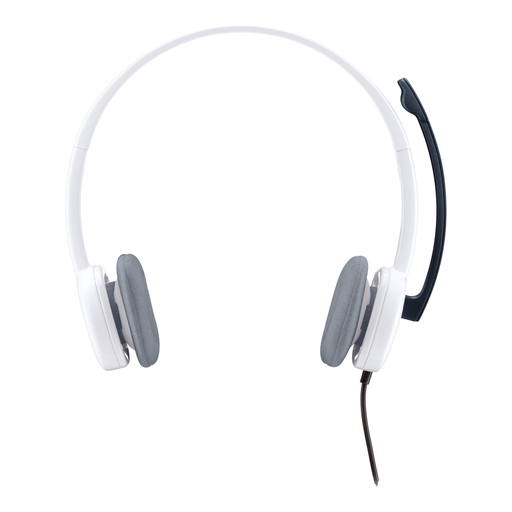
Why it suits this profile: A straightforward wired headset for calls, music and multimedia, without a battery or Bluetooth pairing.
The 3.5mm connection and 180cm cable make the requirements clear. However, check whether your device has a combined port.
80 grams, stereo audio and an adjustable microphone with volume and mute controls.
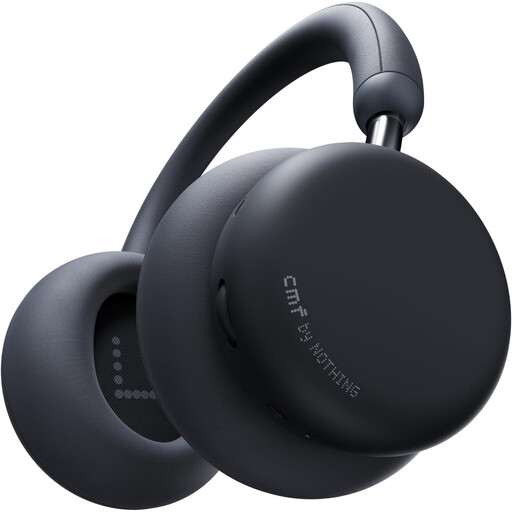
Why it suits this profile: For anyone looking for wireless over-ear headphones for music, calls, working from home and travelling.
The product information lists battery life separately with and without ANC: up to 48 hours with ANC and up to 100 hours without ANC. This makes the claim easier to assess.
Bluetooth 5.4, support for AAC, SBC and LDAC, multipoint connectivity and replaceable ear cushions.

Why it suits this profile: Designed for gamers who want to use a wired gaming headset with PCs and consoles without having to recharge it.
The fixed 3.5mm connection prevents a flat battery. Check beforehand whether the software feature for 7.1 surround is available on your platform.
50mm drivers, cardioid microphone, 240 grams and compatibility with PC, Mac, PlayStation, Xbox, Switch and mobile devices.
We have put together a complete, up-to-date list of products that fully meet these strict selection criteria and the applicable European safety regulations.
Choose a model with an adjustable microphone, mute function and a connection supported by your computer. A USB headset is practical for a laptop or desktop computer with a free USB port. A 3.5mm model is more flexible for devices with a combined headset connection.
Bluetooth headphones use a built-in battery that needs to be recharged regularly. The electricity costs are generally limited, but battery capacity may decrease over time. Therefore, check the stated battery life and whether wired use is possible when the battery is empty.
Their lifespan depends on usage, storage and strain on the cable or hinges. A model with replaceable ear cushions can be practical for intensive use. Avoid high volumes, do not pull on the cable and store the headset in a dry place. The product information for the models mentioned states a statutory warranty of at least two years under EU consumer law; additional rights may apply under the relevant national law.
