
Vandaag of morgen in huis

Kwaliteit gegarandeerd

Welkomstaanbiedingen ontgrendelen: GRATIS bezorging | Tot 80% korting | Gratis 30 dagen JoyPlus-proefperiode
Download de app
Headphones should suit the way you use them every day. Do you mainly listen to music, spend a lot of time on video calls or want to reduce background noise when you’re out and about? You won’t necessarily need the same type of headphones for each. Wireless headphones give you more freedom to move, while wired models often work straight away without needing to be charged.
But the product name doesn’t tell you everything. Terms such as “surround sound”, “long battery life” and “noise cancelling” may sound appealing, but they reveal little about comfort, microphone quality or how well the headphones will work in practice. Use these checks to avoid paying for features you’re unlikely to use.
Long playback time is useful, but actual battery life depends on the volume, Bluetooth connection, active noise cancellation and other settings. Check whether the stated battery life comes from the product specifications and whether fast charging is mentioned.
Wired headphones don’t have this issue. A model with a 3.5mm jack works straight away with compatible devices, without a battery or Bluetooth pairing.
Noise-cancelling headphones can reduce background noise, but the results vary depending on the situation. Low, steady sounds such as train or fan noise are generally different from voices or sudden noises. Also check whether the headphones have a transparency mode, so you can hear what’s happening around you without taking them off.
Noise-cancelling claims should be treated as information provided by the brand. According to Sennheiser, the Momentum 4 adapts its active noise cancellation to your surroundings. This is a manufacturer’s claim; your experience may vary depending on the user and environment.
Over-ear headphones cover the whole ear, while on-ear headphones rest on it. Over-ear models may provide more coverage, but often take up more space. A lighter model may be more comfortable on the go, while a soft headband and well-fitting ear cushions matter during long work sessions.
Also consider the weight, adjustability and whether the headphones fold away. A model that’s comfortable at home may not be practical for your commute.
Bluetooth headphones are handy for smartphones, tablets and laptops without a cable. Check the Bluetooth version, pairing method and whether the headphones support simultaneous connections to multiple devices. That’s especially useful if you switch between a work computer and your phone.
Wired headphones usually work on a plug-and-play basis. Just check which connection you need. The Jabra EVOLVE 30 II MS Stereo has a 3.5mm jack and comes with a Jabra Evolve 30 II LINK MS controller for USB connection.
If you’re looking for headphones for music and calls, look beyond the audio playback alone. Check:
Headphones with a microphone can be suitable for working from home, but how clearly you come across also depends on the microphone’s position and the software on the device you’re using.
Specifications such as stereo, frequency range and transducer size give you a technical indication, but they don’t determine how music will sound on their own. A good fit and a stable connection are just as important.
For everyday use, keep the volume at a moderate level and take breaks during long listening sessions. Manufacturers may include safety warnings in the manual. Also check that a wireless model isn’t described as water-resistant unless this protection is explicitly stated in the specifications.
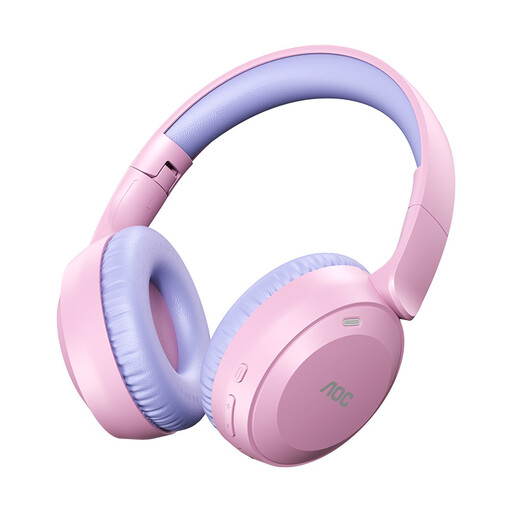
Why it suits this profile: This wireless over-ear model is designed for people who want to listen to music without a cable and are looking for foldable headphones for everyday use.
The product listing mentions Bluetooth 6.0, a foldable design and Type-C fast charging. Before buying, check the current compatibility and the conditions attached to the stated playback time.
According to the product name: up to 75 hours of playback, a weight of 182 grams, an over-ear fit and a Type-C connection.
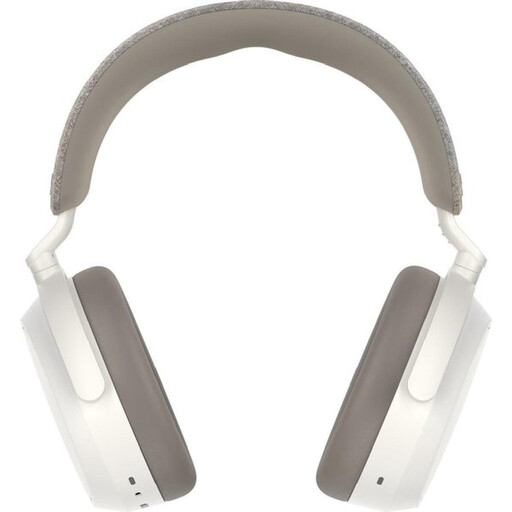
Why it suits this profile: This model is aimed at music lovers and people working from home who want over-ear headphones with a wireless connection, app controls and noise cancellation.
The manufacturer lists adaptive noise cancellation and a transparency mode. These features can help, but bear in mind that results may differ on a train, in an office and at home.
According to Sennheiser’s specifications: up to 60 hours of battery life, Bluetooth, four microphones, USB-C fast charging and control via the Smart Control app.
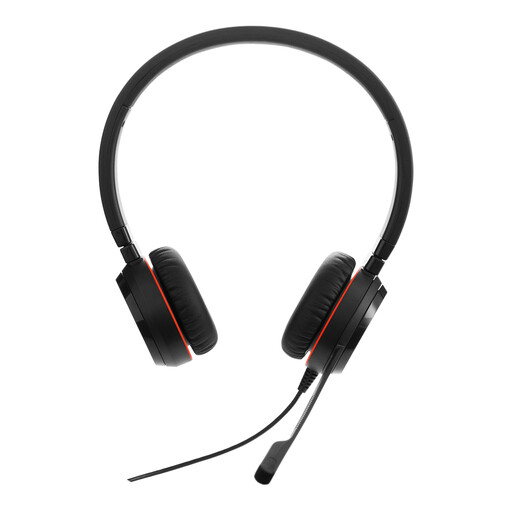
Why it suits this profile: This stereo headset is a good fit for people working from home and professionals who mainly want reliable calls over a wired connection, without having to manage a battery.
The wired plug-and-play connection means no unexpected charging or repeated pairing. Do bear in mind the 0.95-metre cable and 3.5mm jack.
Stereo audio, binaural design, wired connection and an included USB controller.
We’ve put together a complete, up-to-date list of products that meet these strict selection criteria and the applicable European safety regulations.
Switch on Bluetooth on your smartphone, tablet or computer. Put the headphones into pairing mode and select the product name from the Bluetooth list. If you have any problems, follow the brand’s instructions and check that the battery is sufficiently charged.
Their lifespan depends on the hinges, ear cushions, cables, battery and daily use. The battery in a wireless model may hold less charge over time. A wired model has no battery, but the cable and connector can still be damaged by pulling or kinking.
They can be, but check the microphones and compatibility with your device in particular. Noise cancellation is designed to reduce background noise for the listener; it doesn’t automatically guarantee that your voice will sound clear to the person on the other end. For lots of video calls, headphones with a microphone and a wired USB controller may therefore be a practical choice.
