
Traveller with headphones that charge via a cable
You want to charge your headphones or earbud case, but they may not support Qi. Check which cable your specific model needs.


Start by checking how your headphones or earbud case charge. If they only charge via a cable, a multi-port USB charger is a better choice than a Qi station. Wireless charging is only an option if your specific case supports it. Choose a 2-in-1 or 3-in-1 station only if you also need the other charging points, and check which adapter and cables are included.
You want to charge your headphones or earbud case, but they may not support Qi. Check which cable your specific model needs.
You want to be able to place the case on a charging point. Check that your specific case supports Qi charging and sits properly on the charging surface.
You want to share charging space for earbuds, phones and perhaps a watch at your holiday home. Check that the number of charging points or ports suits the devices you’re bringing.
First, check how your headphones or case charge. Then consider how many other devices need charging at the same time, and what power supply and cables you’ll need.
| What to consider | What should you check? | Who is this important for? |
|---|---|---|
| Wired charging | Check which cable you need and whether it fits a USB-C or USB-A port. Also check how the available power is shared when charging multiple devices. | If I need to charge headphones or a case with a cable, I want to make sure I bring the right connection. Around 36% of consumers prioritise wired compatibility. |
| Qi-compatible case | Check whether your specific case supports wireless charging and whether the station has a suitable charging point for earbuds. | If I’d rather place my case on a charging point, that specific case needs to support Qi charging and sit securely. Around 29% of consumers prioritise wireless charging for their case. |
| Charging multiple devices at once | Count the devices that need charging at the same time and check that the charging points and power output suit those models. | If several guests want to charge their devices at once, suitable ports and charging points matter more than simply seeing ‘2-in-1’ or ‘3-in-1’ on the label. Around 21% of consumers prioritise charging multiple devices at once. |
| Power supply and portability | Check which adapter and cables are included, and whether the design is practical to carry and store. | If I want to be able to charge straight away at a holiday home, I want to know which parts I need to pack myself. Around 14% of consumers prioritise a complete, easy-to-carry charging set. |
Wireless audio doesn’t tell you whether the headphones or case can charge wirelessly. You could end up with an unused Qi charging point and still need the right cable.
Before buying, check the charging method and cable required for your specific model.
For the Belkin travel station reviewed, Belkin specifies up to 15 W for a compatible iPhone and 5 W for the AirPods charging point. These are different ratings for different charging points.
Check the power output and compatibility for each point, not just the product title.
What’s in the box varies by model and version. You may need to bring a power adapter or the cable for your headphones separately.
Check what’s included with the specific version and pack the right cable for your headphones.
The fire service warns that a charger needs room to release heat, and that damaged chargers or cables can pose a risk.
Charge in a clear space, not under bedding, and don’t use damaged parts. The fire service recommends charging in a room with a working smoke alarm wherever possible.
Belkin describes the BoostCharge Pro Qi2 WIZ024vfBK reviewed here as a foldable travel station with separate charging points for a compatible iPhone, Apple Watch and AirPods.
Samsung offers both the wireless Wireless Charger Trio EP-P6300TBEGEU and the wired 65 W Power Adapter Trio EP-T6530NBEGEU. These are different charging solutions.
The UGREEN product information reviewed includes the wired Nexode 35 W with USB-C and USB-A, and the separate foldable MagFlow 2-in-1 for a compatible phone and earbud case.
This selection includes a multi-port USB charger for wired charging and foldable wireless stations for compatible earbud cases and other devices.
 No image available
A wired option if your headphones or other devices charge via USB. Check that the cable you need fits one of the ports.
The title specifies 10 ports, USB-C and USB-A. Charging speed depends on the port used, the device and the total available power.
 No image available
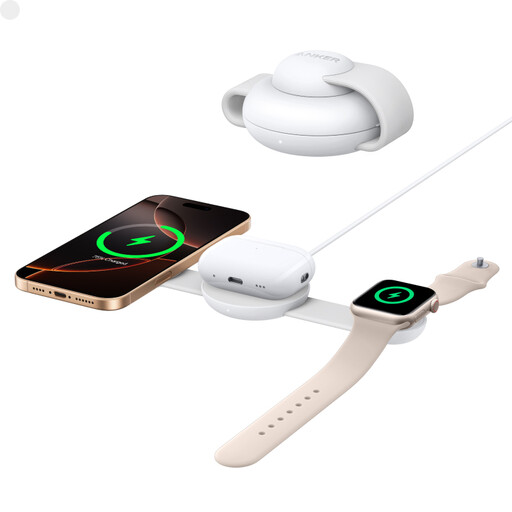
An option if you want to charge a compatible earbud case, phone and Apple Watch on one station. Check that your devices are compatible.
The product information specifies a foldable design and wireless charging up to 15 W. The description says it can charge AirPods, iPhone and Apple Watch at the same time.
 No image available
A foldable wireless option if you also want to charge a compatible earbud case, phone and Apple Watch.
The product name specifies Qi2 and 15 W. The product information mentions a charging surface for AirPods and other Qi-compatible earbuds. Check that your case is compatible.
No. Wireless audio doesn’t automatically mean wireless charging. Apple Support explains that the charging method varies by AirPods model, so check the specifications for your specific headphones or case.
Check that the case is positioned correctly on the intended charging point and look for the charging light. Sony warns that if the WF-1000XM4 case isn’t positioned correctly, charging may slow down or stop. For this model, also follow the guidance about using a case cover.
No, this varies by model and version. Belkin says a 36 W adapter is included with the WIZ024vfBK, while UGREEN specifies an adapter of at least 45 W, not included, for maximum charging speed with the MagFlow reviewed. Also check whether your headphone cable is included.
In the Netherlands, statutory consumer rights apply alongside any commercial guarantee. According to ACM ConsuWijzer, if a product is faulty during normal use, the seller must resolve the issue through repair, replacement or, where appropriate, a refund. This doesn’t mean every product has the same fixed guarantee period.
Yes. The Netherlands Food and Consumer Product Safety Authority states that CE marking is compulsory for electrical consumer products. The mark alone doesn’t prove that a specific item has been independently tested.
No. The Dutch government says the USB-C requirement applies to new devices placed on the Dutch market from 28 December 2024. It doesn’t change the connection on a device you already own. Check the connection on the headphones you’re taking with you.