Having two screens doesn’t in itself mean you need a headphone amplifier. Microsoft Support advises selecting your preferred audio output first when multiple outputs are available. If your headphones don’t work as you’d like through the existing connection, choose a USB DAC/amplifier based on its connections, controls, power supply and any microphone input. An amplifier won’t eliminate physical fan noise from your laptop.
Who is this relevant for?
Listener with two screens
You want to listen privately and first check which device is playing the sound; an extra amplifier isn’t automatically necessary. Microsoft Support advises selecting your preferred output when multiple audio devices are available.
Listener with demanding headphones
You’re looking for a connection and amplification that suit your headphones. FiiO and iFi specify the connections and features for each model, so compare these details with your headphones.
Headset and microphone user
You want to listen and speak from the same workstation. Creative and Focusrite describe different microphone and headset options for their models.
What should you look for when choosing?
| What to consider |
What should you check? |
Who is this important for? |
| The right audio output |
Test your headphones first, then select your preferred output in Windows. |
I want to avoid sound playing through my laptop speakers and first check which output is active; around 40% of consumers prioritise this predictable audio route. |
| Connection and amplification |
Compare your headphone plug and specifications with the output on the exact model version. |
My headphones need to fit the selected output directly; around 30% of consumers prioritise this connection and suitable amplification. |
| Space and power |
Check the USB port and power supply required, the desk space needed, and whether there’s a line output for active speakers. |
I want to know how much space and how many connections my desk setup will need; around 20% of consumers prioritise this practical setup. |
| Microphone or headset |
Check whether you use a headset plug or a separate microphone, and which input the model has. |
I want to be able to make calls or speak while listening; around 10% of consumers prioritise a suitable headset or microphone input. |
Common buying mistakes
-
Buying an amplifier before checking the audio output
Windows may use a different available audio output from the one you intended. Test your existing headphones first and select your preferred output explicitly.
-
Assuming USB is the only power source
FiiO specifies a separate 12 V/2 A power supply for the K11, while Creative describes the Sound Blaster X4 as USB bus-powered. Check the power requirements for the exact model and what’s included with that version.
A separate power adapter also needs a socket and space on your desk.
-
Expecting every headphone amplifier to support a microphone
A headphone output isn’t the same as a microphone or headset input. Check the inputs listed specifically if you want to make calls or record.
If the connection you choose isn’t compatible with your microphone, you may need additional audio equipment.
Brands worth comparing
These brands and model ranges offer different connections and features; their inclusion doesn’t mean every model will suit every pair of headphones or setup.
FiiO
The K11 is a desktop DAC/amplifier with USB and additional digital inputs; the KA11 is a more compact USB DAC/amplifier.
- FiiO lists multiple outputs and gain settings for the K11.
- FiiO also specifies a separate 12 V/2 A power supply for the K11; these features don’t automatically apply to the KA11.
iFi audio
The ZEN DAC 3 is designed for a USB-based desktop setup with headphone and line outputs.
- iFi specifies a 6.3 mm headphone output and a balanced 4.4 mm output, as well as fixed or variable line output.
- Compare the connections with your equipment; product specifications aren’t an independent listening test.
Creative
The Sound Blaster X4 is an external USB sound card for a setup where a headset or microphone also matters.
- Creative specifies USB bus power, a headset input and a separate microphone input.
- Check that the connections suit your headset or microphone.
Focusrite
The Scarlett 2i2 4th Gen is an audio interface for anyone who wants to connect microphones or instruments as well as listen.
- Focusrite specifies two microphone preamps and a headphone amplifier.
- The recording features may be unnecessary if you only need a listening output; Focusrite’s quality descriptions are manufacturer claims.
Topping
The DX5 II is a desktop DAC with an integrated headphone amplifier.
- The model range is designed for a fixed desktop setup.
- Before buying, check the connections and controls on the exact version.
Joybuy product picks
The options below are wired USB or USB-C headsets for listening and, depending on the model, speaking. They’re headsets, not standalone headphone amplifiers.
 Image unavailable
Logitech PC 960 USB Wired Headset
A wired USB headset for computer use if you also want to speak.
The product description lists a microphone, volume control and microphone mute.
View at Joybuy
 Image unavailable
Logitech G G432 7.1 Surround Sound Wired Gaming Headset
A headset for computer use if you want to use a microphone while listening.
The product description lists a USB DAC, a 3.5 mm connection and a microphone with flip-to-mute control.
View at Joybuy
 Image unavailable
Samsung EO-IC100 USB Type-C Wired In-Ear Headset, Black
A wired USB-C headset for making calls too, if your device has a compatible connection.
The product description lists a built-in DAC, microphone and in-line controls.
View at Joybuy
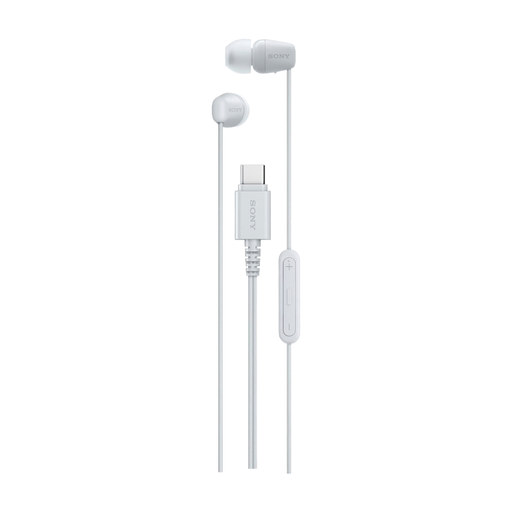 Image unavailable
Sony IER-EX15C USB-C Wired In-Ear Headset, White
A wired USB-C in-ear headset for a laptop with a compatible USB-C connection.
The product description lists a built-in microphone and remote control. The in-ear design may block out surrounding noise, so bear this in mind if you need to hear what’s happening around you.
View at Joybuy
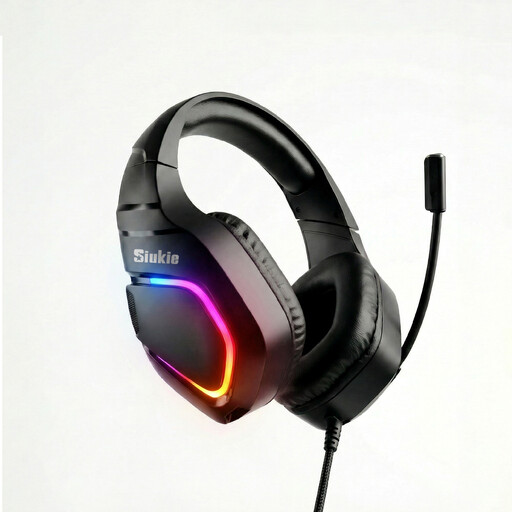 Image unavailable
Siukie H100 Gaming Headset, USB + 3.5 mm
A wired headset for laptop or PC use if you want to speak as well as listen.
The product information lists USB and 3.5 mm connections, plus a microphone.
View at Joybuy
Frequently asked questions
Do I need two headphone amplifiers if I have two screens?
No, the number of screens doesn’t determine that. Microsoft Support advises selecting your preferred device when multiple audio outputs are available; then check whether your existing headphone connection is suitable.
What should I set up after connecting a USB DAC?
Select your preferred audio output in Windows, then check the cables and volume control. The World Health Organization notes that both volume and the duration of exposure to loud sounds have an impact. So start at a low volume and adjust it to suit your needs.
Can I connect a microphone to a standard DAC with a headphone output?
Only if the device also has a suitable microphone or headset input. Creative specifies both inputs for the Sound Blaster X4; a headphone output on another model doesn’t confirm that it also has a microphone input.
Who can help if a product is faulty in the Netherlands?
According to the Dutch government, the seller must provide a solution if a product is faulty. There’s no fixed two-year statutory guarantee period in the Netherlands; what you can expect depends, among other things, on the product and the information you received when you bought it.


