Who might find a headphone amplifier useful?

Student who wants to listen quietly

You want to listen to music or lectures through headphones rather than your laptop speakers. For audio problems, Microsoft Support advises selecting the correct audio output, so first check that your existing headphones work.

Listener with a noisy audio output

You can hear interference through wired headphones or want to try a separate USB audio connection. A different connection may be an alternative, but it won’t necessarily eliminate every type of interference.

Student with a dedicated listening spot

You’re looking for an easy-to-reach volume control or connections for your own headphones. Also check whether the device needs a separate power supply and how much room the equipment and cables will take up.

What should you look for when choosing?

What to consider What should you check? Who is this important for?
Listening without laptop speakers Test your wired headphones and select them as the audio output. I mainly want to stop sound carrying into the shared room, and would rather try my current headphones first. Around 36% of consumers say quiet listening is their main reason to buy.
Interference in the audio chain Check when the interference occurs and whether a separate USB audio output can connect to your laptop. I can hear interference through my existing connection and want to know whether a different audio output might help. Around 29% of consumers say avoiding interference is their top priority.
Connection and volume Compare the plug and any headset microphone with the device’s outputs; also check the conditions attached to the power specifications. I want the plug and microphone function to work with my headphones, and to be able to set the volume to a comfortable level. Around 21% of consumers put compatibility first.
Space and power Check the USB port, connections and controls required, as well as whether a separate power supply is needed. I have a small listening area and want to know how much space, cabling and power my setup will need. Around 14% of consumers prioritise a compact setup that’s easy to use.

Common mistakes when buying

  • Buying an amplifier when the wrong output is selected

    A laptop may be sending audio to a different device from the headphones you’ve connected.

    First connect your existing headphones and check in the sound settings which output device is active.

  • Confusing call noise reduction with blocking room noise

    The call features Creative describes for the PLAY! 4 are software features. They don’t prove that the device blocks fan noise or sounds from your housemates.

    First work out whether you can hear interference in the audio chain or want to block sounds from outside your headphones. For reducing audible background noise, VeiligheidNL recommends well-fitting headphones or noise-cancelling.

  • Assuming an output or power rating will suit every setup

    A connection needs to match your plug. The maximum power FiiO specifies for the K11 applies at 32 ohms in balanced mode, not to every output or pair of headphones.

    Check the exact output and the conditions attached to the specifications before choosing a model.

  • Choosing an overseas power-supply version without checking

    The Atom Amp 2 version described by JDS Labs lists 110–120 V; this doesn’t confirm that it’s suitable for use in the Netherlands.

    If you’re considering buying one, check the exact regional version and the power supply it requires.

Brands to consider

Creative

The Sound Blaster PLAY! 4 is a compact, USB-powered DAC for a compatible wired pair of headphones or CTIA headset.

  • Creative lists a USB-C connection and a four-pole 3.5mm CTIA output.
  • The output and plug need to match your headphones. The call software described doesn’t demonstrably block sound from the room.

FiiO

The K11 is a desktop DAC and headphone amplifier for a permanent setup, with multiple inputs and outputs.

  • FiiO lists USB, optical and coaxial inputs, a volume control and three gain settings.
  • The stated maximum of 1400 mW applies at 32 ohms in balanced mode. The K11 uses an external 12V power supply.

iFi audio

The ZEN DAC 3 is a USB desktop DAC and headphone amplifier with two types of headphone output and line outputs.

  • According to the manual, this model has 6.35mm and 4.4mm outputs and switchable gain. It can be powered via USB or 5V DC.
  • The separate 5V power adapter is not included. The manual advises turning the volume down before changing the gain setting.

JDS Labs

The Atom Amp 2 is a standalone analogue headphone amplifier for anyone who already has a suitable analogue audio source.

  • JDS Labs lists 3.5mm and RCA inputs, plus a headphone output.
  • A standalone analogue amplifier doesn’t replace a DAC. The 110–120V version described shouldn’t be chosen as a Dutch power-supply option without checking first.

Wired listening options at Joybuy

These products are wired headphones or headsets that offer an alternative to listening through laptop speakers; they are not standalone headphone amplifiers.
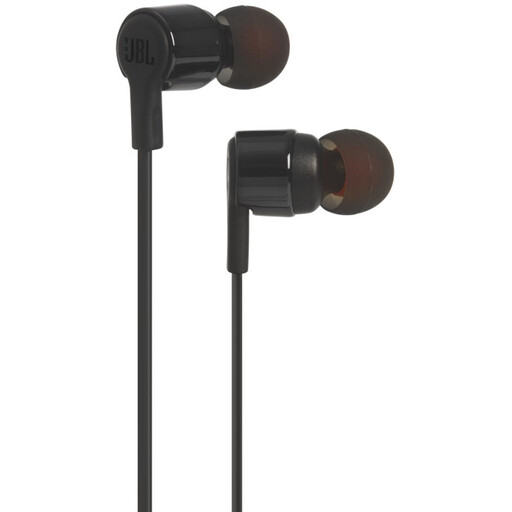
JBL Tune 210 wired in-ear headphones, black

JBL Tune 210 wired in-ear headphones, black

A wired listening option if you want to use a 3.5mm connection.

3.5mm connection and built-in microphone.

Joybuy

Logitech H340 wired USB headset, black

Logitech H340 wired USB headset, black

A USB headset for anyone looking for a wired headset connection to their computer.

USB connection and adjustable microphone.

Joybuy

Samsung EO-IC100 wired USB-C in-ear headset, black

Samsung EO-IC100 wired USB-C in-ear headset, black

A wired option to consider if your laptop has a compatible USB-C connection.

USB-C, built-in DAC and in-line controls.

Joybuy

Trust Ayda wired USB headset with headband, black

Trust Ayda wired USB headset, black

A wired headset to consider if you want a volume control on the ear cup.

USB-A connection with USB-C adapter cable and microphone with mute function.

Joybuy
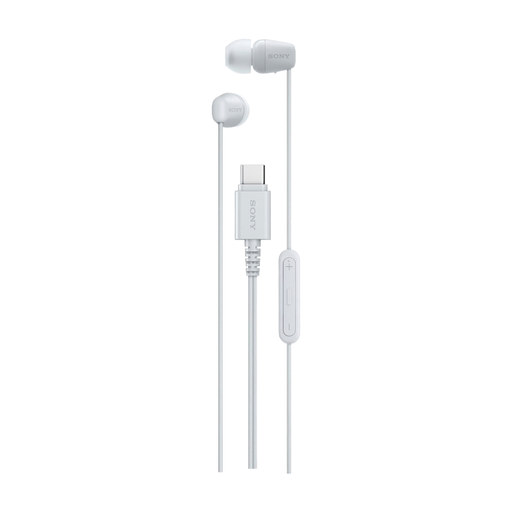
Sony IER-EX15C wired USB-C in-ear headset, white

Sony IER-EX15C wired USB-C in-ear headset, white

A wired listening option if your laptop has a compatible USB-C connection.

USB-C connection, built-in microphone and controls for music and calls.

Joybuy

Frequently asked questions

Why can I still hear sound through my laptop speakers after connecting my headphones?

Check whether your headphones or USB DAC are selected as the audio output. Microsoft Support lists selecting the wrong output device as a possible cause of audio problems on Windows.

Will a headphone amplifier block fan noise or sounds from housemates?

No. An amplifier is part of the audio chain and doesn’t provide acoustic isolation. For reducing audible background noise, VeiligheidNL recommends well-fitting headphones or noise-cancelling; don’t simply keep turning the volume up.

What should I look out for when connecting and using one every day?

Check that the output matches your headphone plug and find out what power supply the device needs. Start at a low volume; the iFi ZEN DAC 3 manual explicitly warns you to do this before changing the gain setting.

Who can help if a product is faulty, and do you get a cooling-off period when buying online?

According to the Dutch government, if you make a claim under the statutory guarantee, the seller must provide a solution; there is no set statutory guarantee period in the Netherlands for every product. When buying online from a business, you generally have 14 days to change your mind, although exceptions depend on the purchase.
