You don’t automatically need a headphone amplifier to listen quietly at a shared desk: connect a compatible pair of headphones and select them as your audio output. A USB DAC with a headphone amplifier can be useful if you need an external connection or different volume control, but the right plug, power supply and any microphone connection depend on your equipment. If you want to reduce sound leakage, the headphone design matters; extra amplifier power is no substitute.
Who is this choice relevant to?
Listening at a shared desk
Wants to listen through headphones rather than the laptop speakers, and is also mindful of sound leaking out to colleagues. Microsoft Support recommends selecting the right audio output; Sony describes a closed-back design as intended to provide sound isolation.
Working in different locations
Takes a laptop and headphones along and wants a compact external connection rather than a fixed set-up. FiiO positions the K3 for desktop use indoors.
Using demanding headphones
Wants to match the output, power and power supply to their headphones. Kieskeurig.nl lists output power and headphone impedance among the points to consider.
What should you look for when choosing?
Headphones connected directly to the laptop
Choose this if: your laptop has a compatible output, your headphones reach a suitable volume and you simply want to turn off the laptop speakers.
Trade-off: you don’t need an extra device, but this option won’t solve the problem if you don’t have the right connection or the volume isn’t usable. Select the headphones as your audio output.
Compact USB DAC with headphone amplifier
Choose this if: you often change workspaces or want a compact external connection; FiiO lists a USB-C input and a 3.5mm headphone output for the K3.
Trade-off: connections and controls vary by model. Check that your laptop can select the USB audio output and that the plugs are compatible.
Desktop DAC with headphone amplifier
Choose this if: you want fixed volume control, specific headphone outputs or a power rating to suit your needs. Only compare figures for the same output and load.
Trade-off: power requirements vary by model. FiiO lists a separate 12 V/2 A DC power supply for the K11; the iFi ZEN DAC 3 manual describes power via the laptop’s USB connection, with an optional DC power supply.
USB audio device with microphone support
Choose this if: you want to connect a wired microphone for calls as well as listen to audio. Fosi Audio lists microphone support for the K5 Pro.
Trade-off: a headphone output isn’t automatically a microphone input. Check that the connections work with your headset; you may not need an interface’s recording features if you only want to listen.
| Point to consider |
What should you check? |
Who is this important for? |
| Private listening without sound leakage |
Select the right audio output and consider the headphones separately from the listening volume. |
If I don’t want to disturb colleagues, I consider the headphones and don’t want to listen unnecessarily loudly. Around 40% of consumers put private listening first. |
| Space and portability |
Check the laptop port, cable required, headphone plug and whether a separate power supply is needed. |
If I often change workspaces, I want equipment that’s easy to take with me and connect. Around 30% of consumers prioritise portability. |
| Compatible output and power |
Compare your headphone plug, impedance and sensitivity with the specifications for the relevant output and load. |
If my headphones don’t sound good enough through the laptop, I want to know whether a different output will suit my model. Around 20% of consumers put driving their own headphones first. |
| Listening and calls |
Check whether the device has a microphone input and which plugs or adapter your headset needs. |
If I want to use the same desk set-up for calls, I need a compatible microphone connection. Around 10% of consumers prioritise calls. |
Common buying mistakes
-
Buying an amplifier when the wrong audio output is selected
Windows may offer several audio outputs. An external DAC won’t automatically make your laptop use the output you want.
First, try a compatible pair of headphones and explicitly select the output you want to use for playback.
-
Assuming more amplifier power means less noise for others
How much sound leaks out to colleagues also depends on the headphone design. Listening at a higher volume can also be harmful.
Consider the headphones and listening volume separately from the amplifier’s power.
-
Choosing a desktop amplifier without checking the power supply and plugs
FiiO lists a 12 V/2 A DC power supply and a 6.35mm headphone output for the K11. According to its manual, the iFi ZEN DAC 3 has different outputs and a different power option.
Compare your laptop port, headphone plug, required cables and power supply with the specifications for the exact model.
Depending on the connection you choose, you may also need a suitable adapter or cable. Make sure you have room for a separate power supply, too.
Brands to consider
FiiO
FiiO describes the K3 as a compact USB DAC/amplifier and the K11 as a desktop model with different headphone outputs.
- According to FiiO, the K3 has a 3.5mm output, while the K11 has 6.35mm and 4.4mm outputs.
- FiiO specifies a separate 12 V/2 A DC power supply for the K11. Power ratings depend on the model, output and load.
iFi audio
According to the manufacturer, the iFi ZEN DAC 3 is a USB DAC/amplifier for a fixed listening set-up.
- The manual lists 6.3mm and 4.4mm headphone outputs and power via the laptop’s USB connection.
- A balanced connection won’t suit every standard plug. A separate DC power supply is optional and isn’t included.
Fosi Audio
Fosi Audio lists the K5 Pro as a USB DAC/amplifier with microphone support, so it’s worth checking the microphone connection too if you make calls.
- The manufacturer lists a 3.5mm headphone output and controls for volume, bass and treble.
- Check separately that the microphone connection is suitable for your headset. The manufacturer’s sound quality claims aren’t independent test results.
Focusrite
According to its manual, the Scarlett Solo 4th Gen is a USB audio interface with separate headphone controls, making it especially relevant if you want to listen and record.
- The user manual lists a headphone output with a 6.35mm TRS plug.
- You may need a suitable adapter for headphones with a 3.5mm plug. Recording features aren’t necessarily useful if you only want to listen.
Headphones you can use straight with your laptop
These Joybuy products are wired headphones to consider as an alternative to a separate amplifier: connect them directly to a suitable laptop port and select them as your audio output.
 No image available
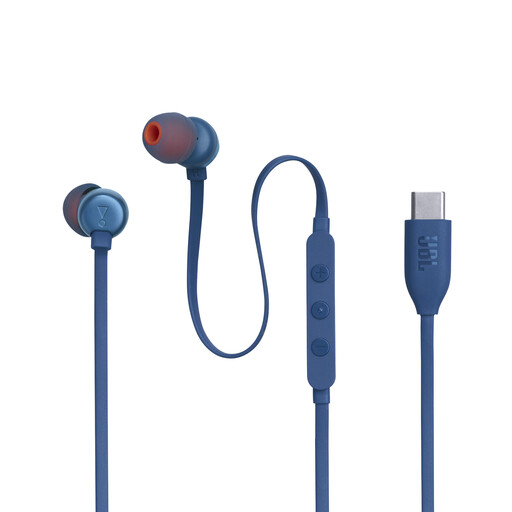
JBL Tune 310C – Blue
Wired USB-C headphones for listening directly from a compatible laptop.
The product information lists a USB-C connection, three-button controls and a built-in microphone. Check that your laptop supports USB-C audio.
View at Joybuy
 No image available
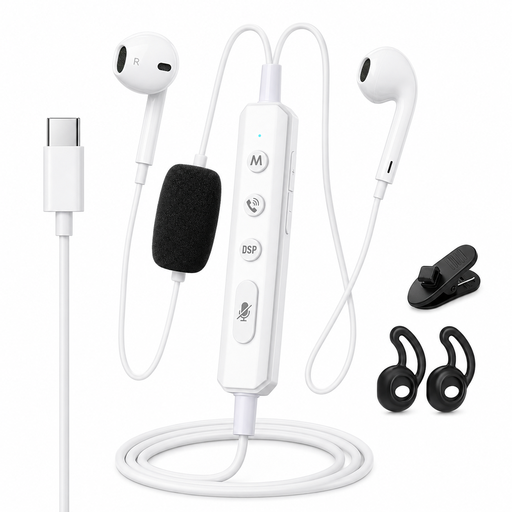
VoxorAI KM08 White
Wired headphones to consider if you’re looking for a Type-C connection and monitoring features.
The product title mentions Type-C and a sound card for real-time monitoring. Check which audio features and connections work with your laptop.
View at Joybuy
 No image available
Kingston USB Hi-Fi Headphones with Microphone
USB headphones with a microphone for listening and making calls from your computer.
The product information lists compatibility with Windows, Mac and Chromebooks. Check that the specified connection is compatible with your laptop.
View at Joybuy
 No image available
Trust Ayda wired headset, black
A wired headset for listening on a laptop or PC and joining calls.
The product information lists USB-A, a USB-C adapter cable, volume control and microphone controls. Check which connection you need.
View at Joybuy
 No image available
Edifier G2II USB Gaming Headset, Black
A USB headset for listening directly on a PC and using a microphone.
The product information lists a microphone and volume controls. Check compatibility with your computer before choosing.
View at Joybuy
Frequently asked questions
Why can I still hear sound from my laptop after connecting a USB DAC?
Select the USB audio output as your playback device and check the connections and volume controls too. Microsoft Support points out that you need to select the right output when you have multiple audio devices.
Do I need a balanced headphone output for a shared desk?
Not just to turn off the laptop speakers. First, check that your headphones have the right plug and wiring; a 4.4mm output on, for example, the FiiO K11 or iFi ZEN DAC 3 isn’t essential for private listening.
How can I get started listening comfortably?
Start at a low volume and don’t turn it up simply to drown out background noise. Thuisarts advises keeping the volume at a comfortable level and using your headphones’ volume limiter where possible; iFi also recommends starting at a low volume with the ZEN DAC 3 before adjusting PowerMatch.
What are my rights when buying online in the Netherlands?
According to the Dutch government, online consumer purchases usually come with a 14-day cooling-off period, although exceptions and the type of seller may matter. You’re also entitled to a product that works as it should, and the seller must help resolve any problems.


