
Quiet home listener
Would rather listen through headphones than laptop speakers and wants to check first whether extra equipment is needed. Kieskeurig.nl and Testaankoop outline points to consider around audio outputs and DACs.


If you simply want to stop listening through your laptop speakers, first connect wired headphones and select them as the audio output; you don’t automatically need an extra amplifier. A USB DAC with a headphone output could be a good fit if you need a separate USB audio path or different connections, while a desktop DAC may offer more connection and adjustment options. For video calls, also check microphone support separately: an amplifier won’t reduce fan noise or other background sounds.
Would rather listen through headphones than laptop speakers and wants to check first whether extra equipment is needed. Kieskeurig.nl and Testaankoop outline points to consider around audio outputs and DACs.
Listens and makes video calls using the same headset, so the connection and microphone support are important things to check. Creative describes the connection and microphone features of the Sound Blaster PLAY! 4.
Wants a separate USB audio path, volume control or connections for wired headphones at a dedicated workspace. FiiO and iFi audio describe these features for specific models.
First decide whether you simply want to avoid your laptop speakers or also want to tackle background noise. Then check that your laptop, headphones and any headset microphone are compatible with the option you choose.
| What to consider | What should you look for? | Who should prioritise this? |
|---|---|---|
| Avoiding laptop speakers | First try using wired headphones as the audio output. An amplifier won’t solve fan or room noise. | If I only want to avoid sound from my laptop speakers, I first want to know whether my current headphone output is enough. Around 36% of consumers have this priority. |
| Connections | Check your laptop’s USB port, the headphone plug and whether you need an adapter. | If I want a separate USB audio path, the connection needs to suit both my laptop and my headphones. Around 29% of consumers put compatibility first. |
| Drive and controls | Compare the headphone plug and output; only assess the stated power at the specified load and output mode. Start with the volume low. | For a permanent desk setup, I want to know whether the outputs and controls will work with my wired headphones. Around 21% of consumers have this need. |
| Headset microphone | Check the microphone connection, plug configuration and supported software separately from the headphone output. | If I want to listen and make video calls using the same wired headset, the microphone also needs to work with my equipment. Around 14% of consumers put calls first. |
You can also use headphones with an existing audio output; whether you need extra amplification depends on that output and the headphones.
First try selecting your headphones as the audio output, then work out what specific problem, if any, remains.
An audio output doesn’t guarantee that a headset microphone will work. Creative specifies a four-pole CTIA connection and microphone recording for the Sound Blaster PLAY! 4.
Check the plug configuration and microphone function if you also want to use the headset for video calls.
FiiO’s stated power for the K11 applies to a 32-ohm load in balanced mode; figures like these aren’t directly comparable in every case.
Compare specifications at the same output and load, check that your headphones’ connection is compatible, and start with the volume low.
The KA11 is a compact USB listening solution; the K11 is designed for a permanent desk setup with more connection options.
The ZEN DAC 3 is a USB-C desktop DAC with separate connections for headphones and other audio equipment.
The Sound Blaster PLAY! 4 is worth considering if you want to combine listening and calls using a wired headset.
The DragonFly Black v1.5 is a compact USB DAC, preamplifier and headphone amplifier for a wired listening setup.
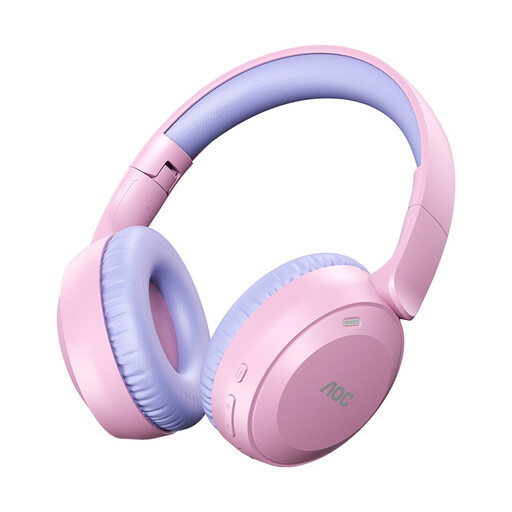
The products below are headphones and headsets for personal listening instead of audio through laptop speakers; they aren’t standalone headphone amplifiers or DACs.
 No image available
A wireless headphone option if you want to listen privately instead of through your laptop speakers.
Bluetooth 6.0; stated playback time of 75 hours; foldable design; weight 182 g.
 No image available
A wired USB headset for a desk setup where you want to combine listening and calls.
The product name specifies a wired USB headset.
 No image available
A headset option for a desk setup where listening and calls are part of the same computer setup.
The product variant is listed as USB-A, MS Teams and black.
 No image available
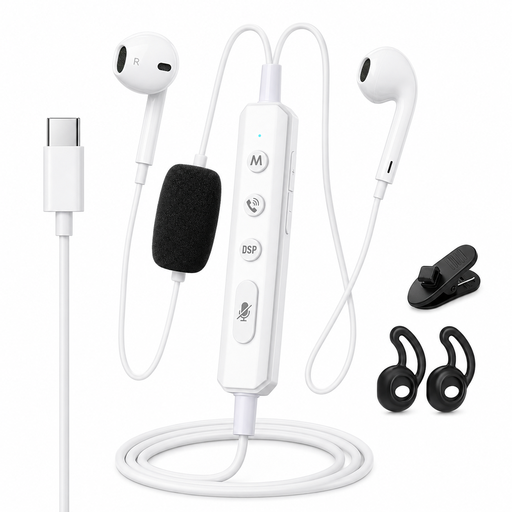
Wired Type-C headphones for personal listening through a compatible connection.
The product name specifies a built-in sound card for real-time monitoring.
 No image available
A headset option for anyone who wants to listen privately on their computer and is looking for the USB-A version.
The product variant is listed as USB-A, black, MS and Mono.
No. An amplifier drives the headphone signal and won’t reduce noise in the room. If a fan or another background sound is bothering you, the World Health Organization says well-fitting or noise-cancelling headphones may help you listen at a lower volume.
Connect the DAC and a compatible pair of wired headphones, then select the DAC as the audio output in your system or playback software. FiiO describes this setting for the KA11. Start with the volume low and check the microphone separately if you’re using a headset.
That depends on the model and your laptop’s connections. FiiO says that you may need an adapter to use the USB-C version of the KA11 with a computer that only has USB-A. The iFi ZEN DAC 3 manual mentions USB power and an optional external power supply, which isn’t included; check what comes with the version you choose.
According to the Dutch government, online purchases from a business often come with a 14-day cooling-off period; whether it applies depends on the type of purchase. You’re also entitled to a product that works properly, and should report any fault to the seller first. The Dutch government says there is no fixed statutory guarantee period for all products in the Netherlands.
The Dutch government lists options including the shop where you buy a new, similar device and your local recycling centre. The take-back scheme has conditions; government information says it applies to equipment owned by individuals.