What should you look for when choosing?
Start with the audio output: you don’t need an amplifier if your current headphones and audio settings already meet your needs.
| What to consider |
What should you look for? |
Who is this important for? |
| Audio through your headphones |
Test your current headphones and select the right audio output in your settings. |
If I simply want sound to come through my headphones, I’ll test the existing output first. Around 36% of consumers prioritise avoiding sound from their laptop speakers. |
| Space, cables and power |
Check the cable route across the desk’s full height range and find out what power each model needs. |
With a desk that moves up and down, I want to position connections and cables practically. Space and power are the top priorities for around 29% of consumers. |
| Headphones and connections |
Compare the plug and relevant output specifications with those of your headphones. |
If I have specific headphones or a particular plug, I’ll check that the output is compatible. Around 21% of consumers prioritise this connection and compatibility. |
| Headset for calls |
Check the microphone input, headset standard and compatibility with your laptop and calling app. |
If I want to use the same wired headset for listening and calls, I’ll check that the microphone works too. This is a top priority for around 14% of consumers. |
Joybuy products
This selection features wired USB-C earphones and headsets as a direct way to listen; they are not standalone headphone amplifiers.
 Image unavailable
JBL Tune 305C, blue
A straightforward listening option if you want to use wired USB-C earphones with a compatible laptop; select the earphones as your audio output.
The product description lists a microphone and in-line controls.
Joybuy
 Image unavailable
Samsung EO-IC100 USB-C headset
Suitable if you want to listen and make calls directly through a wired headset with a compatible USB-C device.
The product information lists a built-in DAC, microphone and controls.
Joybuy
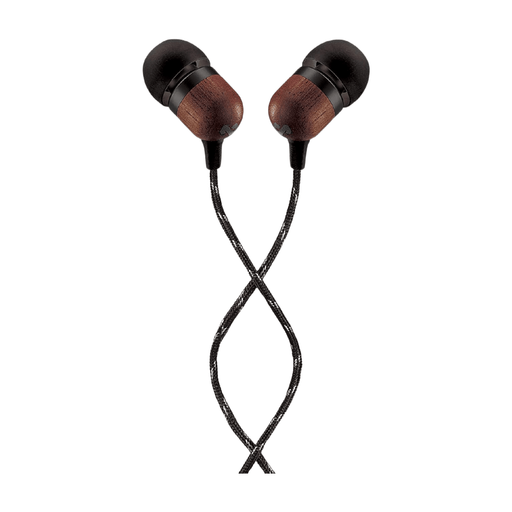 Image unavailable
House of Marley Smile Jamaica USB-C
A wired USB-C listening option if you’re not looking for a separate amplifier and have a compatible connection.
The product name lists a 9.2 mm driver and a built-in microphone.
Joybuy
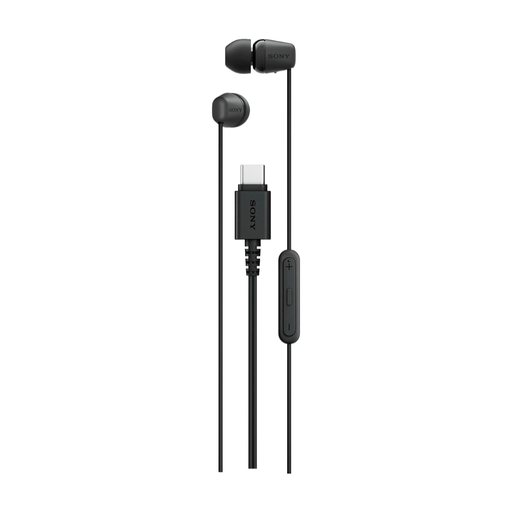 Image unavailable
Sony IER-EX15C USB-C headset
A good choice if you want to use a wired headset for listening and calls with a compatible USB-C connection.
The product name lists a microphone and controls.
Joybuy
Frequently asked questions
How do I stop sound coming from my laptop speakers?
Connect your headphones or USB audio device and select it as the audio output. In Windows, check the selected output under System and Sound; on a Mac, choose the output under Sound. Test this before buying an amplifier. Microsoft Support and Apple Support explain these settings.
Do I need an amplifier to reduce fan or room noise?
No. An amplifier won’t block mechanical fan noise or background noise; it controls the electrical signal to your headphones. If background noise bothers you, how well your headphones seal is a separate consideration.
What should I consider when connecting an amplifier to a sit-stand desk?
Check the USB connection, headphone plug, power requirements and cable routing when the desk moves. Start at a low volume; the iFi ZEN DAC 3 manual advises this before you change PowerMatch.
What are my rights when buying an amplifier online?
For online consumer purchases from a business, you generally have a statutory 14-day cooling-off period after delivery, subject to applicable exceptions. You’re also entitled, according to ACM ConsuWijzer, to a product that performs as you could reasonably expect under normal use. A manufacturer’s warranty does not automatically limit this statutory right.
Is CE marking mandatory and sufficient proof for every version?
Whether CE marking is mandatory depends on the EU product rules that apply to the specific version. The European Union’s Your Europe website explains that CE marking is only mandatory for products covered by harmonised EU rules that require it. Check the documentation for the exact version before relying on a conformity claim.


