
Maker taking photos for an online shop
You regularly photograph whole notebooks and want to use the same composition and dark background each time. Canon Europe discusses using a tripod for consistent product photography.


When photographing handmade notebooks against a dark background, start with even lighting, a stable camera set-up and control over exposure and white balance. A mirrorless camera with an interchangeable lens could be a good choice if you regularly take different compositions or close-up shots. Just check the lens and what’s included in the kit: a camera body is no substitute for a lighting set-up.
You regularly photograph whole notebooks and want to use the same composition and dark background each time. Canon Europe discusses using a tripod for consistent product photography.
You want to show the paper, binding or texture up close, so you’ll also need to consider the lens and its focusing distance. Canon Europe and OM SYSTEM outline points to consider for close-ups and focus stacking.
You sell notebooks whose paper and cover colours need to look true to life in varying light. Canon Europe covers product colour reproduction, while Nikon explains how white balance can affect colour under certain lighting conditions.
Start with lighting and composition. Then consider whether your current camera is limiting you and whether you need an interchangeable lens for the close-ups you take.
| What to consider | What to look for when buying | Who should pay particular attention? |
|---|---|---|
| Dark background | Check whether you can set or adjust the exposure manually. Remember to factor in a light and tripod, too. | I want to keep the background dark without making the cover too dark; around 33% of consumers put control over exposure first. |
| Cover and paper colour | Look at the white balance settings and, if you edit your photos, RAW capture. Test your planned lighting with a neutral card. | If I want the paper and cover colours to look consistent across a series, I need to consider lighting and white balance; around 27% of consumers prioritise colour consistency. |
| Binding and texture | Check the lens mount and the minimum focusing distance of the lens you’re considering. Decide whether you need close-ups or mainly wider shots. | I want to capture the details of the binding or texture clearly in close-ups; around 20% of consumers put detail reproduction at the top of their list. |
| Complete kit | Check whether a lens, battery and charger are included with each variant. Also factor in lighting, a tripod and any close-up or macro lens you may need. | I want a complete, repeatable set-up and need to know in advance what else I’ll need; around 20% of consumers make the overall set-up and workflow their top priority. |
Automatic metering can make a dark scene look too bright. Lighting the notebook properly is still important for the final result.
First, test the exposure with a fixed set-up and adjust the exposure compensation if needed.
You may need a light and tripod as well as the camera, so factor them into your set-up.
The Canon EOS R50 kit described by Canon Netherlands includes an RF-S 18–45mm lens, while the Sony ZV-E10 variant reviewed here is body only.
Check what’s included with the specific variant you’re considering and make sure the lens is compatible with the mount.
With a body-only kit, you’ll need to buy a compatible lens separately if you don’t already have one.
A Joybuy listing for the original Sony ZV-E10 states 24.3 MP, while Sony Netherlands specifies approximately 24.2 effective megapixels.
For a specific offer, check the full model code and compare the listed features with the manufacturer’s specifications.
The EOS R50 is an APS-C mirrorless camera with an RF or RF-S mount and manual focus. It could be worth considering for a compact set-up with an interchangeable lens.
The X-S20 could suit a workflow that uses manual photo settings and RAW files.
The ZV-E10 is an E-mount mirrorless camera that could be suitable for product photography and video.
The Z50II is an option if you’re looking for a mirrorless camera with a viewfinder and interchangeable Nikon Z lenses.
The OM-5 Mark II could be worth considering if you regularly photograph small, three-dimensional details up close.
The Joybuy products shown range from camera and lighting bundles to a camera with a zoom lens and a Sony ZV-E10 kit. Compare the lenses and lighting included with each product against the fixed set-up you want to use for photographing notebooks.
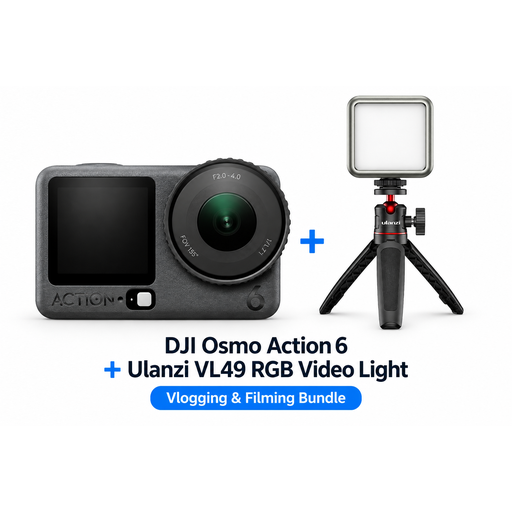 Image unavailable
The bundle includes extra lighting for product shots; consider separately whether the camera suits the fixed composition you want.
Bundle: DJI Osmo Action 6 Standard Combo and Ulanzi VL49 RGB LED light.
 Image unavailable
The product description mentions lighting for product photography; check whether the bundle suits the camera set-up you need.
According to the product description, the included Ulanzi VL81 has an adjustable colour temperature of 3200–5500 K.
 Image unavailable
The product description mentions extra lighting for product photos; check whether this bundle suits the way you want to frame your shots.
The product description lists a 1-inch CMOS sensor and a Ulanzi VL49 RGB LED light.
 Image unavailable
The title mentions optical zoom for different compositions; check whether the lens can focus close enough to capture the details you want to show.
The product title lists 12X optical zoom and 64MP.
 Image unavailable
This kit could suit you if you’re looking for a mirrorless camera with an interchangeable lens; check whether the included zoom lens works for both wide shots and close-ups.
The product description lists a Sony E-mount and a 16–50mm zoom lens. According to the description, an adapter and charger are not included.
Not necessarily: a dark background doesn’t mean the notebook itself should be left unlit. Canon Europe recommends paying attention to product lighting and exposure control. Fix the camera in place and adjust the exposure if the background looks too bright.
Where possible, use the same lighting each time and check the white balance with a neutral card. Nikon explains that automatic white balance can produce different colours from a card reading in certain mixed lighting conditions.
First check whether the lens you’ve chosen can focus close enough for the composition you want. A suitable close-up lens could help with very small details. OM SYSTEM describes focus stacking as another option when you need to capture multiple focus distances.
According to ACM ConsuWijzer, online consumer purchases generally come with a statutory 14-day cooling-off period after delivery. If a product doesn’t meet the standard you could reasonably expect when used normally, the seller is responsible for the statutory guarantee; how this applies depends on the purchase and the circumstances.
Not without permission: according to the Dutch government, you generally need the creator’s permission to use someone else’s copyright-protected photos. Taking your own photos avoids using someone else’s.