Start with your camera and the type of shot you take most often. A suitable standard or kit lens may be enough for a full-card overview, while a macro lens becomes more useful when you want to capture small embellishments in close-up. Then compare the magnification of the exact model, the space in front of the lens for your lighting, and how sharply it captures raised details. More magnification isn’t automatically better for an overview shot.
Who is this guide for?
Card maker who wants overview shots
You want to capture the whole card clearly from above. Before buying a macro lens specifically for this type of shot, first check whether your current lens frames the card well and keeps it sharp. Canon Europe notes that you can start with a standard kit lens or a compact camera for flat-lay photography.
Maker who wants detail shots
You want to capture the texture of the paper, stamps or small embellishments in close-up. Compare the maximum magnification of the exact lens model and check that its mount is compatible with your camera.
Photographer of embossed cards
You want raised elements to appear sharp. For close-ups, it’s a good idea to check sharpness in the crop you want and plan how to position your camera and lighting.
What should you look for when choosing?
First, test your existing lens for a full-card overview. If small details are the main reason you’re buying a lens, compare magnification, compatibility and the space available for lighting at your intended shooting distance.
| What to consider |
What should you check? |
Who should pay particular attention? |
| Fitting the whole card in the frame |
Using your own camera, check that the card fits fully in the frame and appears sharp from your intended shooting height. |
If I mainly want a clear overview shot, I prioritise a useful crop over maximum magnification. Around 36% of consumers prioritise capturing the whole card. |
| Small embellishments |
Compare the maximum magnification of the exact model and check the camera mount and lens version. |
If I want to capture small stamps or embellishments in close-up, I look at the magnification of a lens that fits my camera. Around 29% of consumers prioritise this kind of detailed work. |
| Space for your camera and lighting |
Measure your setup for the crop you want. Distinguish between the minimum focusing distance measured from the focal plane and the working space in front of the lens. |
If I want to position lights close to the card, I need to leave space in front of the lens. For the Z MC 50mm, Nikon gives around 5 cm between the front of the lens and the subject in the close-up setup described. Around 21% of consumers prioritise space for lighting and the camera. |
| Keeping raised elements sharp |
Take a test shot at your intended magnification and check whether the focus covers the full relief. |
If my card has embellishments at different heights, I want to see whether a single focus point is enough. Around 14% of consumers prioritise sharpness across raised elements. |
Common buying pitfalls
-
Assuming ‘macro’ means a set magnification
Maximum magnification varies by model. Canon specifies a maximum of 0.5× for the RF 35mm and 1.4× for the RF 100mm, so the model name alone won’t tell you how tightly you can frame your subject.
Check the maximum magnification of the exact lens and compare it with the size of the detail you want to photograph.
If the magnification isn’t enough for your detail shots, you may need a different lens.
-
Confusing the minimum focusing distance with the working space in front of the lens
For the Nikon Z MC 50mm, Nikon gives a minimum focusing distance of 0.16 m, but in the close-up setup described, the front of the lens is around 5 cm from the subject.
Check the available space for the crop you want and plan where you can position lights or reflectors.
-
Buying a macro lens solely for flat-lay shots
Canon Europe explains that you can also try a flat-lay shot with a standard kit lens. A macro lens won’t automatically determine your composition or lighting.
First, test whether your current lens captures the whole card clearly and at a suitable size. Then consider whether you need more magnification for small details.
-
Expecting maximum magnification to keep all raised details sharp
In close-ups, raised elements may fall outside the area in focus. Nikon describes focus stacking as combining shots taken with different focus points to increase the depth of field in the final image.
Assess a test shot at the magnification you actually want to use. If parts at different depths are blurred, you could plan a stable setup and, if needed, take several shots at different focus points.
Taking and combining several shots at different focus points takes extra time.
Brands to consider
Nikon
For compatible Nikon Z cameras, you can compare the Z MC 50mm and Z MC 105mm for different shooting setups.
- Nikon specifies 1:1 magnification for the Z MC 50mm.
- In the closest focusing setup described, the front of the lens may be around 5 cm from the subject. Bear this in mind when positioning your lighting.
Sony
The FE 50mm F2.8 Macro is an option for a compatible Sony E camera if you want to switch between overview shots and 1:1 detail shots.
- Sony specifies 1× magnification and a minimum focusing distance of 0.16 m for the SEL50M28.
- Sony doesn’t list stabilisation built into the lens. The minimum focusing distance is not the same as the working space in front of the lens.
Canon
For compatible Canon RF cameras, the RF 35mm F1.8 Macro and RF 100mm F2.8L Macro offer different levels of maximum magnification.
- Canon specifies a maximum of 0.5× for the RF 35mm and 1.4× for the RF 100mm.
- The RF 100mm’s higher maximum magnification doesn’t prove that it’s a better choice for an overview shot of a whole card.
Fujifilm
The XF30mmF2.8 R LM WR Macro is designed for a compatible Fujifilm X camera and combines a standard-lens-like angle of view with macro magnification.
- Fujifilm specifies 30 mm, a maximum magnification of 1× and a minimum focusing distance of 0.1 m.
- Fujifilm measures this distance from the focal plane; it isn’t the working space in front of the lens.
Laowa
The 65mm f/2.8 2x Ultra Macro APO is an option for a compatible APS-C setup when you want to focus on very small details.
- Laowa specifies a maximum magnification of 2:1.
- Mounts vary by version. Check that the exact version is compatible with your camera; 2:1 magnification isn’t needed for every shot of a whole card.
Product on Joybuy
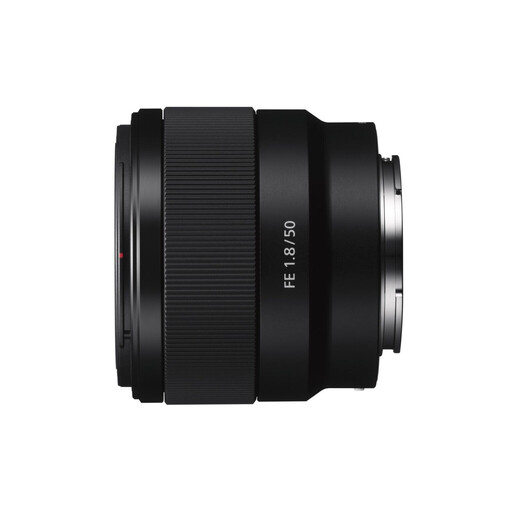
This Joybuy listing is for a Sony E 50mm f/1.8 OSS lens for product and close-up photography. Check the maximum magnification before choosing it for small card details.
 No image available
Sony E 50mm f/1.8 OSS Black
The product description mentions product and close-up photography. Check that the maximum magnification is suitable for the smallest embellishments you want to capture.
The model name specifies 50 mm, f/1.8 and OSS. Before buying, check that this lens is compatible with your camera.
Joybuy
Frequently asked questions
Do I need a macro lens to photograph a whole card?
Not necessarily. First, try to see whether your existing lens captures the whole card clearly and at a suitable size from your preferred shooting height. For small details, check the lens’s maximum magnification separately.
Will a lens with the right brand name automatically fit my camera?
No. Check the exact camera mount, sensor size and lens version. The specifications given apply to individual models; a similar name doesn’t confirm compatibility.
How can I get raised embellishments in focus?
First, assess a test shot using the crop you want. If parts at different heights remain blurred, you can take a series of shots with different focus points and combine them to increase the depth of field in the final image.
What if the lens isn’t suitable or develops a fault after I buy it online?
According to the Dutch government, many eligible consumer purchases made at a distance come with a 14-day cooling-off period. Check the terms and exceptions that apply to your purchase. The product must also meet legal requirements. If it develops a fault, contact the seller about your statutory guarantee, even if a manufacturer’s warranty is available.


