
Players with a particular story in mind
You know which game you want to play, and first check that it’s available for your chosen platform and in a language you’re comfortable with.


Start by choosing based on the exact game you want to play and its language: a Nintendo Switch model is suited to stories from the Nintendo library, while a Steam Deck works with games in your Steam library. If sockets are in short supply, compare the battery life and charging requirements of the exact version you’re considering; Nintendo and Valve say play time depends on the model, game and how you use it.
You know which game you want to play, and first check that it’s available for your chosen platform and in a language you’re comfortable with.
You want to play on the built-in screen and charge when a socket is free, without relying on a permanent TV set-up.
You compare screen size and controls, and consider which games you already own or plan to buy.
The game you want is your first filter: screen and battery life only matter once you know the story is playable on your chosen platform. Then compare the exact model, as screens, battery-life claims and charging requirements can vary between versions.
| What to consider | What to look for | Who is this important for? |
|---|---|---|
| Game and language | Search for the full title in the platform’s store and check the system, version and game language. For PC games, also check compatibility with the handheld. | If I already know which story I want to play, I first check that the exact game works on the device and is available in the right language. Around 33% of consumers prioritise game compatibility and language. |
| Playing without mains power | Compare the official battery life for the exact version and check that you can play without a TV or dock. A stated range doesn’t guarantee the same play time for every game. | When I want to play between charges, I focus on handheld use and the battery life of the model I’ve chosen. Around 27% of consumers prioritise playing without keeping a socket occupied. |
| Reading and controls | Compare the screen size and available controls for the exact version. Also check how text and choices appear in the game you want to play. | For long dialogue, I want to read the text comfortably and make choices easily, without assuming that a bigger screen is better for every game. Around 20% of consumers prioritise readability and controls. |
| Total cost and support | Check which games and charging accessories you already own, what’s included with the console and how much storage the version has. | When I’m weighing up the overall purchase, I consider the console, the games I need and any charging accessories together. Around 20% of consumers prioritise the total cost. |
A story-driven game isn’t automatically available for every console or PC handheld.
Before choosing a device, check the full game title, supported system and game language.
Nintendo and Valve say play time varies by model and use. A maximum figure doesn’t tell you how many hours a specific game will last.
Plan charging around the stated battery life for the exact version, and bear in mind which game you want to play.
ASUS says that a charger is not included with the ROG Xbox Ally X RC73XA.
Check the contents of the box and the power requirements for the full model code before ordering.
You may need to buy a suitable power supply separately as part of your charging set-up.
The model code, regional version and included accessories can affect what you receive and how you connect the device.
Check the full model code, regional version, adapter and storage details of the product you want to buy. For electronics sold in the EU, the Dutch government lists the applicable safety requirements and CE marking.
Nintendo Switch Lite, Switch OLED and Switch 2 offer different handheld options for games from the Nintendo library.
Steam Deck OLED is a handheld PC for playing story-driven games from your Steam library.
The ROG Ally range consists of Windows handhelds. Check the full model code, as versions aren’t interchangeable.
The Legion Go S is a PC handheld available in several configurations.
Playdate is built around its own library, which includes story-focused games. It doesn’t run Switch or Steam games.
This selection includes Nintendo Switch models and Lenovo Legion handhelds for playing on a built-in screen. Check platform compatibility for each game and the included accessories for each version.
 No image available
An option for playing stories in handheld mode without a permanent TV set-up. Check that the game you want works on this version.
The product description lists a 7,9-inch LCD screen, 256 GB of storage and Joy-Con 2 controllers. No game is included.
 No image available
A Windows handheld for anyone looking for a portable PC set-up. Check that the game you want works on this exact version.
The product description lists Windows 11 Home, an 8,8-inch OLED touchscreen, a built-in 74 Wh battery and an integrated touchpad. The controllers are detachable.
 No image available
A SteamOS handheld PC for anyone who wants to use a portable PC game library. Check that the game you want is compatible.
The product description lists an 8-inch WUXGA touchscreen, SteamOS and an integrated touchpad.
 No image available
A handheld-only Switch version for playing without a TV. Check that the game you want is available for Switch Lite.
The product description lists a 5,5-inch touchscreen and 32 GB of internal storage. Nintendo quotes around 3–7 hours for Switch Lite, depending on the software and features; the product information for this bundle states up to 3 hours, depending on the game and how you use it. Check the details for the exact version.
 No image available
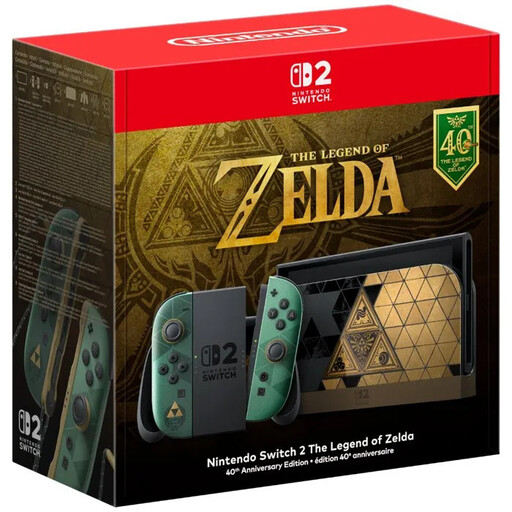
A Switch 2 bundle for handheld gaming. Check that the interactive game you’re looking for is available on Switch 2.
The product description lists a 7,9-inch LCD touchscreen and 256 GB of internal storage.
It depends on the game. Valve recommends installing, updating and launching a Steam game online in advance. Games that require an active connection or an external launcher won’t work in offline mode.
Nintendo says that the HAC-002 Switch power supply can be connected directly to Switch 2, but can’t be used with the Switch 2 dock in TV mode. For other power supplies, check the power requirements and that they’re suitable for use in the UK.
According to ACM ConsuWijzer, the seller is responsible for providing an appropriate solution if a product is faulty. What counts as appropriate depends on the product and the circumstances; expected lifespan isn’t automatically the same for every product.
According to ACM ConsuWijzer, online purchases generally come with a statutory cooling-off period of up to 14 days after delivery. There are exceptions for certain products and digital purchases, so check which terms apply to your purchase.
The Dutch government says electronic devices placed on the EU market must meet the applicable safety requirements and carry a CE marking. Check the specific version, power supply and seller; a product page alone doesn’t prove that the item being offered meets those requirements.