Who is a handheld suitable for?

Player with a set strategy game library

You want to take your existing games, or specific Nintendo, Steam or Windows games, with you. First, check that the right game and edition are available; this matters more than an attractive device feature. Nintendo Netherlands, Valve and ASUS explain the relevant game and platform requirements.

Player without reliable Wi-Fi

You don’t want to depend on terminal Wi-Fi while you wait. Install games and updates in advance, then test whether the game starts without a connection. Steam Support and Nintendo Netherlands explain the requirements you need to know about.

Player facing a long wait and travelling light

You’ll need to balance the screen and controls against the weight and play time you get with your game. Manufacturer estimates alone won’t tell you how long a specific strategy session will last; Nintendo and Valve state that play time depends on the software and how you use the device.

What should you look for when choosing?

Nintendo Switch 2

Best for: when the strategy game you want has a compatible Switch edition.

Bear in mind: mouse controls are available only in games and editions that support them. Nintendo quotes a battery life of approximately 2 to 6.5 hours, depending on the software and features used.

Steam handheld

Best for: when your Steam library is the priority and you check compatibility for each game.

Bear in mind: a compatibility rating doesn’t guarantee that a game will start offline. Trackpads and the touchscreen offer input options, but it’s up to the game to determine which ones work.

Windows handheld

Best for: when you need a specific Windows PC game or launcher.

Bear in mind: check the controls and offline requirements for each game. A stated battery capacity won’t tell you how many hours your game will run for.

What to consider What should you check? Who is this important for?
Games you want Check the exact title, platform and edition. For Steam, also check each game’s compatibility. If I want to take my existing strategy game library with me, I first check that my games will work on the device. Around 36% of consumers put the available game library first.
Starting offline Install and start the game in advance, then test the same start without internet. Also check whether a launcher or connection is required. If I don’t want to rely on Wi-Fi, I want to know before I set off that my game will start on its own. Around 29% of consumers give offline play top priority.
Controls and readability Check whether the game supports mouse controls, trackpads or the touchscreen, and whether text and maps are easy to read on screen. If I spend a lot of time using maps and menus, I want to be able to control and read the interface comfortably. Around 21% of consumers put controls and readability first.
Battery and portability Compare the weight, charging options and stated play time. If possible, base your plans on a test using your game. For a long wait, I want enough play time without carrying an awkwardly heavy bag. Around 14% of consumers give battery life and portability top priority.

Things to check before you set off

  • Assuming a physical Switch 2 game contains the full game on the card

    With a game-key card, the game data isn’t stored on the card. Nintendo says you need to download the game over the internet, so you can’t count on playing straight away offline if you haven’t downloaded it in advance.

    Check the type of card, then complete the download and start the game for the first time before you leave. Make sure you have enough free storage space, too.

  • Assuming a Steam Deck Verified label guarantees offline play

    Valve assesses how well games play on Steam Deck, but offline use also depends on the game. According to Steam Support, titles that require an active connection or an external launcher won’t work in offline mode.

    Check compatibility and try starting your game without a connection before you set off.

  • Assuming battery capacity or maximum play time reflects how long you can play

    Nintendo and Valve state that play time depends on the software and how you use the device. These figures aren’t a guarantee of how long a specific strategy session will last.

    Allow some extra time and check what’s included in the offer. The Dutch product page for the ASUS ROG Xbox Ally X RC73XA says that a charger isn’t included, so check whether you’ll need to buy a suitable one.

    For the ASUS model mentioned, you may need to provide a suitable charger yourself if you don’t already have one.

Brands worth comparing

Nintendo

A good option for supported Switch strategy games, including the separately designated Switch 2 Edition of Civilization VII.

  • Nintendo states that Civilization VII – Nintendo Switch 2 Edition supports Joy-Con 2 mouse controls.
  • Nintendo quotes approximately 2 to 6.5 hours of battery life for Switch 2, depending on the software and features used. This isn’t a measure of how long your game will run.

Valve

Steam Deck OLED is a good option if you want to play compatible Steam strategy games.

  • Valve lists trackpads and a touchscreen. For the OLED model, Valve quotes a play time of approximately 3 to 12 hours, depending on the game.
  • A Deck Verified label alone doesn’t tell you whether a game will start offline. Check the connection requirements and whether an external launcher is needed, too.

ASUS

The ROG Xbox Ally X is a Windows handheld for anyone who wants access to PC games.

  • For model RC73XA, ASUS lists a battery capacity of 80 Wh and a weight of 715 g.
  • The Dutch product page for RC73XA says that a charger isn’t included. Manufacturer claims about performance aren’t independent tests of strategy games.

Lenovo

The Dutch page for Legion Go S model 83N6001RMH describes a SteamOS handheld with an 8-inch screen.

  • The stated screen and SteamOS details apply to model 83N6001RMH.
  • These configuration details don’t necessarily apply to other Legion Go S models. Also check the compatibility and offline start of each game.

MSI

The Claw 8 AI+ is a Windows handheld worth comparing with other options if you need a PC game.

  • MSI’s global specifications list an 8-inch touchscreen, 80 Wh battery and a weight of 795 g for the model described.
  • These specifications don’t confirm which model is available in the Netherlands or how a specific strategy game will perform.

Joybuy products for handheld gaming

This selection includes Switch 2 and other handhelds for gaming on the go. For each model, check that it suits the strategy game you want to play and your offline requirements; the stated bundle contents don’t replace these checks.
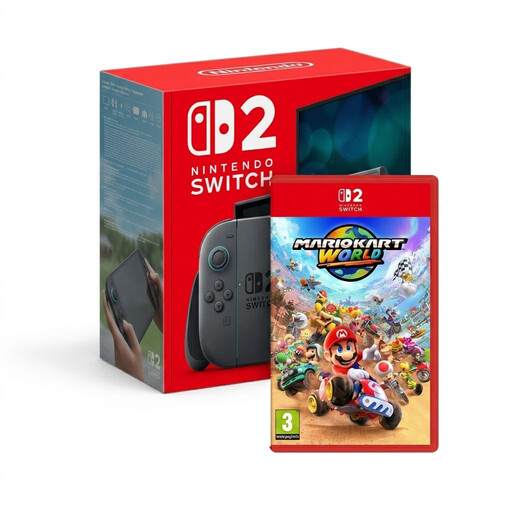
Nintendo Switch 2 with Mario Kart World

Nintendo Switch 2 with Mario Kart World

The Switch 2 is a good option if the strategy game you want has a compatible Switch edition. This bundle includes Mario Kart World, not a strategy game.

View at Joybuy

Nintendo Switch 2 with Nintendo Switch Sports Resort and 3 months of Nintendo Switch Online

Nintendo Switch 2 with Nintendo Switch Sports Resort and 3 months of Nintendo Switch Online

A good fit if you’re looking for a Switch 2 to play a supported Nintendo strategy game; check the game edition separately. The bundle lists Nintendo Switch Sports Resort as digital content, not a strategy game.

View at Joybuy

Lenovo Legion Go 8ASP2 handheld

Lenovo Legion Go 8ASP2

A handheld option if you want to play a specific Windows PC game on the go. Check the controls, required launcher and offline start for each game.

View at Joybuy

Lenovo Legion Go S 8APU1, model 83N6001TMH

Lenovo Legion Go S 8APU1, 83N6001TMH

A good option if you’re looking for a handheld for Steam games. Check the exact model, and test the compatibility and offline start of the games you want to take with you.

View at Joybuy

ASUS ROG Xbox Ally, 16 GB RAM, 512 GB SSD, white

ASUS ROG Xbox Ally, 16 GB RAM, 512 GB SSD, white

A handheld option if access to PC games is important to you. This model has 16 GB RAM and a 512 GB SSD; the product information says that the charger must be purchased separately.

View at Joybuy

Frequently asked questions

Can I play a downloaded Steam strategy game at the ferry without Wi-Fi?

Not automatically. Update the game online and start it online at least once. According to Steam Support, games that require an active connection or external launcher won’t work in Steam offline mode. Test the specific game before you set off.

Can I play a physical Switch 2 game straight away without internet?

Not if it’s a game-key card. According to Nintendo, the game data isn’t stored on the card, so you’ll need to download the game first and start it once while connected to the internet. After that, you can start the downloaded game without internet, as long as the card is inserted.

Which memory card can I use with the Switch 2?

Nintendo specifies microSD Express cards for expanding storage. Nintendo says you’ll need a system update via the internet to use a card; also check how much free space your game requires.

In the Netherlands, do I automatically lose my right to a repair after two years?

No. According to the Dutch government, there’s no fixed statutory guarantee period in the Netherlands. What you can expect from a product depends, among other things, on the product itself and normal use. If a product is faulty, contact the seller; any manufacturer’s guarantee is in addition to this.

What should I look out for when buying online and checking product safety?

Check the product’s identity, the seller and the applicable CE marking. The Dutch government states that electronic products placed on the market in the EU must carry the applicable CE marking. For a distance purchase by a consumer, you’ll generally have 14 days to change your mind, subject to applicable exceptions.
