
Players who want to carry on offline
You want to keep playing without reliable Wi-Fi at the ferry terminal, and can prepare downloads, updates and the first launch at home. Nintendo and Valve explain why this preparation matters for each game.


For gaming without reliable Wi-Fi at the ferry terminal, choose a handheld and an RPG that work offline locally. Download and update the game beforehand, then test that it starts without a connection. Nintendo and Valve explain the offline requirements for each game, while PlayStation Portal relies on Wi-Fi and a PS5 for Remote Play. Then compare your own game library, battery life with the games you play and what you’ll find comfortable to carry.
You want to keep playing without reliable Wi-Fi at the ferry terminal, and can prepare downloads, updates and the first launch at home. Nintendo and Valve explain why this preparation matters for each game.
You want to know whether the RPGs you already own will work on the handheld. Nintendo and Valve provide game-specific information about handheld support and compatibility.
You’ll be switching between waiting and travelling, so the size, weight and battery life need to suit the screen size you find comfortable to read on.
Choose this option: if the RPG you want is a Switch game that supports handheld mode and you’re looking for a system designed for handheld play.
Bear in mind: check whether the specific game is supported and can launch offline.
Choose this option: if you want to play Switch games on a 7-inch OLED screen and also use TV or tabletop mode.
Bear in mind: Nintendo quotes battery life of around 4.5 to 9 hours; play time depends on the game and how you use it.
Choose this option: if you want to play a specific Switch 2 game or prefer the 7.9-inch screen.
Bear in mind: Nintendo quotes around 2 to 6.5 hours of battery life; game-key cards require an internet connection for downloading and the first launch.
Choose this option: if the RPGs you want are in your Steam library and are compatible with the handheld.
Bear in mind: Valve quotes 3 to 12 hours for the Steam Deck OLED, depending on the content; compatibility and offline launch vary by game.
Choose this option: if you want to install a compatible RPG locally from a Windows PC platform.
Bear in mind: check the game’s requirements and offline functionality, and whether a charger is included with the model.
Choose this option: only if you specifically want to stream a supported game and have suitable Wi-Fi where you’ll be playing.
Bear in mind: Remote Play requires a PS5 and Wi-Fi; Portal doesn’t play locally installed RPGs.
If you’re playing RPGs while waiting at a Dutch ferry terminal, these are the main things to consider. First check whether your game works offline locally, then look at battery life, your existing library and the device’s size.
| What to consider | What should you check? | Who is this important for? |
|---|---|---|
| Continuing to play offline | Check the requirements for the specific game; download and update it, launch it online, then test it offline. | If you don’t want to rely on Wi-Fi at the terminal and want to resume an RPG without a connection, this is your top priority. Around 31% of consumers put offline play first. |
| Battery life for a longer-than-expected wait | Compare the quoted range for the exact model and don’t plan around the upper limit. | If you want to keep playing when the wait takes longer and charging isn’t an option, battery life with the games you play really matters. Around 25% of consumers put battery life first. |
| Your own RPGs | Make a list of the games you want to play and check platform compatibility and offline requirements for each one. | If you already own games, you’ll want to know whether those specific titles work on the handheld before choosing a platform. Around 25% of consumers start with their own game library. |
| Portability and readability | Compare the weight and screen size of the exact model. | If you’ll be putting the device away regularly while you wait and want text to be comfortable to read, look for the right balance between portability and screen space. Around 19% of consumers prioritise portability. |
PlayStation Portal relies on a suitable connection and a PS5 for Remote Play. An unreliable connection at the terminal could interrupt or prevent streaming.
If playing offline is important to you, choose a device and game that work locally, then test the combination without a connection beforehand.
According to PlayStation, supported cloud games on PlayStation Portal require a PlayStation Plus Premium subscription.
Nintendo says you need to download the game, and an internet connection is required for the first launch before you can start it offline.
Check how much free storage you’ll need beforehand, and complete the download and first launch before you set off.
If there isn’t enough space to store games, you may need to expand the storage with a microSD Express card. You’ll first need to install a system update over the internet to use one.
Nintendo and Valve quote battery life ranges that depend on the software, content or usage. The maximum therefore doesn’t tell you how many hours your game will last.
Allow some leeway, and try your chosen game on the device if battery life is a deciding factor.
The game also needs to work on your chosen platform and be playable offline. ASUS also states that the ROG Xbox Ally doesn’t come with a charger.
Check the game requirements, offline functionality and contents of the exact offer before you order.
If your model doesn’t include a charger, you’ll need to arrange a suitable one.
Relevant for players who want to play RPGs from the Nintendo Switch or Switch 2 library.
Relevant for players with compatible Steam RPGs who want to use a handheld PC.
Relevant for players who want to install RPGs locally from compatible Windows PC platforms.
Relevant for players considering a SteamOS handheld for compatible games in their Steam library.
Relevant if you specifically want to play games using Remote Play or supported cloud streaming.
This selection includes handhelds for Nintendo Switch and PC games. Check whether each RPG works on the model you choose and can launch offline.
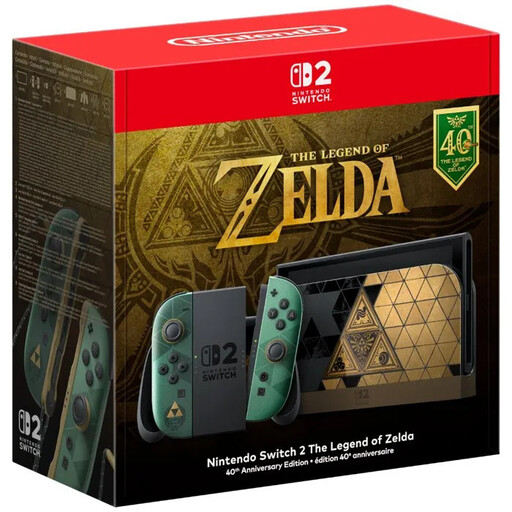 Image unavailable
For playing a compatible Switch 2 RPG in handheld mode; check beforehand that the game can launch offline.
The product information says that no game is included; you’ll need to buy an RPG separately.
 Image unavailable
A handheld option for playing PC RPGs on the go; check compatibility and offline functionality for each game.
 Image unavailable
This model is worth considering if you want to play compatible RPGs from your Steam library on a handheld; check compatibility and offline launch for each game.
The product information lists SteamOS.
 Image unavailable
For playing a compatible PC RPG on a portable gaming console; check the game requirements and offline functionality.
The product name lists 16 GB RAM and 512 GB SSD storage. According to the product information, a charger isn’t included as standard.
 Image unavailable
A handheld PC for playing PC RPGs on the go; check compatibility and offline functionality for each title.
The product name lists a 20.3 cm touchscreen and 1 TB SSD storage. According to the product information, the charger must be purchased separately.
No. According to Nintendo, you need to download the game, and an internet connection is required for the first launch. After that, the game can start without an internet connection as long as the game-key card is inserted.
Update the game online beforehand and launch it to check whether anything else needs installing. According to Steam, games that require a connection or use an incompatible external launcher won’t work in offline mode.
Nintendo only supports microSD Express cards for expanding game storage. You’ll need to install a system update over the internet before using one.
For Remote Play, PlayStation specifies a PS5 and Wi-Fi of at least 5 Mbps. For the separate option of supported cloud games, PlayStation specifies a PlayStation Plus Premium subscription; check which way you want to play.
If there’s a fault, contact the retailer. According to the Dutch government, the retailer must provide a solution; any extra warranty doesn’t replace your statutory rights.