What should you consider when choosing?
Nintendo Switch
A good fit if: you want to play a specific Switch game while travelling and it supports handheld mode.
Trade-off: the Lite is lighter, while the OLED has a larger screen. Check the game’s play style and controls.
SteamOS handheld
A good fit if: you already have the relevant games in your Steam library.
Trade-off: set up Offline Mode in advance and check whether each game works without an active connection.
Windows handheld
A good fit if: you want to use a specific Windows game library.
Trade-off: check the chosen game’s controls and offline requirements; having Windows on the device doesn’t automatically guarantee compatibility.
For a journey without reliable Wi-Fi or a confirmed power socket, compatibility, offline preparation, screen size, weight and battery life are all important considerations.
| What to consider |
What to look for |
Who should pay particular attention? |
| Game and offline play |
Check the exact title and platform version, play style, controls and online requirements. Install and test the game in advance without a connection. |
If you’re counting on playing that one particular hidden-object game during the journey, you won’t want to discover on the way that it doesn’t work or still needs to connect online to launch. Around 26% of consumers prioritise game compatibility and offline play. |
| Screen details |
Compare the screen size and check how the game is controlled; a touchscreen doesn’t mean that every game supports touch controls. |
If you want to spot small objects, a larger screen may matter more than a compact device. Around 21% of consumers prioritise screen detail. |
| Weight and size |
Compare the weight and dimensions of the exact model with how you plan to hold the handheld during the journey. |
If you want a device that’s easy to carry and comfortable to hold for longer periods, a smaller screen may be an acceptable trade-off. Around 21% of consumers say portability is their main consideration. |
| Battery life |
Check the stated battery life for the model you’re considering and test it at home with your own game and settings; actual battery life varies with use. |
If you can’t charge during the journey, you’ll want to plan with some time to spare. Around 16% of consumers prioritise battery life. |
| What else you need |
Check what storage, accessories and power supply you need, and whether they’re included with the model. |
If you want to know in advance what else you’ll need besides the handheld, check which items are included and whether you’ll need any extras. Around 16% of consumers look at this first. |
Handhelds at Joybuy
This selection includes Nintendo Switch models and handhelds with SteamOS or Windows for playing hidden-object games on the go. Check that the device, controls and offline features are right for each game.
 No image available
Lenovo Legion Go 8ASP2
Could be a good fit if you’re looking for a Windows handheld for gaming on the go; check that your hidden-object game works and can launch offline.
Windows 11 Home; 8.8-inch OLED touchscreen.
View at Joybuy
 No image available
Lenovo Legion Go S 8APU1, 83N6001TMH
Could be a good fit if you want to use your Steam library on a handheld; test the game in Offline Mode first.
SteamOS; 8-inch WUXGA touchscreen.
For offline play, Valve recommends signing in, installing updates, launching the game and enabling Offline Mode in advance. Games that require an active connection or an external launcher won’t work in this mode.
View at Joybuy
 No image available
ASUS ROG Xbox Ally, 16GB RAM, 512GB SSD, White
Could be a good fit if you want a Windows handheld; check the controls for each hidden-object game and whether it can be played offline.
Windows 11 Home; 7-inch touchscreen; 16GB RAM; 512GB SSD.
According to the product description, the charger must be purchased separately.
View at Joybuy
 No image available
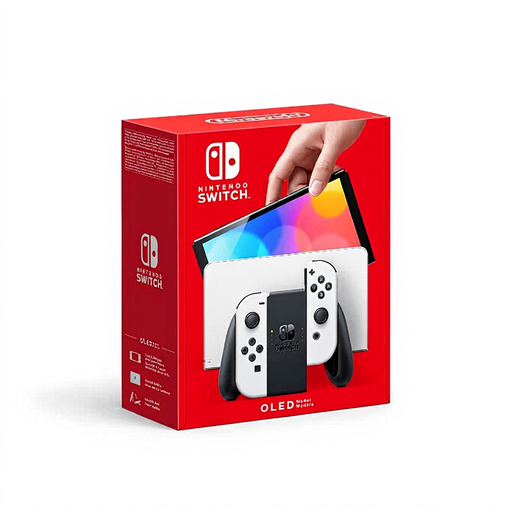
Nintendo Switch OLED White
Could be a good fit if you’re choosing a hidden-object game for Switch and want more screen space than a more compact handheld offers.
7-inch OLED screen; handheld mode.
Check your exact game’s play style and controls before you decide.
View at Joybuy
 No image available
Nintendo Switch 2 Console (EU)
Could be a good fit if you want a Switch 2 handheld with a large built-in screen; first check whether your hidden-object game is compatible.
7.9-inch LCD screen; handheld mode.
Nintendo says some older Switch games may not be supported or may not be fully compatible with Switch 2.
View at Joybuy
Frequently asked questions
Will a Switch hidden-object game automatically work on a Switch Lite?
No. Check whether the exact game supports handheld mode and whether it relies on features that require separate Joy-Con controllers. Nintendo lists A Castle Full of Cats as a hidden-object game for Switch, but you should still check that it supports handheld mode.
How do I prepare a Steam game to play without internet?
Steam recommends signing in while online, installing all updates, launching the game you want to play once, then enabling Offline Mode. Steam says games that require an active connection or an external launcher won’t work in this mode.
How long will the battery last during the journey?
It depends on the model, game and how you use it. Nintendo lists approximately 3–7 hours for the Switch Lite and 4.5–9 hours for the Switch OLED; Valve lists approximately 3–12 hours for the Steam Deck OLED, depending on the content. Test your own game at home and allow some extra time if you can’t charge.
Do I have to wear a seat belt while playing on a coach?
Yes. If your seat on a coach has a seat belt, you must wear it according to the Dutch government. The government lists an exception for a scheduled bus service within a built-up area; this isn’t a general exception for coaches.
Will every hidden-object game work on a handheld with a touchscreen?
No. A touchscreen on the handheld doesn’t confirm that the game supports touch controls. Check the exact title’s play style and controls; some Switch Lite games may require separate controllers to use certain Joy-Con features.


