
Nintendo platform gamer
Start with the Nintendo platform games you want to play, then check that they work on your chosen model and in the way you want to play. Nintendo explains which play styles each model supports.


Start with the platform games you want to play: a Nintendo Switch model suits compatible Switch games, while a PC handheld is worth considering if you want to take your PC library with you. Then choose based on how you like to play and how long you need to play without a power socket; it’s best to check downloads and game compatibility before you leave. PlayStation Portal is only an option if streaming over the connection at your destination works for you.
Start with the Nintendo platform games you want to play, then check that they work on your chosen model and in the way you want to play. Nintendo explains which play styles each model supports.
If you don’t want to rely on hotel Wi-Fi, get your games ready before you leave and check whether they need to be downloaded or require a connection. For example, Nintendo says that a Switch 2 game-key card requires you to download the full game over the internet.
If you want to take PC platform games with you, check how each game works on your chosen handheld. Valve provides a compatibility rating for Steam Deck games, while ASUS describes the ROG Xbox Ally as a Windows handheld.
First check that your chosen games work on the handheld, then see whether you can play without hotel Wi-Fi and consider the play style and battery life you need.
| What to consider | What should you check? | Who should pay extra attention? |
|---|---|---|
| Games you want to play | Make a note of the titles and check the platform, edition and compatibility; for Switch 2, also check older Switch games. | If I want to take specific platform games with me, I first check that those exact titles work on the device I’ve chosen. Around 33% of consumers prioritise access to the games they want. |
| Playing without Wi-Fi | Check whether each game needs to be downloaded, activated or streamed, and complete any necessary downloads in advance. | If I want to start playing as soon as I arrive without using hotel Wi-Fi, I check installation and streaming requirements. Around 27% of consumers prioritise being able to play offline. |
| Handheld, tabletop or TV | Check which play styles the model supports and whether you can access a suitable TV connection. | If I want to play at a table or on a TV as well as in handheld mode, I consider the model’s features and the hotel room. Around 20% of consumers give play style the highest priority. |
| Play time between charges | Use the stated battery life for the exact model as a guide; play time also depends on the software and how you use it. | If there may not be a power socket nearby, I take the expected gaming session into account and check the packaging for a suitable power supply. Around 13% of consumers focus on play time without charging. |
| Existing PC games | Check each title’s suitability for the handheld, as well as its offline and launcher requirements. | If I want to take my PC game library with me, I check the games I actually play instead of relying on the platform name alone. Around 7% of consumers start with their own PC library. |
With a Nintendo Switch 2 game-key card, you need to download the full game over the internet. Without preparing in advance, this could delay your first gaming session.
Check the card type and download the game before you leave; also make sure you have enough storage space.
PlayStation Portal uses streaming. Sony says Remote Play needs a connection of at least 5 Mbps and recommends at least 15 Mbps. Cloud streaming for eligible games requires PlayStation Plus Premium.
Choose this option only if the games you want, your account requirements and the connection at your destination are suitable.
A PlayStation Plus Premium subscription is required for cloud streaming.
The Switch Lite is designed for handheld use and cannot be connected to a TV.
If playing on a TV is important, check the model’s features in advance and make sure you can access the hotel TV.
Nintendo offers a version of the Switch Lite that does not come with a power supply.
Check what’s included with the exact version before you leave.
If necessary, you’ll need to arrange a power supply separately for this version.
A good choice if you want to play Nintendo platform games; Switch models vary in the play styles they support and their compatibility.
The Steam Deck OLED is an option if you want to play platform games from your Steam library.
The ROG Xbox Ally is worth considering if you want to play specific compatible PC games on a Windows handheld.
PlayStation Portal lets you stream eligible PS5 games; it isn’t a standalone offline handheld.
The products below are aimed at Nintendo Switch 2 games and PC game libraries. For each game, check that it works on your chosen handheld and can be started without hotel Wi-Fi.
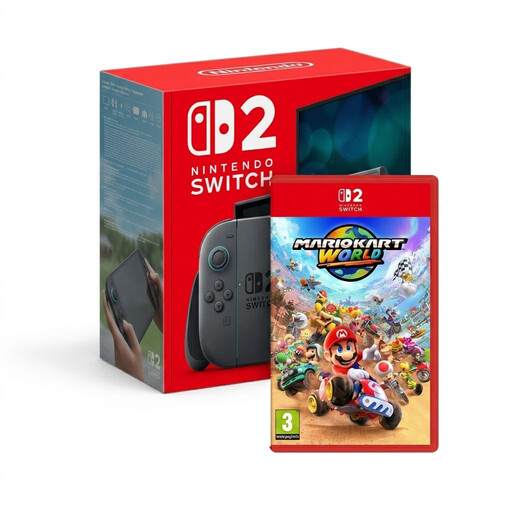 Image unavailable
A good fit if you want to take Switch 2 games with you; check older Switch games separately for compatibility.
Nintendo lists a 7.9-inch screen and battery life of around 2–6.5 hours, depending on the software and how you use it.
 Image unavailable
An option for taking PC games with you on a handheld; check each game’s compatibility and offline requirements.
 Image unavailable
A good fit if you want to play PC games on a handheld; check support and offline requirements for the titles you want to take with you.
 Image unavailable
A PC handheld for taking compatible PC games with you; check the game and offline requirements for each title.
A charger isn’t included with this version; arrange a suitable one for your trip if needed.
 Image unavailable
A handheld gaming PC for taking compatible PC games with you; check the requirements for each title.
A charger isn’t included, so bear this in mind when preparing for your trip.
It depends on the game and how well you prepare. A Switch 2 game-key card requires you to download the full game, while PlayStation Portal uses streaming. Check your game’s requirements and complete any necessary downloads before you leave.
No, the Switch Lite cannot be connected to a TV. The Switch OLED model supports TV mode using the included TV dock; also check that you can access a suitable TV input at the hotel.
Check the exact version and what’s included in the box. Nintendo offers a Switch Lite version without a power supply, so don’t assume every model comes with the same accessories.
According to ACM ConsuWijzer, you have a legal guarantee as well as any seller’s warranty if a product doesn’t meet what you could reasonably expect. For online purchases, there is a statutory cooling-off period that, according to ACM ConsuWijzer, ends 14 days after delivery. Check the applicable terms and any exceptions for your specific purchase.