
Offline platform gamer
Wants to start a familiar platform game straight away on the campsite, even without reliable Wi-Fi. Nintendo’s guidance on game-key cards and online licences makes it a good idea to check downloads and settings in advance.


For platform games on a campsite, first choose a handheld that runs the games you want, then test at home that they start without an internet connection. The Switch Lite is compact for solo play, while the Switch OLED also supports tabletop play with separate controllers. Nintendo quotes a shorter battery life range for the Switch 2 than for the Switch OLED, but actual playtime depends on the software and features used on both consoles.
Wants to start a familiar platform game straight away on the campsite, even without reliable Wi-Fi. Nintendo’s guidance on game-key cards and online licences makes it a good idea to check downloads and settings in advance.
Often plays out of reach of a power socket and weighs the quoted, game-dependent battery life against size and portability. Nintendo and Valve give battery life as a range, not a guarantee for a particular game.
Mostly wants to take their own PC games with them and checks whether individual titles work on a SteamOS or Windows handheld. Valve provides compatibility information for Steam Deck games; also test whether your chosen game starts offline.
| Buying concern | What to check before you buy | Who it matters most to |
|---|---|---|
| Being able to play offline | Check that the exact game works on the console, complete downloads and first launches at home, then test the game without Wi-Fi. Nintendo says that a Switch 2 game-key card requires a download first; some online licences also require an internet connection. | If there’s no Wi-Fi on the campsite, I want to know in advance that my game really does start offline. Around 36% of consumers prioritise offline playability. |
| Time between charges | Compare the quoted playtime for the exact model: Nintendo and Valve say it depends on the software or how the device is used. Also check whether your campsite has power and which charger is suitable for the console. | If I can’t charge near a power socket very often, I want to plan my gaming time carefully. Around 29% of consumers say battery life is their main buying concern. |
| Portability or playing together | Decide whether you’ll mostly play solo in handheld mode or also want tabletop play; check which controllers and play styles the game supports. Nintendo describes the Switch Lite as a handheld model without TV output. | If I want to pack light or play together around a table, I look at the size and controls. Around 21% of consumers prioritise portability or shared tabletop play. |
| Taking your existing PC games with you | Check Valve’s compatibility information for Steam Deck games or review the requirements for your chosen Windows handheld. Test installation, controls and offline launching for each game. | If my platform games are already in my PC library, I want to know whether those specific titles work on the handheld. Around 14% of consumers start by looking at the PC games they already own. |
Nintendo says that the game data for a game-key card must first be downloaded from the internet. Without that download, you won’t be able to start the game for the first time on the campsite.
Check the game type and required storage space, and make sure the game has been downloaded and launched at home before you leave.
Nintendo and Valve quote ranges that depend on software, features and usage, so the highest figure won’t tell you how long your chosen game will last.
Test your game using the settings you plan to use and, where possible, plan a time to recharge.
Nintendo says the Lite only supports Switch games that work in handheld mode with the built-in controls. Games that use certain features of separate Joy-Con controllers may therefore not be suitable for you.
Check the game’s supported play styles and controller features before choosing a console.
Some Joy-Con features may require separate controllers and a way to charge them.
The Joybuy listing we checked for the ASUS ROG Xbox Ally says that a charger is not included as standard.
Check what’s in the box and confirm which USB-C power supply is suitable for the exact model.
For anyone who wants to play Nintendo Switch games, from solo handheld sessions to tabletop play with compatible controllers.
For anyone who wants to play specific games from their own Steam library on the go.
The Legion Go S with SteamOS is a PC handheld option for anyone looking for a larger screen.
For anyone looking for a Windows handheld for PC games and Windows gaming services.
This selection includes Nintendo Switch 2 consoles and PC handhelds for anyone who wants to play Nintendo Switch 2 games or existing PC platform games on the go.
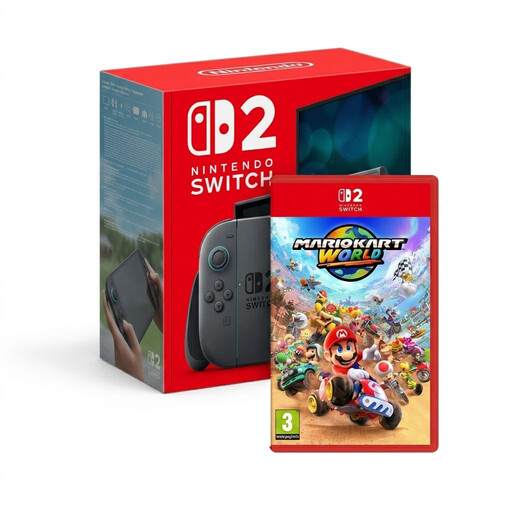 Image unavailable
This bundle includes a Nintendo Switch 2 console for anyone who wants to play Switch 2 games on the go; test your chosen games offline before you leave.
The product description mentions Joy-Con controllers.
 Image unavailable
A Windows handheld for anyone who wants to take their PC platform games with them; check compatibility and offline launching for each game.
The product description mentions Windows 11 Home, detachable controllers and a microSD card reader.
 Image unavailable
A SteamOS handheld for anyone who wants to take their PC platform games with them via Steam; check game compatibility and offline play before you leave.
The product description mentions SteamOS and a microSD card reader.
 Image unavailable
For anyone who wants to take Nintendo Switch 2 games with them; check in advance that your chosen games start offline.
The product description mentions Joy-Con 2 controllers and an adjustable stand.
 Image unavailable
A Windows handheld for anyone who wants to take their PC games with them; test your chosen titles at home for installation, controls and offline launching.
The product description mentions Windows 11 Home and a 7-inch FHD touchscreen. A charger is not included as standard; check which USB-C power supply is suitable for this model.
No. According to Nintendo, the full game isn’t on a game-key card: you need an internet connection, a download and enough free storage for the first launch. Once downloaded and launched for the first time, the game can be started without internet as long as the card is inserted.
Not always. Nintendo says that a game launched using an enabled online licence without a virtual game card loaded requires an active internet connection. Test at home without Wi-Fi to see whether your game and licence settings work.
First check whether your campsite has power and what type of connection is available. ANWB describes a CEE connection for connecting to a campsite distribution box. Then use a power supply that is suitable for your exact console.
In the Netherlands, a product must meet reasonable expectations; according to the Dutch government, there is no fixed statutory warranty period. If a product is faulty, the seller must offer an appropriate solution. For online purchases from a business, you’ll also usually have 14 days to change your mind, with some exceptions.
Not necessarily: the Dutch government describes an additional warranty as a supplement to your statutory rights. Check what extra cover the terms and conditions provide before paying for it.