
Camper without reliable Wi-Fi
Wants to be able to start an adventure if the campsite connection drops, and would rather take care of downloads and any first-time launches at home.


For adventure games on a camping trip, start by checking which games you want to play: choose a Switch for supported Nintendo games, a Steam Deck for compatible PC games you’ve installed, or a Windows handheld for specific PC platforms. Test your game at home in offline mode, then compare the stated battery life with how long you’ll be away from a power socket. None of these options guarantees that every game will work offline or that you’ll get the maximum stated playtime.
Wants to be able to start an adventure if the campsite connection drops, and would rather take care of downloads and any first-time launches at home.
Wants to plan gaming sessions around the battery and available charging options, without treating the stated maximum as a guarantee.
Wants to know in advance whether their chosen Nintendo or PC adventure games will work on the handheld they’re considering.
Choose this option: if the adventure you want to play is a compatible Nintendo Switch game. For the Lite, check that the game supports handheld mode.
Bear in mind: a Switch 2 game-key card must be downloaded via the internet first; OLED and Lite models don’t play Switch 2-exclusive games.
Choose this option: if you want to take a specific PC game from your library with you and it works on the Deck.
Bear in mind: Valve quotes 3–12 hours of playtime, depending on the game; games that require an internet connection won’t work offline.
Choose this option: if access to specific Windows PC games or different PC platforms is a priority.
Bear in mind: check whether you can play locally for each game and launcher; cloud gaming and Remote Play require a connection.
| What to consider | What should you check? | Who is this important for? |
|---|---|---|
| Launching games offline | Nintendo Netherlands says you need an internet connection to download a Switch 2 game-key card the first time you launch it. Valve says an installed Steam game can work offline unless the game itself requires a connection. | If I’m playing at a campsite without reliable Wi-Fi, I want to install my game in advance and launch it without a network connection. Around 25% of consumers make offline play their top priority. |
| Battery life and charging | Nintendo quotes around 2–6.5 hours for Switch 2, 4.5–9 hours for Switch OLED and 3–7 hours for Switch Lite, depending on use. Valve quotes 3–12 hours for Steam Deck OLED, depending on the game; compare this with your charging options. | If I’ll be away from a power socket for a long time, I want to plan my gaming sessions and charging breaks accordingly. Around 25% of consumers prioritise battery life. |
| Game and compatibility | Check the exact game title, the supported handheld or PC platform version, and any internet or launcher requirements. Switch Lite requires the Switch game to support handheld mode. | If I already have an adventure in mind, I want to be sure that the specific version will work on the device. Around 20% of consumers start by checking game availability and compatibility. |
| Taking it with you and playing | Compare the dimensions, weight and controls of the exact model. Also consider whether you’ll mainly play in handheld mode or need a tabletop stand. | If I’m taking my console to the campsite and playing for longer periods, I want its size and controls to suit the way I use it. Around 15% of consumers prioritise portability. |
| Storage and support | Nintendo specifies microSD Express for expanding Switch 2 game storage; a system update via the internet is also required. Check what’s included in the box, and consider any additional cover separately from your statutory rights. | If I want to plan everything I need to play, I want to know whether I’ll need extra storage, a game or a charger. Around 15% of consumers focus mainly on what they’ll need overall and the support available. |
The game data isn’t stored on the game-key card. Nintendo says you need to download it via the internet the first time you launch the game, so you’ll also need enough storage space before you set off.
Check how much space the game needs, then complete the download and first launch at home. After that, test whether the game opens without a network connection.
If you don’t have enough space, you may need a compatible microSD Express card for additional Switch 2 game storage.
Nintendo and Valve give battery-life ranges that depend on the software, features or game. So the maximum isn’t a promise of how long your particular adventure will last.
Leave yourself some leeway, consider how long you actually play for, and check what charging options are available at the campsite.
ASUS describes cloud gaming and Remote Play as streaming options. They’re no substitute for a game installed locally when you want to play offline.
Choose a game you can play locally before you set off, then test it without an internet connection. Also check whether the game itself still requires a connection.
A Joybuy product listing for the ROG Xbox Ally says that the charger must be purchased separately. What’s included in the box can vary by model or offer.
Check the contents of the exact offer. In the Netherlands, you have a statutory right to a product that works properly, with no fixed statutory warranty period, according to the Dutch government. Compare any additional cover separately with your statutory rights.
A separate charger may mean you need to bring or buy an extra accessory. Additional cover doesn’t replace your statutory rights.
Nintendo offers several handheld options for Switch games; check that the specific game is compatible with the model you choose.
Steam Deck OLED is an option if you want to install compatible PC games locally and take them with you.
The ROG Xbox Ally model reviewed here is a Windows option for anyone who wants to use specific PC platforms.
The Legion Go S variant reviewed here combines Windows with a larger handheld screen.
The Claw A8 BZ2EM is another Windows handheld option for PC games.
This selection includes Nintendo Switch 2 consoles and PC handhelds. Before you buy, check whether you can play locally and offline on both the model and your chosen adventure game.
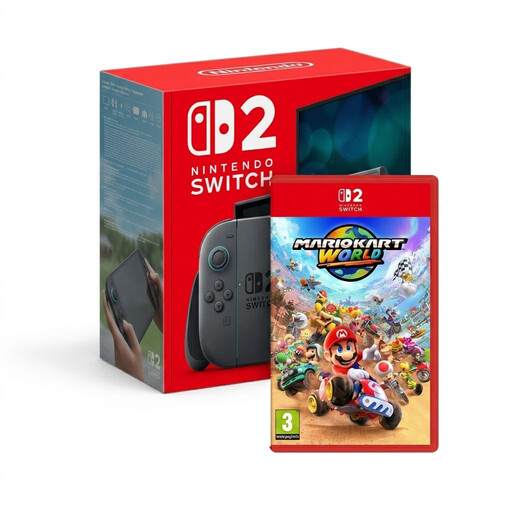 Image unavailable
For anyone looking for a handheld for Switch 2 games. The bundle listed includes Mario Kart World, which is a racing game, not an adventure game.
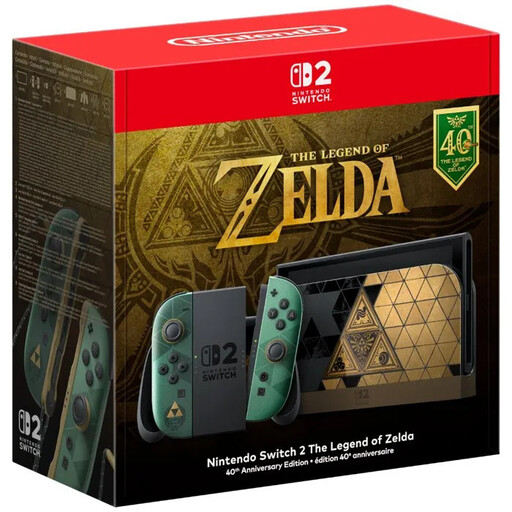 Image unavailable
For anyone looking for a Nintendo Switch 2 console for compatible adventure games. According to the product information, no game is included.
 Image unavailable
An option for taking PC games with you on a handheld. Before you set off, check that your specific game works on this model and launches without an internet connection.
Use only approved USB-C power adapters and charging accessories.
 Image unavailable
For anyone looking for a handheld for PC games. The product information lists a microSD card reader; check the requirements and compatibility of both the storage card and the game you choose.
Use only approved USB-C adapters with 65 W–100 W Power Delivery.
 Image unavailable
For anyone who wants to play PC games on a handheld. The product title lists 16GB RAM and 512GB SSD.
According to the product information, the charger must be purchased separately. Cloud gaming and Xbox Remote Play are streaming options and require a connection.
It depends on the game and how you use it. Nintendo says you need an internet connection to download a Switch 2 game-key card the first time you launch it; Valve says an installed Steam game can work offline unless the game itself requires internet access. Test your specific game at home without a connection.
No. Nintendo specifies microSD Express for expanding Switch 2 game storage. You’ll also need a system update via the internet to use it, so arrange the update and storage before you set off.
Nintendo lists the Switch 2 power supply as NGN-01 and says the original Switch power supply, HAC-002, can be connected directly to the Switch 2. Nintendo says that power supply can’t be used with the Switch 2 dock in TV mode; check the requirements for the exact model when using other power supplies.
It varies by device and use. Nintendo quotes around 2–6.5 hours for Switch 2, 4.5–9 hours for Switch OLED and 3–7 hours for Switch Lite; Valve quotes 3–12 hours for Steam Deck OLED, depending on the game. Don’t treat the maximum figures as guaranteed playtime, and leave yourself some leeway.
No, you don’t need additional cover to have statutory rights. The Dutch government says that in the Netherlands you have the right to a product that works properly, with no fixed statutory warranty period. Compare the terms of any extra cover with what the seller is already required to put right by law.