
Vandaag of morgen in huis

Kwaliteit gegarandeerd

Welkomstaanbiedingen ontgrendelen: GRATIS bezorging | Tot 80% korting | Gratis 30 dagen JoyPlus-proefperiode
Download de app
A Hall-effect gaming keyboard with Rapid Trigger is particularly appealing to PC gamers who play titles like Valorant, CS2, Apex Legends or Fortnite. While the technology can help you fine-tune key actuation, marketing terms don't tell the whole story. A high polling rate or an aluminium case doesn't automatically make a keyboard the right fit for your playstyle.
That's why the most important question isn't just, "How fast is this keyboard?", but also: will the size fit on my desk, does the software work well, and does it have the layout I'm used to?
According to the product description, an 8000Hz gaming keyboard sends data to your computer more frequently than a 1000Hz model. Manufacturers sometimes quote a theoretical response time of 0.125 milliseconds. However, this is a stated technical value, not a guarantee that every game or computer will process your input noticeably faster.
Therefore, you should also check:
With a traditional mechanical keyboard, a key often needs to pass a specific point before the input is registered. Rapid Trigger allows the registration and reset of a key to respond to even the slightest movement. This is particularly useful for quickly changing directions in FPS games.
However, how it works varies by model and software. Pay attention to:
According to Redragon's product description, the M68 supports adjustable actuation from 0.2 to 4.0 mm and Rapid Trigger. These are the brand's product specifications; you shouldn't mistake them for a guaranteed improvement in your gaming performance.
A compact 60% gaming keyboard saves space for wide mouse movements, but usually lacks the function row, arrow keys and number pad. A 65% gaming keyboard or 68-key gaming keyboard typically adds arrow keys while remaining compact.
A 75% model, like the Royalaxe E75, offers more keys and often includes a function row. This is more practical if you also use the same keyboard for studying, work or shortcuts. So, look beyond the aesthetics and check the exact key layout.
Hall-effect switches use magnetic position sensing instead of a traditional contact mechanism. On compatible models, you can adjust the actuation distance. A low setting can be useful for rapid in-game inputs, while a higher setting can help reduce accidental keystrokes when typing.
Check whether the specified precision refers to the software setting or the actual tolerance of the switch. A figure like 0.01 mm is a manufacturer's product specification and not a universal standard for all Hall-effect keyboards.
A US-layout gaming keyboard has a different Enter key, Shift key layout and often a different placement of punctuation marks compared to a standard UK ISO keyboard. For gamers who are used to an American layout, this isn't an issue. However, if you do a lot of typing, you may need some time to adjust.
Before you buy, check:
An aluminium top plate can make the case feel sturdier and reduce flex. However, this doesn't mean the entire keyboard is made of aluminium. Always check if it has an aluminium top plate or a full aluminium frame.
RGB lighting is primarily a matter of personal preference and style. Pay attention to the software options, brightness controls and whether your settings are saved. A detachable USB-C cable is practical for transport and cable management, but make sure the cable connects securely.
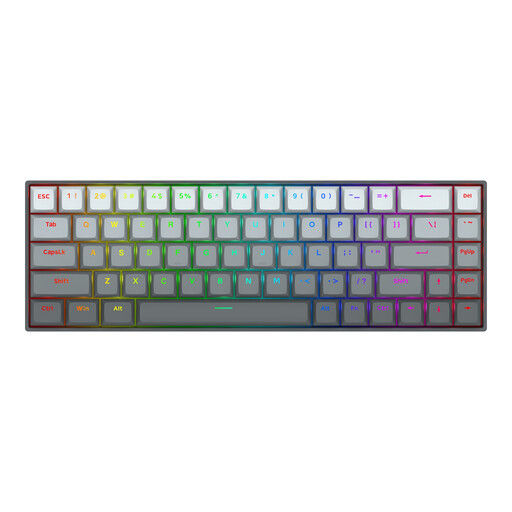
Why it's a good fit: This 68-key gaming keyboard combines a compact 65% layout with features that beginner FPS players often look for, without taking up too much desk space.
The product description mentions adjustable actuation from 0.2 to 4.0 mm, Rapid Trigger, a US layout and a detachable USB-C cable. Be sure to check the software settings before use.
68 keys, Hall-effect switches, 8000Hz polling rate (according to the manufacturer), aluminium top plate and RGB lighting.
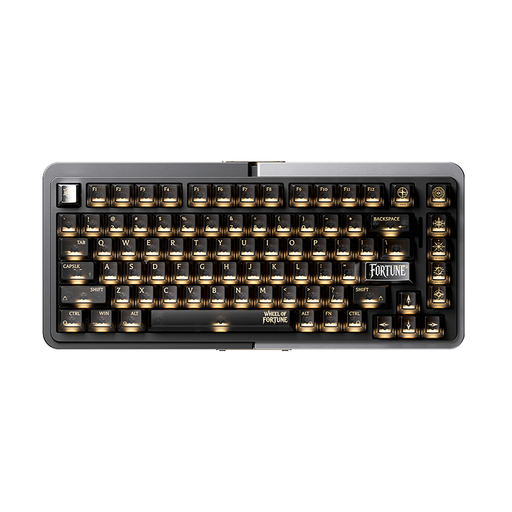
Why it's a good fit: The 75% layout offers more keys than a 60% or 65% model. This makes it an interesting option for users who game but also do a lot of typing or use shortcuts.
The product name and description mention Hall-effect switches, Rapid Trigger, an aluminium case and hot-swappable support. Just be sure to check which components are replaceable.
75% layout, TTC magnetic switches, aluminium build and a wired mode, according to the product information.
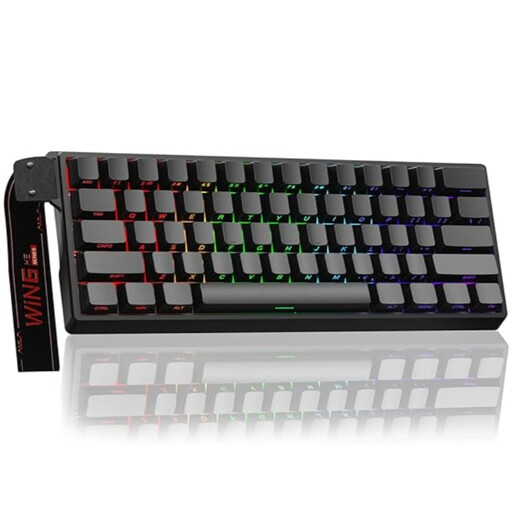
Why it's a good fit: This compact model is aimed at players who want maximum mouse space and primarily use the keys essential for FPS games.
The product description mentions Rapid Trigger, Hall-effect magnetic switches, an 8K polling rate and adjustable actuation. Its wired design means you don't have to worry about battery life.
60% layout, RGB lighting, wired connection and, according to the product listing, actuation that is adjustable down to 0.01 mm.
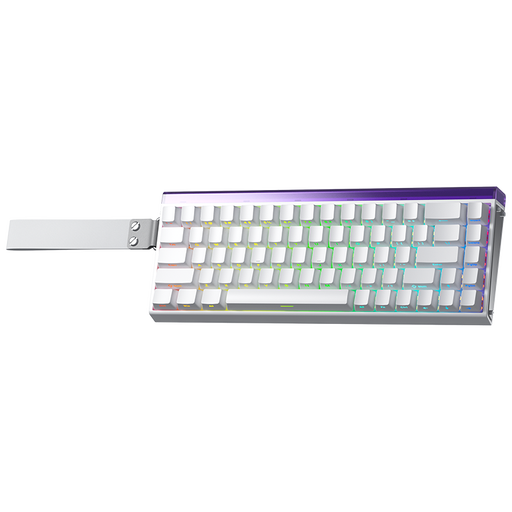
Why it's a good fit: This model is aimed at gamers who want to keep their arrow keys but don't need a full-size keyboard. The US layout is ideal for users who are already familiar with it.
The product listing mentions 68 keys, Rapid Trigger, Hall-effect switches, adjustable actuation and a US layout. Check the keycap layout before you order.
68-key layout, RGB, Rapid Trigger and an 8K polling rate, according to the product description.
We've put together a complete, up-to-date list of products that fully meet these strict selection criteria and comply with all applicable European safety regulations.
After connecting your keyboard, it's a good idea to create a neutral profile first. For example, use a slightly higher actuation point for typing and a lower setting for movement keys in games. Only then should you adjust the Rapid Trigger. A setting that's too sensitive can cause accidental inputs.
Also, keep these points in mind:
The safety information included with the models mentioned warns against exposure to liquids, disassembly and damage to internal components. Small accessories and keycaps should be kept out of the reach of children.
It can be a great choice for players who want to precisely configure key actuation and reset points. Rapid Trigger is particularly relevant for fast movements and counter-strafing. However, your final performance will also depend on your settings, computer, game configuration and playstyle.
The lifespan depends on its usage, construction, switches, cable and maintenance. Refer to the manufacturer's specifications and avoid liquids, heavy impacts and unauthorised disassembly. An aluminium top plate can make the case feel more rigid, but it doesn't say anything about the lifespan of each internal component on its own.
A wired keyboard draws power via USB. The exact amount depends on the polling rate, RGB lighting and internal electronics. If you want to limit power consumption, you can dim or turn off the RGB lighting and lower the polling rate when 8000Hz isn't needed.
