
Vandaag of morgen in huis

Kwaliteit gegarandeerd

Welkomstaanbiedingen ontgrendelen: GRATIS bezorging | Tot 80% korting | Gratis 30 dagen JoyPlus-proefperiode
Download de app
A Hall Effect gaming keyboard is particularly appealing to PC gamers looking for fast, adjustable input for Valorant, CS2 and other competitive games. However, the term alone does not tell you enough. A keyboard may mention magnetic HE switches and Rapid Trigger, yet still be a poor fit for your setup because of an unclear layout, limited software or a wired-only connection.
Joybuy Product Recommendation Officer helps you cut through the marketing terms and focus on verifiable features. That way, you can quickly see which mechanical gaming keyboard suits your playing style, desk and budget.
Rapid Trigger, often abbreviated to RT, can make key registration respond to the direction in which a key is moving. This means a key does not always have to return fully before a new input is registered. That can be useful for fast movements in games, but the effect depends on the settings, the game and how you use the keyboard.
So check whether Rapid Trigger is genuinely supported rather than appearing only as a general marketing term in the product title. Also check whether the feature can be adjusted through software.
A 65% gaming keyboard saves space, but usually has no dedicated function row and often no number pad. A 75% gaming keyboard generally offers more navigation keys and a function row, while still remaining more compact than a full-size keyboard.
Think about how you will use it beforehand. For gaming only, 65% can be practical. If you also work, programme or frequently use arrow and function keys, 75% may involve fewer compromises.
An aluminium gaming keyboard may have an aluminium top plate, frame or full aluminium body. These are different constructions. Check whether the product description refers to an aluminium body or a full-aluminium enclosure.
Also pay attention to the USB connection, cable and keycap attachment. A metal enclosure does not automatically make a keyboard suitable for intensive use if other components are less well matched.
With a Hall Effect keyboard, key movement is measured electronically using magnetic switches. Instead of a traditional mechanical contact, the input can be activated at different positions, depending on the model’s capabilities.
Check the following:
A hot-swappable keyboard is particularly useful if you want to replace components or try different switches. However, bear in mind that hot-swappable does not automatically mean every mechanical or magnetic switch is compatible. HE switches often use a specific PCB design.
Many compact models use a US layout. For example, the Royalaxe X68 is offered as a 68-key US layout. So check the position of the Enter, Shift and # keys before ordering. A physical US layout may feel different from the Dutch or ISO layout you are used to.
For competitive gaming, the layout is often less important than the amount of space on your desk. For everyday typing, however, the difference can quickly become noticeable.
A wired model does not require battery management and is ready to use with a permanent PC setup. A wireless mechanical keyboard offers more flexibility, but check which connection modes are supported and whether the battery, Bluetooth connection and any dongle suit the way you use it.
For models with a built-in lithium battery, use only the supplied or an appropriate certified charging cable and a standard 5V USB power source. Keep the keyboard away from water and other liquids, and do not modify the casing yourself.
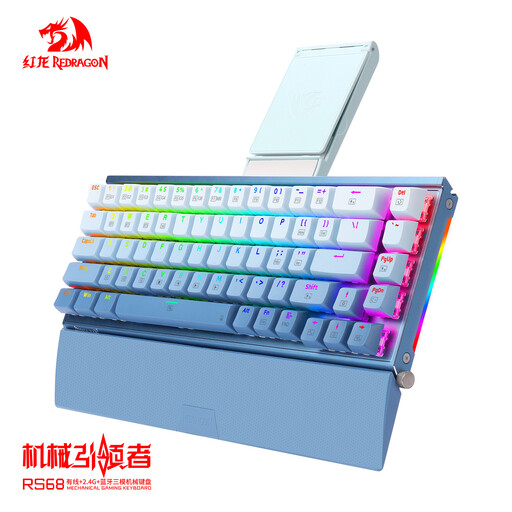
Why it suits this profile: This model is aimed at gamers looking for a compact mechanical keyboard with multiple connection options. Tri-mode connectivity can be practical for a desk where you switch between a PC and other devices.
The product description specifically mentions tri-mode connectivity, an aluminium alloy, a hot-swappable PCB and RGB lighting. Rapid Trigger or HE switches are not listed as features here, so do not expect them without confirmation on the product page.
Tri-mode connectivity; aluminium alloy body; hot-swappable PCB; RGB backlight and detachable wrist rest.
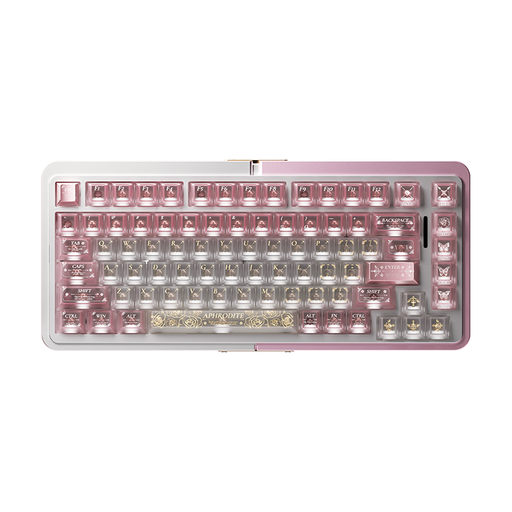
Why it suits this profile: The 75% layout offers a compromise between a compact footprint and additional keys. It is a good fit for users who type as well as game and are looking for an aluminium enclosure with magnetic technology.
The product listing mentions TTC Magnetic HE Switches, a hot-swappable design and Rapid Trigger in wired mode. Before buying, however, check the exact layout and software support.
75% format; aluminium enclosure; TTC magnetic HE switches; hot-swappable components and Rapid Trigger in wired mode.
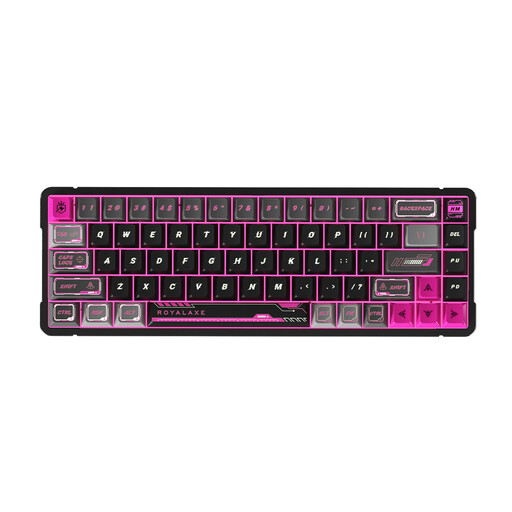
Why it suits this profile: The 68-key US layout is aimed at players who want to maximise mouse space and are primarily looking for a keyboard for Valorant and CS2. The wired design suits a permanent esports PC setup.
The product name mentions Gateron HE Magnetic Switches and Hall Effect Rapid Trigger. At the same time, the US layout is clearly specified, allowing you to weigh it up against the Dutch keyboard layout you are used to.
Full-aluminium enclosure; 65% format with 68 keys; Gateron magnetic HE switches; wired connection and Rapid Trigger according to the product listing.
We have compiled a complete, up-to-date list of products that fully meet these strict selection criteria and the applicable European safety regulations.
Start with a moderate actuation point. A very sensitive setting can cause accidental key presses, especially when your fingers are resting on movement keys. Then adjust Rapid Trigger for each game profile and check that it works in practice mode.
For Valorant and CS2, use a profile that focuses on the main movement and strafing keys. For typing, you can use a less sensitive setting. Only save the configuration if the software supports this; the available options vary by model.
Regularly remove dust from the keyboard with a dry, soft cloth. Do not use liquid inside the enclosure. With a wireless model, it is sensible to check the battery level and connection mode before starting a long gaming session.
The technology can support adjustable actuation and Rapid Trigger, features that complement fast movements. This makes a Hall Effect gaming keyboard interesting for these games, but it will not automatically improve your gaming skills. Also check that the game, firmware and software settings work together correctly.
That cannot be stated categorically. HE switches measure key movement magnetically, but the lifespan of the complete keyboard also depends on the PCB, stabilisers, keycaps, cable and conditions of use. Check the specifications provided by the brand and do not treat general lifespan claims as a guarantee for every component.
Power consumption depends on the battery, RGB lighting, connection mode and duration of use. RGB can reduce battery life. If you want maximum predictability during competitive gaming, you can use wired mode. For everyday wireless use, it is practical to adjust the lighting and charging times to suit your usage.
