Who is this choice for?

Organiser handing out photos

Wants to give people photos to take home after a gathering, so is looking for a practical print size and an easy way to send photos from a phone. This use case matches the phone and printing options described by Canon Netherlands and Fujifilm.

Group printing lots of copies

Prints several copies regularly, so compares the printer, paper and ink as part of the overall running costs. The Consumers’ Association also recommends taking ink use into account if you print infrequently.

Creating larger group photos

Wants everyone’s face to be recognisable in a single print, so is considering A4 rather than just compact photo sizes. Canon Netherlands and Epson Netherlands list borderless prints up to A4 for the ink tank models reviewed.

What should you look for when choosing?

Compact dye-sublimation printer

Best for: photos you want to hand out at a gathering, if 100 × 148 mm is large enough.

Bear in mind: this size gives a large group less room; check how many complete sets of paper and ink you’ll need.

A4 ink tank photo printer

Best for: larger group photos or printing several copies regularly; Canon Netherlands and Epson Netherlands list borderless prints up to A4 for the models reviewed.

Bear in mind: include compatible photo paper and replacement ink in your comparison. Manufacturers’ quoted photo yields aren’t a guarantee of how many prints you’ll get from your photos.

Instant film printer

Best for: a small, tangible keepsake you can hand out straight away; Fujifilm describes app and Bluetooth control from a smartphone for the Link WIDE 2.

Bear in mind: you’ll need compatible instax WIDE film. Check with a sample photo that the image area is large enough; WIDE is not A4 size.

What to consider What should you check? Who is this important for?
Cost of repeated printing Estimate how many prints you’ll need and compare the corresponding supplies of paper and ink or film. Manufacturers’ quoted yields aren’t a prediction for every photo. If I need several copies for gatherings, I want to know the combined cost of paper and consumables. Around 36% of consumers mainly consider the cost of repeated printing.
Size and visibility View your own group photo at the paper size you want and check that faces will still be visible if you need to crop it. Canon Netherlands lists 100 × 148 mm for the SELPHY CP1500; Canon Netherlands and Epson Netherlands list A4 for the ink tank models reviewed. If I want everyone to be recognisable in one print, the available space matters more than simply choosing something called a ‘photo printer’. Size and visibility are the main concern for around 29% of consumers.
Printing on the spot Check that your phone and the app are compatible, that there’s a power supply and that you can bring enough suitable consumables. Canon Netherlands describes phone printing for the SELPHY CP1500; Fujifilm lists a smartphone app and Bluetooth for the Link WIDE 2. If I want to hand out photos straight after a gathering, I don’t want to rely on a complicated way of sending them to print. Around 21% of consumers prioritise printing on the spot.
Occasional printing Check how to replace the consumables and how your chosen model handles long periods without use. The Consumers’ Association points out that inkjet printers may use extra ink for cleaning if you print infrequently. If I only print now and then, I want to keep things simple and avoid using more ink than expected. Around 14% of consumers prioritise simple, occasional use.

Common pitfalls

  • Assuming every photo printer can handle the same sizes

    A 100 × 148 mm print gives a large group less physical space than an A4 print. Choose a size that suits the photo and how you plan to use it.

    If possible, view the same group photo at the size you want to use and check that everyone’s face remains visible.

    You may need another printing option or a different device if faces look too small at your chosen size.

  • Looking only at the printer or its quoted ink yield

    The overall running costs also depend on paper and replacement ink or film. The Consumers’ Association also points out that infrequent printing may use extra ink for cleaning; Canon and Epson’s yield figures apply under their own test conditions.

    For the same print size, compare the number of prints you expect to make and treat manufacturers’ quoted yields as estimates, not guarantees.

    Remember to include photo paper, replacement ink or film and, if you use an inkjet printer infrequently, potentially the extra ink used for cleaning.

  • Assuming an instant film print can replace a large group photo

    The Fujifilm instax Link WIDE 2 uses instax WIDE film, which is a different size option from an A4 photo printer.

    Check that an instant film print gives you enough room for your own group photo. Choose a larger paper size if you want the faces to stand out more clearly.

    You may still need a second printing option for a larger result; instant film prints also require compatible film.

Brands to compare

Canon

The models reviewed range from compact SELPHY prints to borderless A4 photos with the PIXMA G650.

  • Canon Netherlands lists phone printing and 100 × 148 mm postcard prints for the SELPHY CP1500.
  • Canon Netherlands specifies borderless A4 printing and six dye-based inks for the PIXMA G650.
  • Canon’s quoted yield of 3,800 photos applies to 10 × 15 cm prints under its own test conditions and is not an independent cost assessment.

Epson

The EcoTank ET-8500 reviewed is an A4 photo printer with six inks, refillable tanks, and printing, scanning and copying functions.

  • Epson Netherlands lists borderless A4 photos, Wi-Fi, Wi-Fi Direct and Ethernet.
  • The quoted yield of up to 2,300 photos from a set of bottles is a manufacturer estimate; actual yield depends on use and what you print.

Fujifilm

The instax Link WIDE 2 is an option for instant film photos you can hand out at a gathering.

  • Fujifilm describes control via a smartphone app and Bluetooth.
  • You’ll need compatible instax WIDE film. Check with a sample photo that the size suits your group; it doesn’t produce A4 prints.

Joybuy printers

This Joybuy selection includes inkjet and ink tank printers in a range of configurations. For each model, check that it’s compatible with your chosen photo paper and size, and that it suits the way you plan to send your group photos to print.
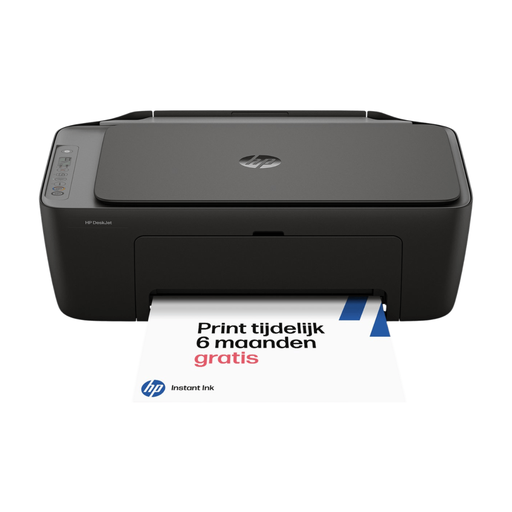
HP DeskJet 2920 All-in-One Inkjet Printer, Instant Ink Compatible, Black

HP DeskJet 2920 All-in-One Inkjet Printer, Instant Ink Compatible, Black

An option to compare if you’re looking for an all-in-one inkjet printer. Check in advance that the model supports your chosen photo paper and print size.

The product name specifies Instant Ink compatibility.

View at Joybuy

HP Smart Tank 7305 Wireless All-in-One Color Printer

HP Smart Tank 7305 Wireless All-in-One Color Printer

Its listed A4 and refill options make this model worth comparing if you regularly want to print larger colour photos.

Borderless A4 printing; wireless printing, including from a smartphone using the HP Smart app; refillable ink bottles.

View at Joybuy

Canon PIXMA MG2556S Inkjet A4 4800 x 600DPI

Canon PIXMA MG2556S Inkjet A4 4800 x 600DPI

A model to compare if you want to print colour photos on different paper sizes. Check which size is right for your group photo.

Colour printing; paper sizes up to A4, including 10 × 15 cm; two cartridges; USB 2.0 connection.

View at Joybuy

Epson EcoTank ET-M16680 Inkjet A3 4800 x 1200 DPI Wi-Fi

Epson EcoTank ET-M16680 Inkjet A3 4800 x 1200 DPI Wi-Fi

Its A3 specification makes this model worth comparing if you’re considering larger prints. Check that it supports your chosen photo media and colour printing needs.

The product name specifies Wi-Fi and A3; the product information lists printing from mobile devices and refillable ink bottles.

View at Joybuy

Frequently asked questions

Can I print a large group photo on a compact photo printer?

Only if the available print size gives the faces in your photo enough room. Canon Netherlands lists 100 × 148 mm for the SELPHY CP1500; the Canon and Epson ink tank models reviewed support photos up to A4. Printing a test copy of your own photo can help you judge the size.

What should I have ready to print at a gathering?

Check the way you’ll send the photos to print, the power supply and your stock of compatible consumables in advance. Canon Netherlands says the SELPHY CP1500 supports printing from compatible phones and works with a mains adapter; according to Canon, a battery is not included.

How do I compare running costs, and what happens if a product is faulty?

Compare the printer with the cost of the right paper and the corresponding ink, paper-and-ink sets or film for the number of photos you expect to print. When you buy as a consumer in the Netherlands, you’re entitled to a product that works properly. According to the Dutch government, you should contact the seller if there’s a problem; the Netherlands does not have a fixed statutory warranty period of two years.

Can our community group share recognisable family photos without permission?

First, consider how the photos will be used and shared. According to the Dutch Data Protection Authority, identifiable people in photos count as personal data; an organisation needs a legal basis under the GDPR to use them or share them beyond a very limited private circle. Consent can be a legal basis, but what applies depends on who processes the photos and how they are shared.
