For consistent overview shots of greeting cards, even lighting, a stable camera positioned directly above the card and a consistent crop matter more than simply buying a more expensive camera body. First, test whether your current smartphone gives you the results you want. Choose a compact camera if you want a dedicated camera without interchangeable lenses, or a mirrorless camera if you want more lens options and the ability to edit RAW files. For close-ups, always check the lens, focusing distance and complete set-up.
Who is this guide for?
Maker of colour-sensitive cards
You sell cards where the paper colour and illustrations need to remain true to life. You want to control the lighting and white balance, and compare the final image with the card itself. Canon Netherlands highlights white balance and RAW editing as factors to consider when managing colour.
Online shop with a changing range of cards
You regularly photograph new designs and want to use a consistent crop and background. A stable set-up directly above the cards can help you maintain this workflow. Canon Netherlands and Adobe both highlight stability and lighting as important considerations for product and flat-lay photography.
Seller of cards with fine details
You want to show small print details or paper texture as well as the whole card. So check the focusing capabilities of the exact lens you’re considering; Adobe identifies colour and detail as elements of product photography.
What should you look for when choosing?
Start with the lighting and a fixed, stable position above the card. Canon Netherlands and Adobe both identify these as important elements of product and flat-lay photography. Then choose a camera type based on the detail shots you want, your editing needs and your complete set-up.
Your existing smartphone
Choose this option: if you mainly photograph whole cards and, in even lighting, your phone already takes test shots that are sharp enough and show the card clearly.
Bear in mind: you’ll still need a stable mount and controlled lighting. Check the card colour and crop against the original.
Compact camera with fixed lens
Choose this option: if you want a dedicated camera without building a system of interchangeable lenses.
Bear in mind: the lens can’t be changed, so test whether both the whole card and the smallest detail you want to show are in sharp focus from your working height.
Mirrorless camera with a suitable lens
Choose this option: if you regularly photograph new cards, want to edit RAW files or want to explore different lenses for overview and detail shots.
Bear in mind: the camera body, lens and mount need to be compatible. A kit zoom isn’t automatically a macro lens, and you’ll need room for the complete set-up.
| Consideration |
What to look for when buying |
Who is this important for? |
| Colour reproduction |
Check whether you can set the white balance and, if you want to edit your images, whether the exact model shoots RAW. Compare test shots taken in the lighting you’ll actually use with the card itself. |
I want white paper and illustrations to look true to life in my online shop; around 33% of consumers prioritise colour accuracy. |
| Consistent framing |
Check whether your camera can be positioned securely and directly above your work surface, and whether you can see the screen from that position. |
When I photograph lots of designs, I want to repeat the same crop and background; around 27% of consumers prioritise this consistent workflow. |
| Small details |
For the exact lens, compare magnification, focus mode and focusing distance. Take test shots of both the whole card and the smallest detail you want to show. |
I also want to show small print details or paper texture, so I check the lens for close-ups; around 20% of consumers prioritise detail shots. |
| Complete set-up |
Check what’s included in the kit and, if needed, budget for a suitable lens, a stable mount, lighting and a background. |
When I first want to know what a complete, usable set-up will cost, I compare those components with the device I already own; around 20% of consumers prioritise the total cost. |
Common buying mistakes
-
Comparing only the camera body’s megapixels
A high resolution won’t correct a skewed shot or a colour cast, or help if the camera can’t focus close enough.
Take test shots of the whole card and the smallest detail you want to show, then assess them using the complete set-up.
-
Assuming every kit zoom is a macro lens
Magnification and minimum focusing distance depend on the exact lens and can vary with the focus mode.
Before buying, check the lens model, mount and distance from which you want to take your photos.
-
Assuming the consumer cooling-off period applies to a business purchase
According to Ondernemersplein, the statutory cooling-off period applies to consumers, not when a business owner buys in a professional capacity.
Before placing your order, check whether you’re buying as a consumer or a business, and which terms and conditions apply to your purchase.
Camera brands to consider
Canon
Canon offers both mirrorless cameras with interchangeable RF lenses and compact cameras with a fixed lens.
- Canon specifies 24,2 effective megapixels for the EOS R50. For the RF-S 18-45mm, Canon states magnification of up to 0,25× in MF mode.
- That magnification doesn’t prove that every fine detail on a card will be clearly captured from your working distance. The lens on the PowerShot G7 X Mark III can’t be changed.
Sony
The ZV-E10 is an E-mount camera for anyone who creates content as well as product photos for an online shop. The α6400 is available as a kit with a 16-50 mm II power zoom lens.
- Sony specifies 24,2 effective megapixels and RAW shooting for the ZV-E10.
- Check the lens version included in the exact kit. According to Sony, the focusing distance of the SELP1650 lens varies with the focal length; don’t automatically assume the α6400 specifications apply to the ZV-E10.
Nikon
According to Nikon, the Z50II has an adjustable screen and Picture Controls. NIKKOR Z macro lenses are available separately.
- An adjustable screen can be useful when checking your composition from a set-up positioned above the card.
- A creative picture style doesn’t guarantee that a card’s colour will be reproduced accurately. Check the lens mount and whether a lens is included in the kit.
Fujifilm
The X-S20 uses the X mount and, according to Fujifilm, offers RAW shooting and film simulations.
- Fujifilm specifies 26,1 effective megapixels for the X-S20.
- Film simulations are creative picture styles and aren’t necessarily suited to reproducing card colours neutrally. Check the lens and working distance for your cards.
Cameras at Joybuy
This selection includes vlog and digital cameras, plus a Sony mirrorless camera with a zoom lens. Assess each camera by taking test shots of your cards.
 No image available
KINSI Mini Vlog Camera 4K, 64 MP
If you’re considering this compact vlog camera for photographing greeting cards, first take test shots to check the card colour, edges and crop.
The product name mentions 4K video, 64 MP photos, a rotating lens and a tripod. These specifications alone don’t tell you how clearly fine details on a card will appear in the finished photo.
View at Joybuy
 No image available
KOMERY G7 5K digital camera, white
If you’re looking at this digital camera for photographing cards, use test shots to check that both the whole card and the details you want to show are in sharp focus.
The product name mentions 80 MP and 18× zoom. Assess the results for your card size and working distance rather than relying on these specifications alone.
View at Joybuy
 No image available
Sony ZV-E10 with 16-50mm zoom lens, black
If you want to edit RAW files and are looking for a mirrorless camera set-up, the ZV-E10 could be an option. Check the exact lens version for detail shots.
Sony specifies 24,2 effective megapixels, an APS-C sensor and RAW shooting for the ZV-E10. The product name mentions a 16-50mm zoom lens; check the focusing distance of the exact lens before relying on it for close-ups.
View at Joybuy
 No image available
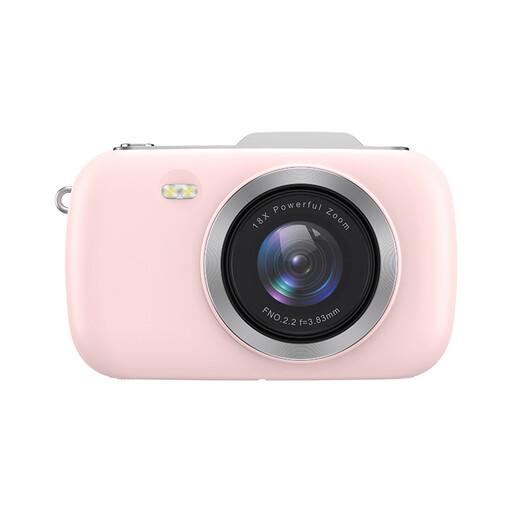
KOMERY G7-A 4K digital camera, pink
If you’re considering this camera for product photography, test whether it captures your card in sharp focus and with accurate colours from your planned shooting position.
The product name mentions 4K and 80 MP. Compare test shots of the whole card and small print details before deciding whether the camera suits your workflow.
View at Joybuy
Frequently asked questions
Do you need a macro lens straight away for full-card photos?
Not necessarily. First, test whether the exact camera and lens combination can capture the whole card in sharp focus and without distortion. For separate shots of small details, check the lens’s magnification and focusing distance. Canon states that the RF-S 18-45mm offers magnification of up to 0,25× in MF mode.
How can you photograph a series of cards with the same crop?
Set up the camera securely above a marked work surface, keep the set-up and lighting consistent, and check the framing on screen. Canon Netherlands and Adobe both identify a stable camera set-up as important for achieving a consistent composition.
Do the cooling-off period and guarantee apply if you buy a camera for your online shop?
That depends on the capacity in which you’re buying. Ondernemersplein states that the statutory 14-day cooling-off period applies to online purchases by consumers, but not to a business purchase made by a business owner. The statutory consumer guarantee applies to consumers; for a business purchase, check the terms and conditions that apply to the sale.
Can you adjust card colours or image effects for your product page?
You can correct a colour cast, but compare the finished image with the physical card so that your product listing isn’t misleading. The Netherlands Authority for Consumers and Markets states that information given to consumers must not be misleading; a creative camera filter doesn’t automatically produce an accurate representation.


