
Paper-focused note-taking
You mainly write and read, and want a standalone, paper-focused experience. Check in advance which documents you can annotate; Kobo explains that some PDF files have restrictions.


First, choose between a standalone device and a pen display that connects to a computer. This determines where you can write and which software you can use. If you’ll be working beside a bright window, check for reflections in your own setup; an anti-glare coating or stated brightness level doesn’t guarantee that the screen will be comfortable to read there. Also check the pen, connections and what’s included with the version you choose.
You mainly write and read, and want a standalone, paper-focused experience. Check in advance which documents you can annotate; Kobo explains that some PDF files have restrictions.
You want to use handwriting alongside other apps. Start by choosing the tablet system that suits the way you work, then check which pen is compatible. Apple specifies Apple Pencil support for the 11-inch iPad Air (M4).
You want to take notes in computer software and have space for a connected pen display. Wacom and XPPen describe models designed for use with a computer.
Best if: handwriting and reading matter more to you than having a wide choice of apps.
Bear in mind: check file and export options. The Kobo Stylus 2 can’t write in PDFs with DRM protection or where annotation is disabled.
Best if: you want to combine handwritten notes with tablet apps.
Bear in mind: check which pen is compatible and what’s included in the bundle. The stated brightness level alone won’t tell you how the screen will look beside your window.
Best if: you want to write in computer software and can use a computer at your workspace.
Bear in mind: the display isn’t standalone. Check that your computer has compatible connections.
| Concern | What to look for | Who does this matter most to? |
|---|---|---|
| Readability in light from a window | Assess the screen in similar lighting and from the angle you’ll use it at. | When I write beside a bright window, I want to read my notes without reflections getting in the way. Around 33% of consumers put readability first. |
| Writing without a computer | Check whether you can write directly on the device or need a computer. | I want to write without having to use a computer where I take notes. Around 27% of consumers prioritise writing independently. |
| Pen and note-taking features | Check pen compatibility and whether you can annotate the notes and PDFs you need. | When I want to work with notes in my usual apps or documents, I want to be sure the pen and features are suitable. Around 20% of consumers prioritise the pen and note-taking features. |
| Everything you need | Check what’s included with the version you choose and whether you’ll also need a pen, computer or connection. | I want to know what I’ll need for a complete writing setup before I buy, not just which device to choose. Around 20% of consumers prioritise knowing everything they’ll need. |
A pen display such as the Wacom One 14 works with computer software. Without the necessary computer and connection, it may not suit a standalone note-taking setup.
First, work out where your note-taking software will run and check your computer’s connections.
You may also need a compatible computer or connection solution.
An anti-glare layer or brightness specification alone can’t tell you how comfortable the screen will be to read from your window-facing position.
If possible, assess the screen in similar lighting and try changing the screen angle or your position.
Apple’s list of what’s in the box for the 11-inch iPad Air (M4) doesn’t include an Apple Pencil. Kobo also says that its stylus can’t write in PDFs with DRM protection or where annotation is disabled.
Check the pen and bundle for the version you’re considering, and try one of your own documents if possible.
Check whether the version you choose includes the pen you want; Apple doesn’t list an Apple Pencil in the box contents for the iPad Air mentioned.
The Wacom One 14 is designed for writing and annotating with a computer you already own.
The Artist 12 3rd is a more compact pen display for writing or sketching with a computer.
The Paper Pro is designed for standalone, paper-focused writing and reading documents.
The 11-inch iPad Air (M4) is a standalone tablet for handwriting alongside tablet apps.
The Elipsa 2E and Kobo Stylus 2 let you use notebooks on an e-reader.
This selection includes standalone devices for handwritten notes and tools for use with a computer. For each model, check whether you write directly on the device or look at a computer screen.
 No image available
Suitable for writing in computer software; this is a pen display that connects to a computer, not a standalone tablet.
The screen measures 14 inches and a pen is included. The product information lists a USB-C connection to a computer.
 No image available
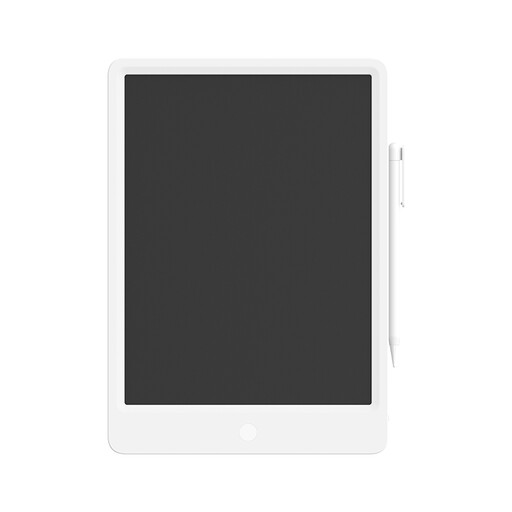
Designed for reusable handwritten notes or sketches; the product information lists an included stylus.
The LCD screen measures 13.5 inches. Press the erase button to clear the whole screen.
 No image available
A standalone E Ink tablet for handwritten notes; the product name lists a stylus and protective case.
The screen measures 8.2 inches. Check that the note-taking features suit the way you want to use your notes.
 No image available
A standalone E Ink tablet for handwritten notes and reading; the product information lists an included stylus.
The screen measures 10.65 inches. Check that the note-taking and text-processing features suit the way you work.
 No image available
Suitable for use with a computer if you can look at a separate monitor while working with the pen on the tablet.
There’s no built-in screen; the active area measures 263 × 148 mm. The product information lists USB and Bluetooth connections to a computer.
Yes. According to Wacom, you’ll need a computer and a suitable USB-C connection to use the Wacom One 14. Check your computer’s connections before choosing this model.
Not necessarily. reMarkable describes the Paper Pro’s reading light as a useful feature in low light. So be sure to assess reflections and light in your own setup too.
No. Kobo says that writing with the stylus doesn’t work in PDFs with DRM protection or in PDFs where annotation is disabled.
Not according to Apple’s list of what’s in the box, which includes the iPad Air and a USB-C charging cable. Check the bundle and compatibility of the pen you want before making your choice.
For distance purchases, you generally have a 14-day cooling-off period, with some exceptions, according to the Dutch Government. ACM ConsuWijzer explains that your statutory guarantee applies alongside any retailer or manufacturer’s guarantee, and depends on what you could reasonably expect from the product with normal use.