
Vandaag of morgen in huis

Kwaliteit gegarandeerd

Welkomstaanbiedingen ontgrendelen: GRATIS bezorging | Tot 80% korting | Gratis 30 dagen JoyPlus-proefperiode
Download de app
A new graphics card can make your PC suitable for higher resolutions, more monitors and demanding software. However, a fast GPU is not automatically right for your system. A card may be too long for the case, draw too much power or have insufficient VRAM for your games and creative software.
Pay particular attention to these three common pitfalls:
Only looking at the GPU name
An RTX 5080, RTX 5070 or Radeon RX 9070 tells you something about the chip series, but not about the size, cooler, power consumption or connections of the specific version.
Confusing 8K support with 8K performance
A graphics card may output a resolution of 7680 × 4320 pixels, but that does not mean every game will run in 8K at a high frame rate. Performance also depends on the game, settings, processor, drivers and upscaling technology used.
Using VRAM as the only measure of performance
16GB GDDR6 is not directly comparable with 16GB GDDR7. The memory bus, memory speed, GPU architecture and software support also affect performance. So always look at the full list of specifications.
Start by considering your monitor and how you intend to use the card. For 1440p gaming, a mid-range card is often a more sensible choice than a model designed primarily for extremely high resolutions. For 4K gaming, VR, 3D rendering or video editing, GPU power and VRAM are more important.
Technologies such as ray tracing calculate realistic lighting and shadow effects, but they can reduce the frame rate. According to the product descriptions, NVIDIA cards such as the RTX 5060 Ti, RTX 5070 and RTX 5080 support features including ray tracing and DLSS 4. The available features and their impact vary from one game or programme to another. So check whether your software supports them.
According to the product information, AMD cards including the Radeon RX 9070 and Radeon RX 9060 XT support ray tracing and AMD technologies such as FidelityFX. Here too, the experience depends on the application being used and the current drivers.
Video memory is used for textures, high resolutions, video frames and 3D assets, among other things. For modern games and a graphics card for content creation, 12GB or 16GB may be more practical than 8GB, especially when working with large projects or high texture settings.
Also pay attention to the type of memory:
More VRAM does not automatically make a card faster. Also check the memory bus and bandwidth. For example, the RTX 5080 models in this selection have 16GB GDDR7, a 256-bit memory bus and a specified bandwidth of 960GB/s.
Measure the inside of your PC before buying. Check:
A compact graphics card does not always occupy just one slot. The GIGABYTE RTX 5080 WINDFORCE OC SFF is 304 mm long, 126 mm wide and occupies three slots. The card uses a 12+4-pin PCIe Gen 5 connector, and the product specification lists 850 watts as the recommended power supply. This makes measuring and checking essential, even with a Small Form Factor case.
A PCIe 5.0 graphics card will generally also work in older PCIe systems, but the available bandwidth may differ. So check your motherboard’s manual. Also look at the monitor ports: modern models often have several DisplayPort connections and one HDMI 2.1 connection.
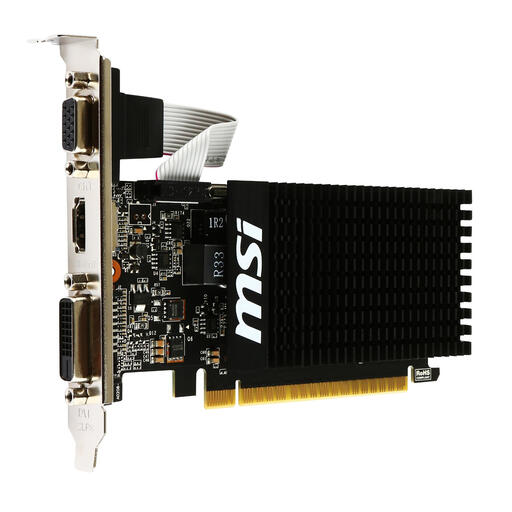
Why it suits this profile: This low-profile card is designed for office work, multimedia, older systems and light gaming. No additional power connector is required.
The product information clearly states that this card is not designed for demanding modern games. This helps avoid unrealistic expectations about gaming performance.
Passive cooling, a low-profile design, single-slot form factor and HDMI, DVI-D and VGA connections.
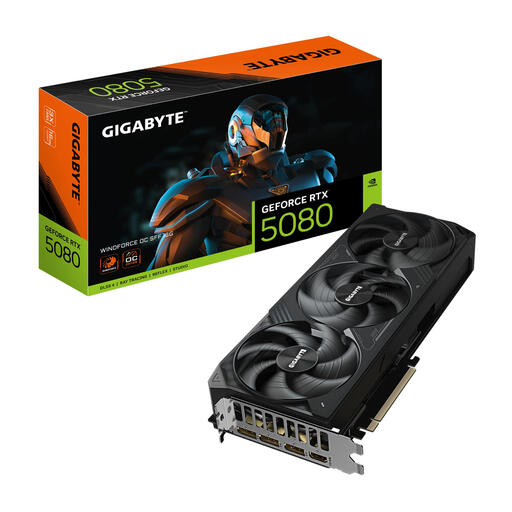
Why it suits this profile: The combination of RTX 5080, 16GB GDDR7, PCIe 5.0 and support for high resolutions makes this a good fit for demanding gaming and creator PCs.
The SFF designation indicates a more compact design, but the card is still 304 mm long and three slots wide. Its dimensions and power requirements are therefore central to the buying decision.
16GB GDDR7, 3x DisplayPort 2.1 and 1x HDMI 2.1b; according to the product specification, 7680 × 4320 is the maximum output resolution.
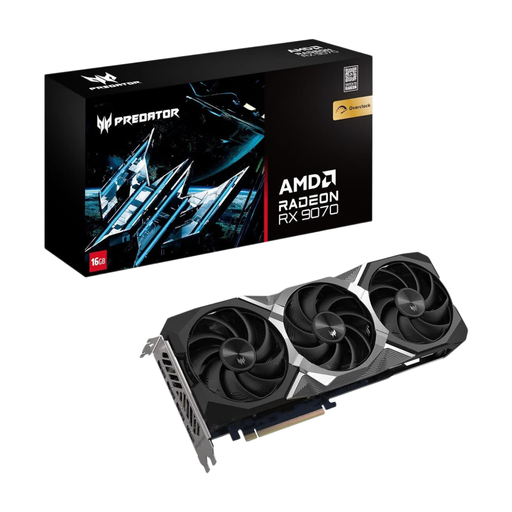
Why it suits this profile: With 16GB GDDR6, PCIe 5.0 and ray tracing support, this model is aimed at demanding games, streaming and creative applications.
As well as 8K output, the card lists specific values for memory, connections, dimensions and power requirements. This allows you to check whether it is suitable for your PC.
16GB GDDR6, 3x DisplayPort 2.1, 1x HDMI 2.1a and a specified boost clock of up to 2700 MHz.
We have put together a complete, up-to-date list of products that fully meet these strict selection criteria and the applicable European safety regulations.
Switch off the PC completely and unplug it from the mains before installing the card. Then check that:
A heavy graphics card with three fans may produce additional heat and noise. Clean the filters and fans regularly to remove dust. With heavier cards, a support bracket can help reduce the load on the PCIe slot.
For 1440p gaming, 8GB may be sufficient, depending on the game settings. For 4K gaming, large texture packs and creative software, 12GB or 16GB will generally provide more headroom. However, VRAM is only one part of overall performance.
Often, yes, because PCIe is backwards-compatible with earlier generations. The speed may then be limited by the older connection. Also check that the power supply, case and physical PCIe slot are suitable.
That depends on the model. The specified figures in this selection vary considerably: a GT 710 is designed for a power supply of approximately 300 watts or more, while RTX 5080 models recommend an 850-watt power supply. Consider the power consumption of the entire system, not just the figure shown for the graphics card.
