Start by choosing a lens with a mount that fits your camera, then match the focal length to the space available and the framing you want. An 85mm prime is well suited to individual portraits if you can stand far enough back; for portraits that show more of the surroundings, or when space is limited, a 50mm prime or compatible standard zoom is a practical choice. Check the framing on your sensor and make a test print before the exhibition.
Who are these options for?
Photographer taking individual graduation portraits
You can stand back and want the right framing for an individual portrait. The angle of view of an 85mm lens also depends on the sensor size; Sony Netherlands states that the SEL85F18 gives an angle of view equivalent to 127.5 mm on full-frame when used with an APS-C sensor.
Photographer working in a small space
You want to capture the graduate with their outfit or surroundings, but you can’t move far back. Compare a suitable 50mm version with a standard zoom, and check the mount on the exact version, as specified by Canon Europe and Tamron Europe.
Photographer creating a print series
You want to display several portraits together as a physical series. So consider more than just your lens choice: check focus and final framing, and make a test print. Epson Europe highlights print resolution and viewing distance as factors to consider for photo prints.
What should you consider when choosing?
85mm prime for individual portraits
A good fit if: you have room to stand back and mainly want to take individual portraits.
Trade-off: the narrower angle of view requires more space; also check how the lens frames your subject on your sensor.
50mm prime for portraits with context
A good fit if: you want to include the graduation outfit or some of the location in the frame, or have less room to move back.
Trade-off: with a fixed focal length, you can’t zoom from the same position to adjust the framing.
Standard zoom for flexible framing
A good fit if: you switch between individual portraits, small groups and shots that show more of the surroundings.
Trade-off: the Tamron version mentioned has a maximum aperture of f/2.8; check that the mount you choose fits your camera.
| Consideration |
What to check |
Who is this important for? |
| Framing and shooting distance |
Compare an 85 mm lens with a 50 mm lens or standard zoom on your sensor; check whether you can stand far enough back at the location. |
When I’m taking an individual portrait and have room to stand back, I want to assess the framing on my camera. Around 31% of consumers prioritise framing and shooting distance. |
| Camera compatibility |
Note your camera model, mount and sensor size, then compare them with the full model name and mount version. |
I want to be sure the lens fits my camera and gives me the angle of view I want before I buy. Around 25% of consumers make compatibility their top priority. |
| Light and depth of field |
Compare the maximum aperture of the exact models and test focus at the actual shooting distance. Image stabilisation doesn’t replace a suitable shutter speed when your subject is moving. |
In changing light, I also want to assess which parts of the portrait will be in focus. Around 25% of consumers focus mainly on light and depth of field. |
| Final print |
Agree the print size with the printing service and view a test print from the intended viewing distance. |
For a series on the wall, I want to see how the framing and focus look on paper. Around 19% of consumers prioritise checking the exhibition print. |
Common buying mistakes
-
Focusing only on ‘85 mm’ and forgetting the sensor size
An 85mm lens doesn’t give the same angle of view with every sensor size. As a result, the framing you get on your camera may differ from what you expect.
Check the angle of view on your own camera and at the location where you’ll be taking the portraits.
If the framing isn’t right, you may need to find a different position or use another lens after all.
-
Ordering a lens with the right name but the wrong mount
Some models are available with different mounts. The model name alone won’t tell you whether that version fits your camera.
Before you buy, compare the full model name and mount version with your camera model.
-
Assuming image stabilisation will freeze a moving person
Image stabilisation helps reduce camera shake when shooting handheld, but you’ll still need a suitable shutter speed to capture someone who is moving.
Test the focus and shutter speed during the portrait session, even if your lens has image stabilisation.
-
Judging an exhibition series only on the camera screen
A screen won’t show how the framing and focus will look at the final print size and from the intended viewing distance.
Agree the size and finish with the printing service, and check at least one test print.
A test print means using materials or placing an order before you have the whole series printed.
Brands to consider
Canon
Models covered include an RF 50mm prime and an RF 85mm prime for compatible RF cameras.
- Canon specifies an RF mount and a maximum aperture of f/1.8 for the RF 50mm F1.8 STM.
- For the RF 85mm F2 MACRO IS STM, Canon lists f/2, built-in stabilisation and a maximum magnification of 0.5×.
- These features apply to the models mentioned; check that the RF mount fits your camera.
Sony
The FE 85mm F1.8, model SEL85F18, is a Sony E-mount lens with separate angles of view listed for full-frame and APS-C.
- Sony Netherlands specifies an f/1.8 aperture and a weight of 371 g for this model.
- This lens has no optical stabilisation; any stabilisation depends on the camera body.
Nikon
The NIKKOR Z 85mm f/1.8 S is an 85mm option for a compatible Nikon Z camera.
- Nikon specifies a Z mount, FX format, a maximum aperture of f/1.8 and a minimum focusing distance of 0.80 m.
- Check the mount and whether the shooting distance works for the framing you want.
Tamron
The 28–75mm F/2.8 Di III VXD G2, model A063, offers a standard zoom range and is available in separate mount versions.
- Tamron specifies a maximum aperture of f/2.8 and versions for Sony E and Nikon Z mounts.
- Check which mount version you need; the Sony E and Nikon Z versions aren’t interchangeable.
Sigma
The 85mm F1.4 DG DN | Art is an 85mm prime available in separate Sony E-mount and L-mount versions.
- Sigma specifies a maximum aperture of f/1.4 for this model.
- Sigma notes that its dust- and splash-resistant construction doesn’t make the lens waterproof; also check you have the right mount version.
Joybuy product selection
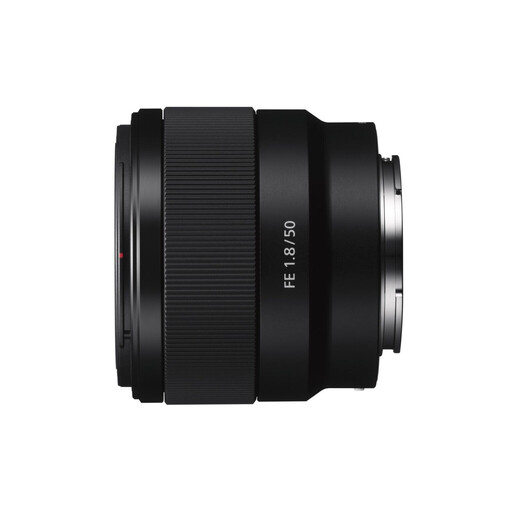
This Joybuy selection features a 50mm lens for portraits where you may want to include some of the surroundings. Before buying, check that the Sony E mount fits your camera.
 No image available
Sony E 50mm f/1.8 OSS Black
The fixed 50 mm focal length is well suited to portraits where you want to show some of the surroundings.
Mount: Sony E. Focal length: 50 mm. Maximum aperture: f/1.8. OSS.
Joybuy
Frequently asked questions
Will an 85mm lens fit every camera?
No. Check the mount on the exact version and your camera model. Then compare the angle of view on your sensor: Sony Netherlands lists the SEL85F18 as having a focal length of 85 mm and, on APS-C, an angle of view equivalent to 127.5 mm on full-frame.
How can I check a photo before having it printed for an exhibition?
Make a test print in the intended size and view it from the expected viewing distance. Epson Europe discusses print resolution and viewing distance; the printer’s dpi alone doesn’t guarantee that the photo or lens is sharp enough.
Who should I contact if a lens I bought as a consumer in the Netherlands is faulty?
Report the fault to the seller. According to ACM ConsuWijzer, in addition to any commercial guarantee, you have a statutory guarantee: if a product develops a fault sooner than you could reasonably expect under normal use, the seller must offer an appropriate solution at no cost.
Can I exhibit recognisable graduation portraits without making any arrangements first?
Don’t assume you can. According to the Dutch Data Protection Authority, an organisation needs a valid GDPR legal basis to take and publish recognisable images; for events, consent is often the most obvious legal basis. For images of pupils, the Dutch Data Protection Authority sets out specific consent rules, including parental consent for pupils under 16. Agree the purpose and use with the people photographed and, if involved, the organiser.
Can I use a photo taken by someone else for the exhibition?
Ask the photographer for permission to use and publish their copyright-protected photo. According to the Dutch Government, making a copy for personal use doesn’t give you permission to distribute or publish the photo.


