What should you consider when choosing?
Ethernet backhaul
Choose this when: there’s a suitable network cable between your home and garden office, and your mesh points support Ethernet backhaul.
Bear in mind: the cable route, available ports and correct configuration. Your broadband package may still limit upload speeds.
Wireless mesh
Choose this when: you don’t have a cable and there’s still a usable signal at a suitable point between the buildings.
Bear in mind: distance and external walls can weaken the signal. NETGEAR lists these as factors that affect the connection.
Powerline backhaul
Choose this when: there’s no cabling and a test shows that the devices you’ve chosen can connect through your electrical wiring.
Bear in mind: compatibility varies between model combinations. For Deco PX50 powerline backhaul, TP-Link lists requirements including two PX50 units on the same electrical circuit.
First compare the connection between your home and garden office, then check your internet upload speed. The Consumers’ Association notes that upload speeds over cable and DSL are often lower than download speeds.
| Consideration |
What should you check? |
Who is this important for? |
| Connection between buildings |
Check where the receiving point can be positioned, whether Ethernet backhaul is possible and which backhaul is active after installation. |
I want the connection between my home and garden office to remain reliable while I upload a large file. Around 33% of consumers prioritise the connection between buildings. |
| Upload speed |
Run the same upload test by the router and in the garden office; also check the upload speed included with your broadband package. |
I want to know whether slow photo uploads are caused by Wi-Fi or my internet connection. Around 27% of consumers prioritise upload speed. |
| Expansion and compatibility |
Make a note of the brand and full model number of your existing points. Check powerline compatibility separately from standard mesh compatibility. |
I want to expand my existing network rather than replace everything unnecessarily. Around 20% of consumers prioritise finding a compatible way to expand their network. |
| Indoor or outdoor positioning |
First decide where to install the unit; then check its outdoor suitability, power supply, mounting options and compatibility. |
I need to install a mesh point outdoors and want to know whether the exact model is suitable. Around 20% of consumers require outdoor placement. |
Mesh products at Joybuy
These products are mesh systems with multiple points. Use one for a garden office if the connection to your home and the intended backhaul suit your setup.
 Image unavailable
TP-Link Deco BE68 (2-pack)
An option for a mesh setup where you want to use wired or wireless backhaul.
Two units; each has a 10 Gbps, 2.5 Gbps and 1 Gbps WAN/LAN port.
Supports wired and wireless backhaul. Wired backhaul requires a suitable network cable route.
View at Joybuy
 Image unavailable
Linksys Velop Pro 7 (2-pack)
An option if you want to use multiple mesh points and are considering a wired connection.
Two nodes; tri-band on 2.4, 5 and 6 GHz; Wi-Fi 7.
The stated expansion options apply to other Velop Pro 7 nodes or compatible Linksys Cognitive Mesh devices.
View at Joybuy
 Image unavailable
TP-Link Deco XE75 Pro (3-pack)
A mesh system with multiple units for a setup that may also need wired network connections.
Tri-band on 2.4, 5 and 6 GHz; Wi-Fi 6E; three Gigabit Ethernet ports per unit.
View at Joybuy
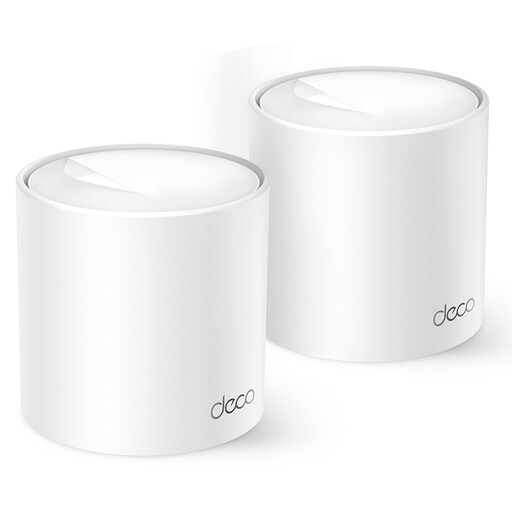 Image unavailable
TP-Link Deco X10 (2-pack)
An option for a two-point mesh network that you can expand with other Deco models.
Wi-Fi 6; dual-band on 2.4 and 5 GHz; two Gigabit Ethernet ports per unit.
View at Joybuy
 Image unavailable
TP-Link Deco XE75 (3-pack)
A mesh system with three units for indoor use, if it suits the connection to your garden office.
Tri-band on 2.4, 5 and 6 GHz; Wi-Fi 6E; three Gigabit Ethernet ports per unit.
For indoor use only.
View at Joybuy
Frequently asked questions
Do I need a licence to use Wi-Fi in a garden office in the Netherlands?
You can use Wi-Fi in the Netherlands without a licence, provided the frequencies and equipment meet the applicable requirements. The Dutch Authority for Digital Infrastructure points out that licence-exempt use is still subject to conditions; make sure you also select the correct country setting.
Can I mount a standard indoor mesh unit outside?
Don’t assume you can: check whether the exact model is suitable for outdoor use before installing it outside. TP-Link specifies an IP65 rating and PoE or adapter power for the Deco X50-Outdoor.
How can I tell whether my Deco points are connected via Ethernet or powerline?
TP-Link explains that you can check whether Ethernet backhaul is active for each satellite in the Deco app’s network map. For a PX50 satellite, you can also check the PLC backhaul there; then test the upload speed from your garden office.
What if the Wi-Fi in my garden office is good, but my photo album uploads slowly?
Compare upload speeds in both locations and check the upload speed included with your broadband package. Uploading isn’t the same as downloading; according to the Consumers’ Association, upload speeds over cable and DSL are often lower than download speeds.
What rights do I have when buying a mesh system online?
In the Netherlands, consumers who buy online generally have a statutory cooling-off period of up to 14 days after delivery, although legal exceptions may apply. The seller must also resolve issues with a product that, under normal use, doesn’t meet what you could reasonably expect of it under statutory guarantee rules. The applicable period isn’t automatically the same for every mesh system.


