
Vandaag of morgen in huis

Kwaliteit gegarandeerd

Welkomstaanbiedingen ontgrendelen: GRATIS bezorging | Tot 80% korting | Gratis 30 dagen JoyPlus-proefperiode
Download de app
A gaming mouse should suit your game, hand and desk setup. Even so, it is easy to overpay for specifications you will barely use. A high DPI figure may sound impressive, but it does not automatically say anything about in-game control. A wireless connection is not always convenient either if the battery runs flat or the receiver is poorly positioned.
In this buying guide from the Joybuy Product Recommendation Officer, we compare the key features of a gaming mouse. You will learn which specifications can be verified, which marketing claims deserve a more critical look and which models suit different playing styles.
A gaming mouse with a high DPI setting can make the cursor move faster. That does not automatically mean you will aim more accurately. Many FPS players deliberately use lower in-game sensitivity and make larger movements with their arm.
So do not look only at the maximum DPI figure. Also check:
A model with 6400 DPI is sufficient for many players. Higher values are mainly useful if you like to fine-tune your settings or use multiple monitors.
An 8000 Hz polling rate means that, according to the product specification, the mouse can transmit data up to 8000 times per second. This may be relevant for competitive FPS gaming, but it also places greater demands on your computer and can affect battery consumption in wireless models.
For casual gaming and office work, 1000 Hz is often a practical setting. Also check whether the high polling rate is available in wireless mode. With some mice, this value applies only when using a specific receiver, software or wired connection.
An ultralight gaming mouse weighing approximately 54 to 75 grams can feel fast during short movements. A heavier model may provide greater stability. The shape remains more important than weight alone.
Before buying, check:
An ergonomic gaming mouse designed for right-handed use is not automatically suitable for a left-handed player. Pay attention to the dimensions as well. The Trust GXT 109 Felox, for example, is 131 mm long, 70 mm wide and weighs 102 grams. That feels very different from a 54-gram model.
A wired gaming mouse receives continuous power via USB and does not need to be recharged. This is practical for a permanent desktop setup. A flexible cable and a good mouse mat can help minimise cable drag.
A wireless gaming mouse using 2.4 GHz typically connects via a USB receiver. This connection is designed to provide low latency during gaming. Bluetooth is convenient for laptops, tablets and everyday use, but check in advance whether your gaming computer supports the connection mode you want.
Tri-mode models combine 2.4 GHz, Bluetooth and USB-C. This is useful if you want to use the same gaming mouse with a PC, Mac and work setup. For Mac compatibility, pay attention to the software as well: according to the product information, the configuration software for the ET wireless gaming mouse is available only for Windows and works only in wired mode.
Most models in this selection use an optical sensor. Examples include:
Use these figures as a point of comparison, not as a standalone guarantee of quality. Sensor resolution, software, shape and your personal settings together determine how the mouse feels in use.
A programmable gaming mouse can provide additional functions for MOBA, RTS and productivity tasks. However, check how many physical buttons it has and which functions are supported by the software. A mouse with six buttons is straightforward for FPS games; a model with eleven or more buttons may be more useful for complex shortcuts.
RGB lighting does not improve gaming performance. Choose a gaming mouse with RGB primarily if lighting is important to your desk setup. Check whether the effects can be disabled and whether the software is compatible with your operating system.
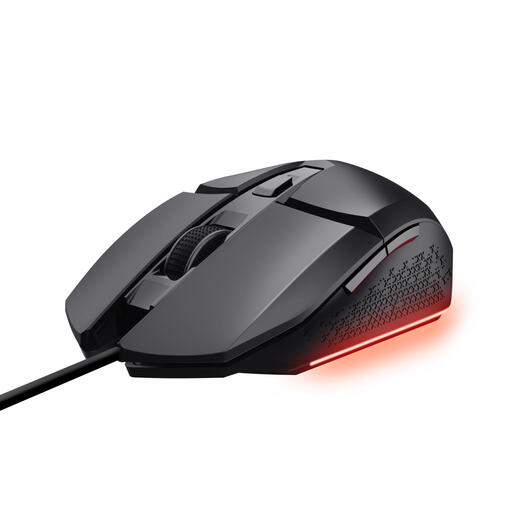
Why This Fits Their Persona: A wired gaming mouse for PC and Mac users who want adjustable DPI, RGB lighting and extra buttons without having to manage a battery.
The specifications clearly state that it uses a wired connection and offers 6400 DPI and six programmable buttons. You are not paying for wireless features you do not need.
Optical sensor, six buttons, RGB lighting with three settings and a 1.5-metre cable.

Why This Fits Their Persona: Designed for players looking for a lightweight wireless FPS gaming mouse and willing to pay more for extensive customisation options.
Its low weight of 54 grams is backed by clear information about the optical sensor, USB-C and wireless operation. However, check whether your PC supports the 8000 Hz setting.
54 grams, up to 35,000 DPI, programmable buttons and up to 95 hours of battery life, according to the product information.

Why This Fits Their Persona: For players who want to combine wireless freedom, RGB lighting, extensive customisation and a charging dock in one cohesive desk setup.
The mouse offers multiple connection options, so you are not dependent solely on Bluetooth or a cable. Before buying, check that the included software works with your system.
56 grams, up to 42,000 DPI, tri-mode connectivity and up to 8000 Hz, according to the product information.
For a permanent PC setup and long gaming sessions, a wired model is straightforward to use. If you regularly switch between a laptop and desktop, look for a model that combines 2.4 GHz with Bluetooth. For Mac users, hardware compatibility is not the only consideration; the availability of configuration software also matters.
A six-button model is often a good fit for FPS games. MOBA and RTS players may benefit from additional programmable buttons. With wireless mice, pay attention to the stated battery life, but remember that lighting, polling rate and usage intensity can affect actual runtime.
Browse a current selection of models and compare connectivity, lighting, DPI, weight and programmable features based on your gaming setup.
That depends on the model and its software. A basic USB gaming mouse will often work as a standard mouse on macOS. Additional software may be required for DPI profiles, macros and RGB settings. Always check the stated system requirements before ordering.
There is no single setting that works for everyone. Start with a moderate DPI level, then adjust the sensitivity in the game. A gaming mouse with adjustable DPI is more practical than a model that merely highlights an exceptionally high maximum value.
For competitive players, a high polling rate can be worthwhile if their PC, monitor and game can process it effectively. For casual gaming, MOBA titles, office work and older systems, 1000 Hz is often sufficient. Compare the complete combination of sensor, weight, shape, connectivity and price rather than focusing on this one specification alone.
