
Vandaag of morgen in huis

Kwaliteit gegarandeerd

Welkomstaanbiedingen ontgrendelen: GRATIS bezorging | Tot 80% korting | Gratis 30 dagen JoyPlus-proefperiode
Download de app
A gaming mouse needs to do more than look striking with RGB lighting. For PC and laptop gaming, tracking, grip, connectivity and customisation options matter most. Yet many buyers pay extra for features they rarely use, while overlooking important details such as weight, software or compatibility.
In this buying guide, you’ll find out what to look for and which models suit different playing styles.
A gaming mouse with a high DPI can be set to a high sensitivity, but that doesn’t automatically mean you’ll play more accurately. Many FPS players actually prefer a lower DPI setting combined with larger mouse movements. So pay attention to the sensor, adjustable DPI steps and polling rate too.
A sensor with a maximum of 24,000 or 30,000 DPI mainly gives you more flexibility. You don’t have to use the highest setting.
A wireless gaming mouse usually works via 2.4 GHz, Bluetooth or both. Bluetooth is handy for office work and laptops, but 2.4 GHz is generally the obvious choice for low-latency gaming. Also check whether a USB receiver is included and how the mouse charges.
A USB-C model is handy if you already use the same cable for other devices. With a wireless model, you should also check the stated battery life and whether you can continue using it in wired mode while it charges.
An ergonomic gaming mouse should suit your hand size and grip style. A large mouse can feel comfortable with a palm grip, while a compact, lightweight model may be better suited to claw or fingertip use. Check the dimensions, weight and whether the shape is designed for left- or right-handed use.
Having lots of buttons isn’t always an advantage either. They can be useful for MMO, MOBA or RTS games, but may get in the way with a simple FPS setup.
DPI determines how far the cursor moves in response to a given physical mouse movement. An adjustable gaming mouse gives you flexibility for different games and office work. Also look at the polling rate, for example 1000 Hz. This indicates how many times per second the mouse sends its position to the computer.
A higher polling rate can be useful for fast movements, but may require more system resources. A rate of 1000 Hz is a practical balance for many users. Some models offer higher rates, such as 8000 Hz; if so, check whether your PC and game can make effective use of that setting.
A lightweight gaming mouse weighing around 56 to 65 grams can feel comfortable for fast FPS movements. A heavier model, such as an ergonomic mouse weighing around 112 grams, may feel more stable and offer extra buttons. There’s no one-size-fits-all weight.
Consider:
A mouse with programmable buttons lets you assign actions, shortcuts or macros to specific functions. Check that the configuration software is available for your operating system. Some models only support the software in wired mode or on Windows.
An RGB gaming mouse mainly offers visual customisation. Check whether you can switch off the lighting and save profiles. RGB is a style choice, not an indicator of performance.
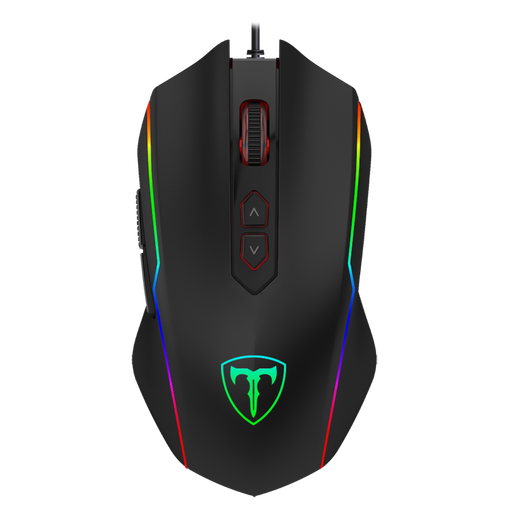
Why it suits this profile: This wired model is a good choice if you want to get started without a battery, dongle or wireless settings to worry about. It works with PC and Mac, and offers adjustable DPI for gaming and everyday use.
The specifications list five DPI levels, four polling rates and eight programmable buttons. That lets you check the settings rather than judging the mouse by its RGB lighting alone.
7200 DPI, polling rate of up to 1000 Hz, eight programmable buttons and seven RGB modes. The cable means you won’t have to stop to recharge.

Why it suits this profile: The combination of a right-handed ergonomic shape, a weight of around 63 grams and wireless HyperSpeed connectivity makes this a good fit for competitive FPS players.
The stated weight and connection type are clearly listed, so you’ll know upfront that this isn’t a heavy model with lots of extra buttons.
Razer Focus Pro sensor with up to 30,000 DPI, USB-C and a manufacturer-stated battery life of up to 90 hours.

Why it suits this profile: This model is aimed at users looking for plenty of customisation options, a low weight and multiple connection choices for gaming and office work.
The mouse supports Bluetooth, 2.4 GHz and wired USB-C mode. You can choose the connection to suit gaming, laptop use or charging.
Stated weight of 56 grams, up to 42,000 DPI, polling rate of up to 8000 Hz, and a magnetic charging and receiver dock with RGB lighting.

Why it suits this profile: A practical choice if you want a gaming mouse for both your laptop and PC, and regularly switch between wireless, Bluetooth and USB-C.
The product information clearly states that the programming software is only available for Windows and in wired mode. This helps avoid any false expectations when using a Mac or Bluetooth.
Tri-mode connectivity, up to 10,000 DPI, eight programmable buttons, RGB settings and four polling rates of up to 1000 Hz.
We’ve put together a complete, up-to-date list of products that meet these strict selection criteria and the current European safety regulations.
It can be, especially if the model uses a 2.4 GHz connection with a USB receiver. Check the polling rate, battery status and whether you can use the mouse in wired mode via USB-C. Bluetooth is particularly handy for everyday use and devices with few USB ports.
For most players, an adjustable range matters more than the maximum figure. FPS players often use lower sensitivity, while fast desktop use or some strategy games may benefit from a higher setting. Choose a model that lets you adjust the DPI easily and save profiles.
Lifespan depends on use, maintenance, switches, and whether the mouse uses a cable or battery. Some brands provide a click rating; according to Razer, for example, certain switches are rated for tens of millions of clicks. This is a product specification, not a guarantee of a set lifespan. Keep the mouse dry, clean it with a dry cloth and charge a wireless model according to the instructions.
