
Vandaag of morgen in huis

Kwaliteit gegarandeerd

Welkomstaanbiedingen ontgrendelen: GRATIS bezorging | Tot 80% korting | Gratis 30 dagen JoyPlus-proefperiode
Download de app
A gaming mouse can improve your gaming experience, but a high DPI rating or eye-catching RGB lighting doesn’t automatically mean it’s right for you. Many buyers focus on marketing claims, only to discover later that the mouse is too heavy, uncomfortable to hold or needs charging too often.
Watch out for these three common pitfalls:
Below, we explain which specifications matter and which gaming mouse might suit different types of user.
A lightweight gaming mouse weighing around 53 to 70 grams can feel comfortable for fast FPS movements and low sensitivity. A heavier model may offer more stability and extra buttons. The right weight depends on your play style, desk and grip.
Check the shape, too:
An ergonomic shape won’t suit everyone automatically. Check the dimensions rather than relying on the product title alone.
DPI determines how far the cursor moves in response to a given physical movement. A high-DPI gaming mouse can be useful for large monitors or for users who prefer fast cursor movement. Many FPS players, on the other hand, use lower sensitivity for more controlled aiming.
A maximum rating of 26,000, 30,000 or 44,000 DPI doesn’t mean you need to use that setting. More important features include:
Some models let you adjust the X and Y axes separately. This can be useful with ultrawide screens or specific in-game settings.
The polling rate shows how often the mouse sends data to the computer. 1000 Hz is a common setting. A gaming mouse with an 8K polling rate refreshes more often, but the difference depends on your monitor, frame rate, game and PC hardware. Rapoo’s product information also says that a higher polling rate can increase CPU usage.
For wireless models, check the connection type:
A rechargeable gaming mouse is convenient, but check the stated battery life at each polling rate. Battery-life claims often apply to a specific setting. Rapoo states that the VT3 MAX lasts up to 750 hours at 1000 Hz with the appropriate power-saving setting; battery life may differ with more intensive use or a higher polling rate.
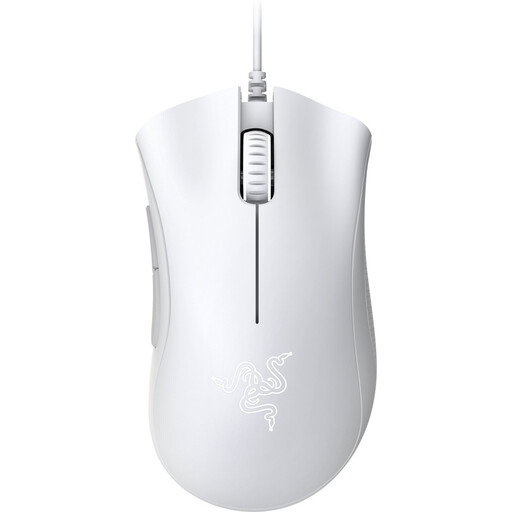
Why it suits this profile: A wired gaming mouse keeps things simple: no battery, receiver or charging schedule to worry about. Its right-handed shape suits users looking for a classic ergonomic design.
The specifications are straightforward: 6.400 DPI, five buttons and a USB connection. You’re not paying for wireless features you may not use.
Optical sensor, programmable buttons and a polling rate of up to 1000 Hz, according to the product specifications.

Why it suits this profile: This compact wireless model is designed for FPS players and users with smaller hands or a preference for a lightweight mouse.
The product information gives its weight as 53 grams and states a battery life of up to 95 hours. That gives you a clearer idea of its intended use than a general claim about speed alone.
HERO 2 sensor, LIGHTSPEED connection, USB-C charging and a stated polling rate of up to 8 kHz with software support.

Why it suits this profile: For players who want to charge less often and need multiple functions for FPS, MOBA or MMO games.
The stated battery life applies at 1000 Hz and requires a recent driver for low-power mode. This qualification helps put the claim into context.
53 grams, 10 programmable buttons, macro support, optical switches and, according to Rapoo, up to 8K wireless polling.

Why it suits this profile: For a right-handed player who wants extra buttons, RGB lighting and a supportive shape, as well as speed, for a range of games.
The choice isn’t based on DPI alone. Its shape, weight of around 112 grams and number of buttons make it clear that it’s designed for a different kind of use than a 53-gram esports mouse.
11 programmable buttons, 2,4GHz wireless and Bluetooth connections, wired use and RGB lighting, according to the product specifications.
We’ve put together a complete, up-to-date list of products that meet these strict selection criteria and the applicable European safety regulations.
It can be, especially if you choose a model with a 2,4GHz connection and its own USB receiver. Check the battery life, charging time and polling rate, too. Bluetooth is handy for PCs and laptops, but is more often chosen for flexibility than competitive performance.
For most users, an adjustable range of up to a few thousand DPI is enough. A high-DPI gaming mouse gives you more options, but your aiming accuracy also depends on the sensor, mouse mat, screen resolution and in-game settings. So look for a model that lets you switch quickly between DPI profiles.
Its lifespan depends on the switches, cable or battery, daily use and maintenance. Manufacturers sometimes state a click rating, such as 10 million, 90 million or 120 million clicks. This is a product specification, not a guarantee of a particular lifespan. Keep the sensor dry and clean, avoid pulling on the cable and charge a built-in battery with a suitable USB cable.
