
Vandaag of morgen in huis

Kwaliteit gegarandeerd

Welkomstaanbiedingen ontgrendelen: GRATIS bezorging | Tot 80% korting | Gratis 30 dagen JoyPlus-proefperiode
Download de app
A gaming mouse needs more than a high DPI figure on the box. Its shape, weight, connection and button layout all affect how comfortable it feels to use day to day. You may not realise you’ve made the wrong choice until a few weeks in: your hand gets tired, the cable gets in the way or the battery runs out at an inconvenient moment.
As Joybuy Product Recommendation Officer, I cut through the marketing copy to focus on the product specifications that matter. That way, you can compare a gaming mouse for PC on practical features rather than just lighting or impressive figures.
A gaming mouse with a high DPI can be set to a very high sensitivity, but a higher maximum figure doesn’t automatically mean you’ll play more accurately. Many FPS players actually use a lower sensitivity for more controlled movements. So check the sensor type, the available sensitivity increments and the polling rate too.
An optical gaming mouse is the standard choice for gaming. Also check that the software works with your operating system and that you can adjust the DPI settings easily.
Product descriptions don’t always list weight in the same way. Some models are weighed with the battery included, others without it. For example, the Logitech G309 is listed as weighing 86 grams with an AA battery and 68 grams without a battery when used with a separate charging system. So make sure you’re comparing like with like.
A lightweight gaming mouse is particularly useful for fast movements and low sensitivity. A heavier model may feel more stable. There’s no one-size-fits-all answer.
An ergonomic gaming mouse is usually shaped for one hand and one dominant direction of use. This can be comfortable, but a large vertical mouse won’t suit every grip or game. Check the dimensions, handedness and shape before you order.
An FPS gaming mouse is often lightweight and has just a few buttons. For MMO games, strategy games or productivity, extra programmable buttons can be useful.
Compare the length, width, height and weight with your current mouse. A model weighing around 58 to 75 grams is generally considered lightweight within this range. For example, the Razer Cobra is listed at 58 grams, while the Trust GXT 929 Helox weighs around 73 to 75 grams, depending on the product information used.
Also consider your grip:
A wired gaming mouse receives a constant power supply, so you don’t need to keep track of a battery. The trade-off is that the cable runs across your desk. A wireless gaming mouse using 2.4 GHz connects via a USB receiver and is designed for low latency. Bluetooth is handy for laptops and multiple devices, but check whether the mouse also supports a fast wireless connection.
For wireless models, check:
DPI indicates sensitivity. A setting of 6,400 DPI is already more than enough for many users, while some models go up to 24,000, 30,000 or more. What matters more is whether you can adjust the sensitivity to suit you.
The polling rate indicates how often the mouse sends information to your computer. 1,000 Hz is a common rate. Higher rates can put extra demands on software, hardware and battery life.
Finally, consider the number of buttons. A gaming mouse with programmable buttons is handy for shortcuts, macros or productivity features. Check whether the configuration software is only available for Windows, though. Some models don’t offer advanced features on macOS.
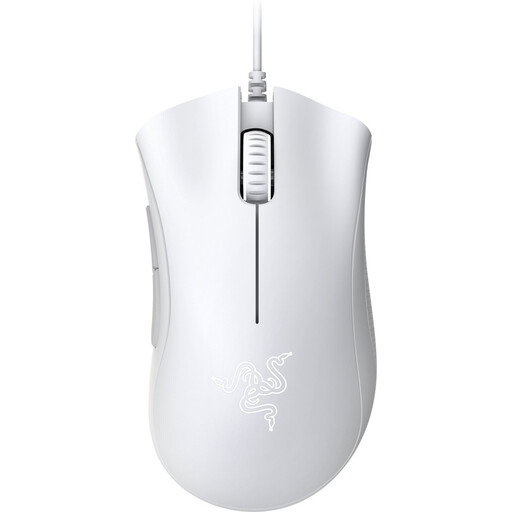
Why it suits this profile: Its wired connection and straightforward controls make this a practical entry-level choice for PC gamers who don’t need a battery or wireless receiver.
The product specifications clearly list an optical sensor, wired connection, five buttons and adjustable sensitivity up to 6,400 DPI. So you’re not paying for features you won’t use.
Ergonomic right-handed shape, 1,000 Hz polling rate and five programmable buttons, according to the product information.

Why it suits this profile: Competitive players looking for a lightweight wireless gaming mouse get a 60-gram model with LIGHTSPEED connectivity and USB-C charging.
The weight, wireless technology and charging method are all clearly listed. This makes it easy to compare the mouse with other lightweight models.
Optical HERO 2 sensor, up to 32,000 DPI according to the product specifications, five buttons and a rechargeable battery.

Why it suits this profile: If you combine gaming with long hours of office work, you can factor in the vertical shape, wireless connection and programmable buttons when choosing your mouse.
The vertical shape is clearly specified, so you can decide in advance whether it suits your grip. At 150 grams, it’s less suitable for players who want an ultra-light mouse.
Up to 30,000 DPI, six programmable buttons, 18-zone RGB lighting and support for HyperSpeed and Bluetooth, according to the product description.

Why it suits this profile: This mouse suits PC and laptop users looking for a relatively lightweight wireless model with RGB, USB-C charging and programmable buttons.
The product information lists battery life of up to 80 hours, a 2.4 GHz receiver and the option to play while charging separately.
Optical sensor up to 4,800 DPI, six programmable buttons, USB-C and RGB lighting, according to the stated specifications.
We’ve put together a complete, up-to-date list of products that meet these strict selection criteria and the applicable European safety regulations.
Many FPS players choose a lightweight model with an optical sensor, a stable connection and a small number of buttons. As well as DPI, consider the weight, shape and whether you can adjust the sensitivity in small increments. A 2.4 GHz wireless connection can be a good choice if you want to keep your desk tidy.
Its lifespan depends on the switches, cable or battery, how intensively it’s used and how well it’s maintained. Manufacturers sometimes give a click rating, but this doesn’t guarantee a particular lifespan. Keep the sensor and glide pads clean, don’t pull on the cable and charge a built-in battery according to the instructions.
Yes, but the shape and number of buttons affect how comfortable it is. A wired gaming mouse is easy to use with a desktop PC. A wireless model with Bluetooth is more practical for multiple devices. Just make sure the mouse isn’t too heavy and that its ergonomic shape suits your hand.
