
Vandaag of morgen in huis

Kwaliteit gegarandeerd

Welkomstaanbiedingen ontgrendelen: GRATIS bezorging | Tot 80% korting | Gratis 30 dagen JoyPlus-proefperiode
Download de app
Buying a gaming mouse seems straightforward until you realise how many models make the same promises. A high DPI rating does not automatically mean that the mouse will feel more comfortable or work more accurately. Wireless freedom, RGB lighting and lots of programmable buttons are not useful for every player either.
As a Joybuy Product Recommendation Officer, I therefore focus mainly on verifiable specifications and practical use. This helps you avoid paying for features you will hardly use.
A gaming mouse with a high DPI rating can be set to be extremely sensitive, but most players use a much lower setting in practice. A sensor with a maximum of 24,000 or 35,000 DPI is mainly of interest if you want plenty of adjustment options. Also check whether the DPI can be adjusted and whether the software supports clear profiles.
For FPS games, a stable sensor, a suitable polling rate and a mouse that remains easy to control are often more important than the highest number on the box.
A wireless gaming mouse keeps your desk tidy and gives you freedom of movement. However, you should check which connection it uses. A 2.4GHz receiver is generally intended to provide low latency during gaming, while Bluetooth is useful for laptops and multiple devices. Also consider the battery life, charging and whether a USB cable is included.
With a model that uses AA or AAA batteries, it is important to know whether the battery is included. A built-in rechargeable battery means you do not need loose batteries, but it does require regular charging.
An ergonomic gaming mouse is not automatically suitable for every hand. Look at its length, width, height and weight. A right-handed shape may be comfortable for a palm or claw grip, but less suitable for left-handed use. A vertical mouse also creates a very different hand position from a standard gaming mouse.
DPI stands for dots per inch and indicates how sensitive the mouse can be set. An optical gaming mouse uses an optical sensor to register movement. Do not just look at the maximum figure; also consider:
According to the product specification, the Razer DeathAdder V3 has a Focus Pro sensor with up to 30,000 DPI and a maximum polling rate of 8,000 Hz. Razer says that this model was designed for competitive use. That positioning is a brand claim; the stated sensor, weight and connection details are verifiable product specifications.
A lightweight gaming mouse can support fast movements, particularly in FPS games. The Logitech G G309 is listed as weighing 86 grams including an AA battery, and 68 grams when used with the Powerplay charging system without a battery. The Razer DeathAdder V3 Pro is listed as weighing approximately 63 to 64 grams, depending on the stated product specification.
A heavier model can instead provide greater stability. The Razer Pro Click V2 Vertical Edition weighs 150 grams and has a vertical shape with a base support. This makes it more suitable for users looking for one mouse for both work and gaming than for players who only make fast FPS movements.
A programmable gaming mouse is useful if you want to assign shortcuts, macros or actions to additional buttons. Always check how many buttons are actually programmable and whether the software works with your system. With some models, advanced settings are only available in Windows or only when the mouse is connected by cable.
RGB lighting does not change the sensor’s performance. A gaming mouse with RGB can, however, complement your existing desk setup. Check whether the lighting can be adjusted in the software and whether you can turn it off if you prefer a more understated setup.
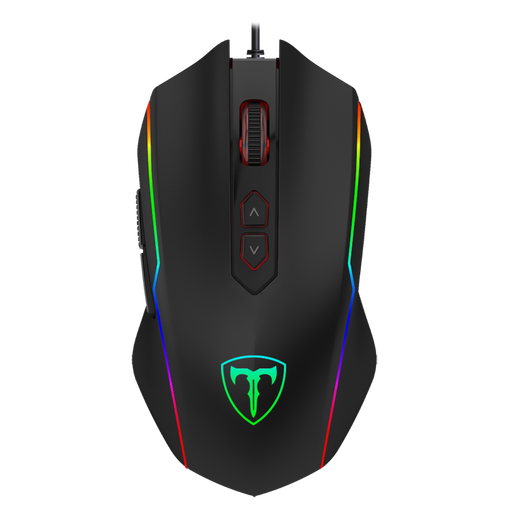
Why it suits this profile: This wired gaming mouse offers adjustable sensitivity, RGB and eight programmable buttons, without the need to charge a battery. It is a straightforward choice for anyone buying their first gaming mouse for PC.
The fixed USB connection eliminates battery management. DPI can be adjusted in five steps from 1,200 to 7,200, while the polling rate has four settings up to 1,000 Hz.
Wired, eight programmable buttons, adjustable DPI and seven RGB modes.
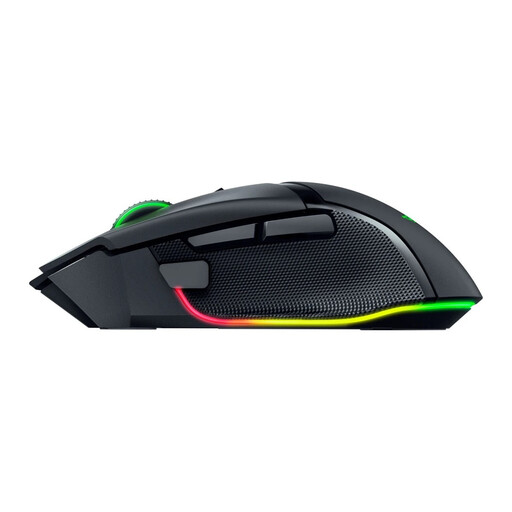
Why it suits this profile: This model combines 2.4GHz wireless and Bluetooth connectivity with an ergonomic shape, numerous buttons and Chroma RGB. It is suitable for gamers who want to save settings for multiple genres.
You are not tied to one way of using it: the mouse can be used wirelessly via 2.4GHz or Bluetooth, and also as a wired mouse via USB.
35,000 DPI, eleven programmable buttons, wireless and wired connectivity, and RGB lighting.
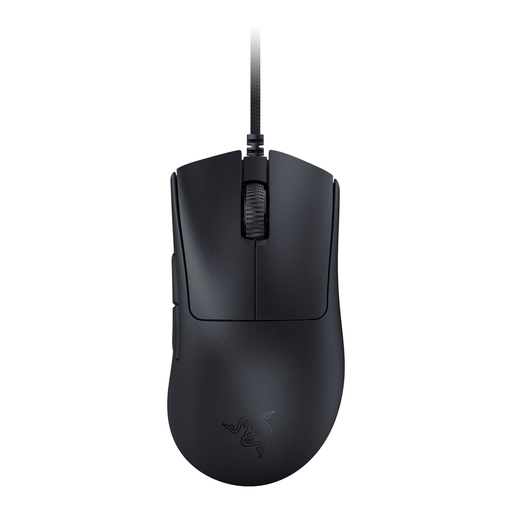
Why it suits this profile: Its stated low weight of 59 grams, right-handed ergonomic shape and wired connection are aimed at players who value fast movements and a consistent connection.
The mouse does not use a battery and, according to the product specification, has a polling rate of up to 8,000 Hz. However, check that your system and game support this setting.
59 grams, 30,000 DPI, optical sensor, programmable buttons and wired USB connection.
We have put together a complete, up-to-date list of products that fully meet these strict selection criteria and the applicable European safety regulations.
Yes, provided the model has a suitable 2.4GHz connection and an appropriate polling rate. Bluetooth is mainly practical for everyday use and multiple devices. Check the stated battery life and keep a USB cable nearby for charging or temporary wired use.
That depends on your screen, game and playing style. For many players, an adjustable range of around 800 to several thousand DPI is sufficient. A gaming mouse with high DPI mainly gives you more choice; the maximum figure alone does not determine the gaming experience.
Its lifespan depends on the switches, cable or battery, frequency of use and maintenance. Manufacturers sometimes provide a click rating, such as 10 or 90 million clicks. This is a product specification or factory rating, not a guarantee of a particular service life. Clean the sensor and mouse feet with a dry cloth, and avoid moisture, drops and pulling on the cable.
