
Vandaag of morgen in huis

Kwaliteit gegarandeerd

Welkomstaanbiedingen ontgrendelen: GRATIS bezorging | Tot 80% korting | Gratis 30 dagen JoyPlus-proefperiode
Download de app
A gaming mouse should suit your game, your hand and your desk. Yet people often base their choice on a high DPI figure, eye-catching RGB lighting or a promise of minimal latency. These features can be useful, but on their own they tell you little about how comfortable a mouse is to use overall.
As a Joybuy Product Recommendation Officer, I sort through product information to focus on verifiable specifications. This helps you see which details matter for FPS, MOBA, RTS and MMO games, and which marketing claims are best treated with a little caution.
A gaming mouse with a high DPI can move the cursor across the screen very quickly. For most players, though, a stable sensor, a mouse that fits well and the right in-game settings matter most. A resolution of 24,000 or 44,000 DPI isn’t necessary for everyone.
So be sure to check:
A gaming mouse with an 8K polling rate reports its position up to 8,000 times per second. This can make movement appear smoother, but it also requires more system resources and support from your software and games. On some models, 8K is only available in a specific connection mode or with a compatible receiver.
A polling rate of 1,000 Hz is already practical for many players. So don’t just look at the highest figure: check the available modes, battery life and compatibility too.
A lightweight gaming mouse weighing around 50 to 70 grams can feel comfortable during fast movements. A heavier model may offer more stability, especially if you use a palm grip. A compact model may also be less suitable for larger hands.
Before you buy, check:
A wireless gaming mouse with a 2.4GHz connection is handy if you want to keep your desk tidy. Bluetooth is useful for laptops and everyday use, but it isn’t the first choice for competitive gaming with every model. A wired mouse doesn’t need a battery and can stay plugged in throughout long sessions.
For wireless models, check:
The polling rate tells you how often the mouse sends data to your computer. Many models support 1,000 Hz; some esports gaming mice also offer 4KHz or 8KHz. A higher figure may matter most at high refresh rates, but it requires a suitable computer setup.
For FPS games, a few easy-to-reach buttons are often enough. MOBA, RTS or MMO players may benefit from having more programmable buttons. Check whether macros are allowed in the games you play and whether the configuration software works with your operating system.
A programmable gaming mouse may include features such as:
Long battery life means you’re less likely to need to charge your mouse during a gaming session. Bear in mind that stated figures usually depend on the polling rate, lighting and connection mode. An RGB gaming mouse may run for less time if the lighting is left on continuously.
Clean the sensor, mouse feet and casing with a soft, dry cloth. Don’t use liquid in the openings, and don’t try to replace a built-in battery yourself.
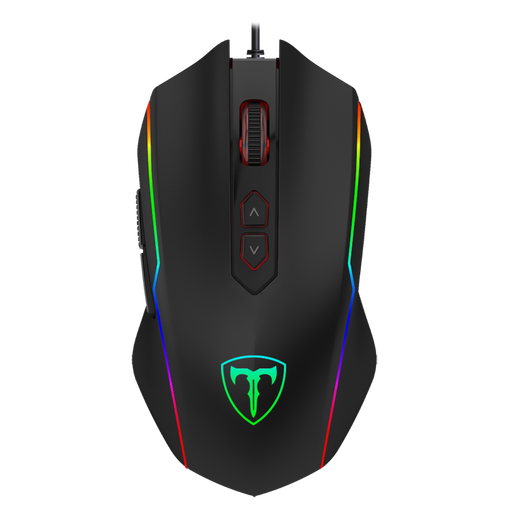
Why it suits this type of user: The wired connection means there’s no need to charge it, while adjustable sensitivity makes it suitable for different games and everyday computer use.
The product information lists five DPI levels, four polling-rate settings and eight programmable buttons, so you’re not tied to a single sensitivity setting.
7200 DPI, RGB lighting, eight programmable buttons and a USB connection.

Why it suits this type of user: This compact wireless model is designed for players who value low weight, high sensor resolution and a fast connection.
The product details list a weight of 53 grams, an adjustable sensor of up to 44,000 DPI, 8KHz LIGHTSPEED and up to 95 hours of battery life. Check that your computer and software support 8K mode.
53 grams, HERO 2 sensor, programmable buttons and rechargeable battery.

Why it suits this type of user: Its combination of low weight, multiple buttons and long stated battery life is well suited to extended sessions and players who use lots of settings.
The product description lists a weight of 53 grams, native 8K wireless, 26,000 DPI, ten programmable buttons and up to 750 hours of battery life at 1,000 Hz. Actual battery life depends on use and settings.
Ten programmable buttons, A HUB software for Windows and Mac, and independent X/Y DPI settings.
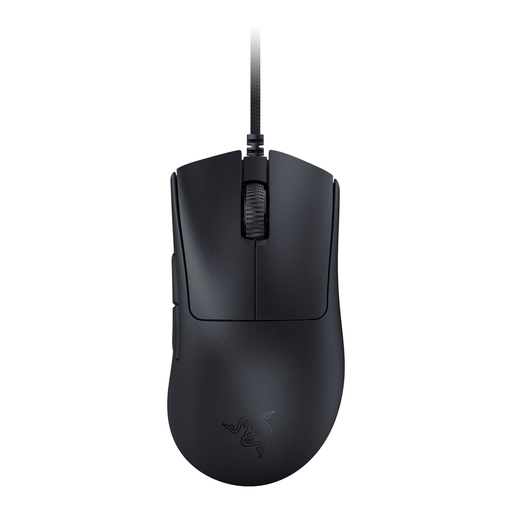
Why it suits this type of user: This model combines a wired connection with an ergonomic, right-handed shape and a low stated weight.
There’s no need to factor in battery life or a wireless receiver. The specifications list a weight of 59 grams, 30,000 DPI, a maximum polling rate of 8,000 Hz and six buttons.
Focus Pro 30K sensor, 8KHz HyperPolling, optical switches and an ergonomic shape.
We’ve put together a complete, up-to-date list of products that meet these strict selection criteria and comply with current European safety regulations.
It can be, especially with a stable 2.4GHz connection and an included receiver. Check the polling rate, charge level and distance between the receiver and mouse. Bluetooth is generally more practical for office and laptop use.
It depends on your screen, game and personal preference. An adjustable range matters more than the highest theoretical figure. Start with a moderate setting and adjust the sensitivity in the game.
Its lifespan depends on the switches, cable or battery, how you use it and how well you maintain it. Manufacturers may give a click rating, but this isn’t a guarantee of the mouse’s overall lifespan. Your statutory warranty and consumer rights apply separately.
