
Vandaag of morgen in huis

Kwaliteit gegarandeerd

Welkomstaanbiedingen ontgrendelen: GRATIS bezorging | Tot 80% korting | Gratis 30 dagen JoyPlus-proefperiode
Download de app
Buying a gaming monitor may seem straightforward: choose a large screen, a high refresh rate and a fast response time. However, it is easy to pay for features that your PC or console cannot fully use. Important details, such as the maximum HDMI speed or limited adjustment options, can also fade into the background in a product title.
The Joybuy Product Recommendation Officer therefore filters the key specifications according to how the monitor will be used. This lets you compare gaming monitors based on practical features rather than marketing terms alone.
A 240Hz gaming monitor, 300Hz gaming monitor or even higher can display exceptionally smooth images. However, this only happens when your computer can also produce enough frames per second. If a game runs at around 100 fps, you will not make full use of a 240Hz screen.
Pay attention to the connection as well. Some screens reach their maximum refresh rate via DisplayPort, while HDMI has a lower limit. For example, the AOC AGON PRO AG346UCD specifies 175Hz via DisplayPort and 100Hz via HDMI. Always check the combination of graphics card, cable and port.
A figure such as 0.03 ms, 0.5 ms or 1 ms sounds clear, but manufacturers may use different measurement methods, such as MPRT or GtG. These figures are not directly comparable. As well as response time, look at the panel type, refresh rate and user settings such as overdrive.
A claimed response time is also no guarantee that every scene will be completely free from motion blur. Treat the figure as one part of the screen’s overall performance.
HDR10 or DisplayHDR True Black 400 indicates that a monitor can process certain HDR information or is associated with a particular certification level. The visible impact also depends on brightness, contrast and local dimming. OLED panels can switch off individual pixels, while LCD panels have different characteristics.
According to the product specifications, the AOC AGON PRO AG276QZD2 has HDR True Black 400, a QD-OLED panel and a brightness of 250 cd/m². This is relevant information, but compare these figures with your room lighting and viewing distance before making a purchase decision.
A Full HD gaming monitor with 1920 × 1080 pixels places less demand on your graphics card. This makes Full HD practical for competitive games and systems where a high fps matters more than extra detail.
A QHD gaming monitor with 2560 × 1440 pixels displays more detail. At 27 inches, QHD is a popular combination for PC gaming. A 32-inch gaming monitor provides a larger image, but Full HD can feel less sharp at this size. QHD is therefore often a sensible choice for a 32-inch screen.
An ultrawide gaming monitor with a 21:9 aspect ratio, such as a 34-inch model with 3440 × 1440 pixels, provides more space in racing games, simulators and productivity applications. However, check that your desk is deep enough and that your favourite games support the aspect ratio.
A monitor with AdaptiveSync, FreeSync or G-SYNC Compatible can match its refresh rate to the frame rate of a compatible graphics card. According to the product descriptions, several models in this overview support FreeSync or G-SYNC Compatible. Before buying, check official compatibility with your graphics card and preferred connection.
For consoles, the HDMI version, resolution and refresh rate are particularly important. For example, a monitor may support a high refresh rate via DisplayPort but a lower refresh rate via HDMI. Also check whether you need a built-in USB hub, speakers, USB-C or height adjustment for your workspace.
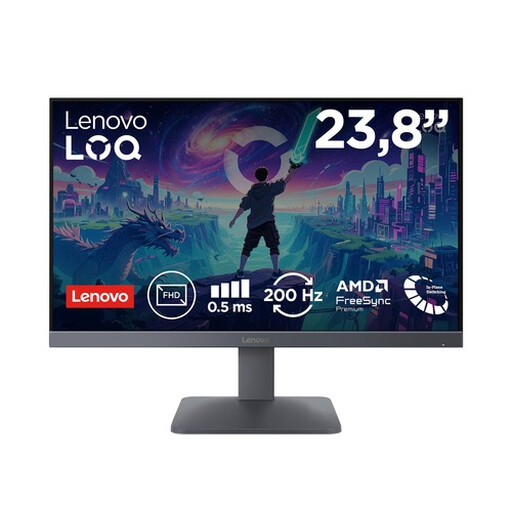
Why it suits this profile: The compact 23.8-inch size and Full HD resolution are a good fit for a straightforward PC or console setup. The quoted 200Hz refresh rate is designed for fast-paced gameplay without requiring an immediate upgrade to QHD hardware.
The product specifications list both the 200Hz frequency and HDMI 2.1 and DisplayPort 1.4. Even so, check which port your system uses.
Fast IPS, 200Hz, FreeSync Premium, HDR10 and support for consoles such as PlayStation 5 and Xbox Series X/S.
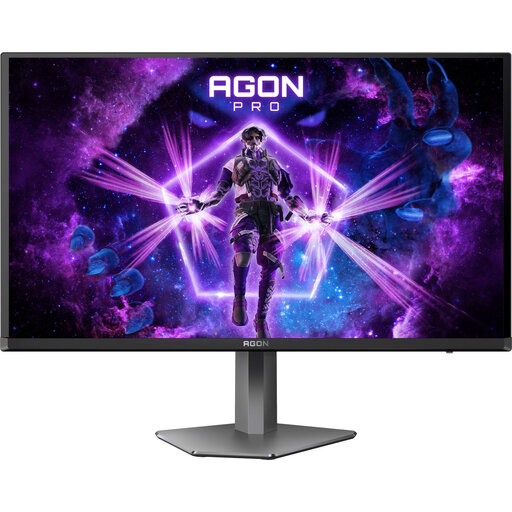
Why it suits this profile: This QD-OLED screen is aimed at users looking for QHD detail, high speed and OLED contrast in one 27-inch gaming monitor.
The specifications list QHD, 240Hz, HDMI 2.0 and DisplayPort 1.4 separately. This allows you to match the desired connection to your setup in advance.
QD-OLED, QHD resolution, 240Hz, quoted response time of 0.03 ms, 99% DCI-P3 and an adjustable stand.
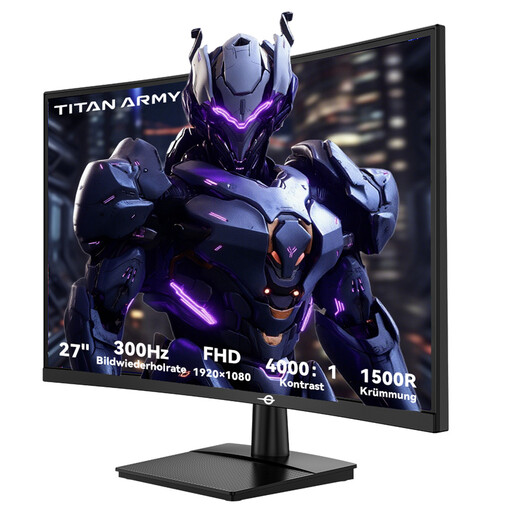
Why it suits this profile: For competitive PC games where a high fps is central, this curved VA screen offers a quoted 300Hz frequency and 1 ms GtG.
The product specifications list the connections separately: two HDMI 2.0 and two DisplayPort 1.4 ports supporting the high frequency.
300Hz, 1 ms GtG, VA panel, 1500R curvature, HDR10 and FreeSync Compatible according to the product specifications.
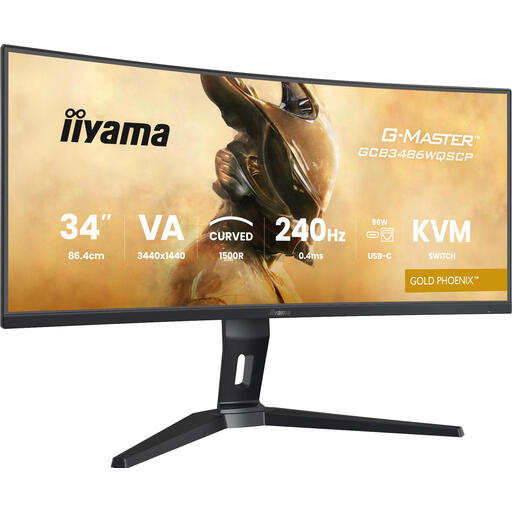
Why it suits this profile: The 21:9 aspect ratio provides extra horizontal space for a game, chat window, streaming software or work document side by side.
The connection, aspect ratio and resolution are clearly stated. Check beforehand that your desk can accommodate the 34-inch width and 1500R curvature.
3440 × 1440, 240Hz, VA panel, FreeSync Premium, KVM switch, USB-C and adjustable height.
We have put together a complete, up-to-date list of products that fully meet these strict selection criteria and the applicable European safety regulations.
Use this quick checklist:
A 144Hz gaming monitor is a practical choice for many PC gamers. The image can look noticeably smoother than at 60Hz, provided your system delivers enough frames. For competitive games, 240Hz or more may be appealing, but the difference becomes particularly relevant at high fps and during fast-paced gameplay.
A curved screen can provide a more immersive viewing position, particularly with ultrawide or larger screen sizes. A curved gaming monitor is not essential for competitive games. Also check whether the curvature, such as 1500R, feels comfortable at your viewing distance and with your desk setup.
Power consumption depends on the screen technology, brightness, HDR use and number of hours per day. Check the energy consumption per 1,000 hours on the energy label and switch the monitor off when you are not using it. A higher refresh rate and powerful HDR mode can affect consumption.
